
DualHotbar Reworked
Use multiple rows of your inventory as hotbars at the same time.
Screenshots



About this Mod
DualHotbar Reworked
This is a fork of RebelKeithy's DualHotbar that attempts to fix all the issues present in the 1.12.2 ChrisLane port.
About DualHotbar
This mod allows you to use multiple rows of your inventory as hotbars at the same time.
It can be configured in different ways to render them stacked and/or next to each other.
The slots are taken from the top row of your inventory going downwards.
There are 3 ways to select an item from the new slots:
- You can simply scroll with the mouse wheel and cycle to items
- You can double tap the number key to cycle to the same slot between hotbars
- You can hold a configurable modifier key (ctrl by default) and the slot number
You can also use the mouse wheel and a configurable modifier key (ctrl by default) to swap full hotbar rows while in stacked mode.
Bug fixes & Improvements
- Fixed rendering issues with offhand items and widget slots
- Fixed hotbar rendering not being disabled while in spectator mode
- Fixed a crash when picking a block using the mouse wheel (#6)
- Fixed duplicated ghost items appearing when picking blocks in creative mode (#8)
- Fixed incorrectly positioned items when picking blocks in creative mode (#8)
- Improved offhand item rendering to align on the same row when hotbars are not stacked
- Fixed chat interaction hotspots (like click to execute/copy) when the hotbar is shifted up (#5)
- Disabled slot switching and hotkeys while in GUIs to prevent unintended actions
New features & Enhancements
- Added support for config synchronization when joining multiplayer servers
- Enabled in-place config updates without rejoining world or restarting the game
- Added compatibility with LemonSkin
- Saturation, food, and health overlays are now rendered at the correct height
- Added compatibility with SimpleDifficulty
- Temperature HUD is now rendered at the correct height
Technical changes
- Replaced ASM with Mixins for better compatibility and maintainability
- Updated the config system and its validation
- Cleaned up and refactored most of the old messy code (probably fixed #7)
- Migrated to Cleanroom's modern ForgeDevEnv
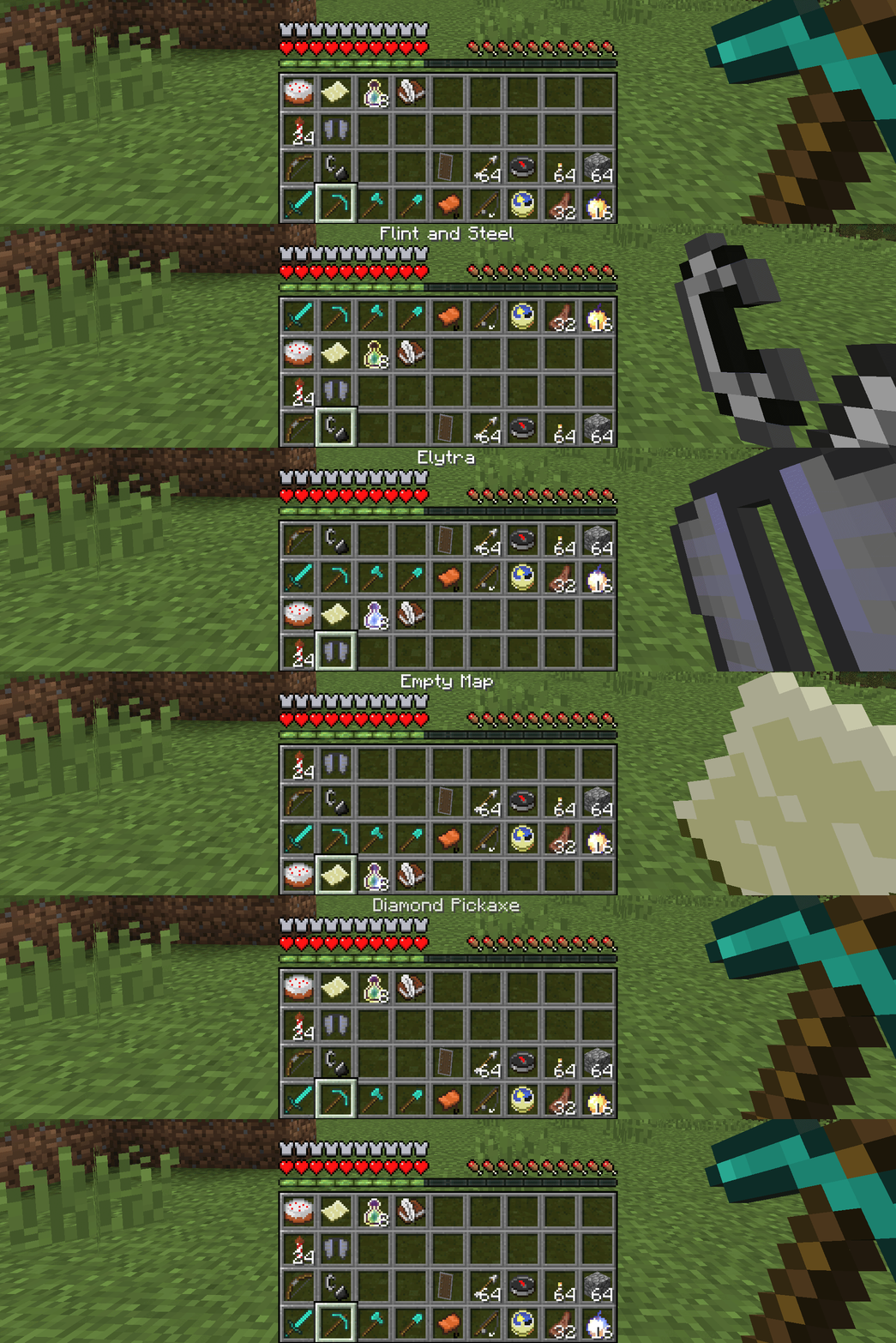
Screenshots
1x2 configuration

1x3 configuration

1x4 configuration

2x1 configuration

2x2 configuration

Hotbar swapping

Inventory

Available Versions
How to Install DualHotbar Reworked on Your Server
Order Server
Order a Minecraft Java server with at least 3 GB RAM (4 GB recommended).
Set forge Loader
In the panel under "Egg", select the forge loader and matching Minecraft version (1.12.2).
Install Mod
Open the mod browser in the dashboard and search for "DualHotbar Reworked". Click "Install" – done! Alternatively, upload the .jar via SFTP to the /mods folder.
Compatibility
Mod Loaders
Minecraft Versions
1.12.2
Server-side
✓ RequiredRecommended RAM
4 GB(min. 3 GB)Frequently Asked Questions
DualHotbar Reworked server crashes on startup – what to do?
Most common cause: wrong forge version or insufficient RAM. Check the server log (latest.log) for "OutOfMemoryError" or "Mixin" errors. With Mado Hosting: ensure at least 3 GB RAM is allocated and the loader matches the mod version (1.12.2). You can switch loaders with one click in the panel.
Is DualHotbar Reworked compatible with forge?
DualHotbar Reworked officially supports forge for Minecraft 1.12.2. The Mado dashboard automatically detects incompatible loader combinations.
Server lagging with DualHotbar Reworked – how to optimize performance?
Recommended RAM: 4 GB (per 8 players). Use /spark profiler to check if DualHotbar Reworked consumes the most tick time. Common fixes: reduce server view-distance to 8-10, install "performant" or "starlight" as supplementary mods on Forge. With Mado Hosting, your server runs on NVMe SSDs with dedicated CPU cores for minimal latency.
Similar Mods



![[TaCZ] Timeless and Classics Zero](https://cdn.modrinth.com/data/SzzJttH8/fd27766d2bb8390d284696b1dbd358f87e081439_96.webp)


Rent Modded Server
Install DualHotbar Reworked with just one click on your server.