
Duch-ArmorHUD
A Fabric HUD mod that displays your armor and item durability with item counts directly on screen.
Screenshots
About this Mod
🛡️ DuchArmorHUD
Never break your armor mid-fight again. DuchArmorHUD adds a clean, fully customizable HUD that shows your armor and weapon durability — plus item counts for anything you want to track — right on your screen at all times.
✨ Features
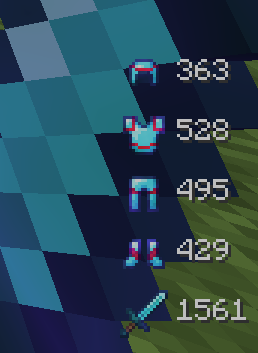
Armor & Weapon Durability HUD
See the remaining durability of your helmet, chestplate, leggings, boots, and held weapon in real time. The sword/tool can be pinned to the top or bottom of the list.
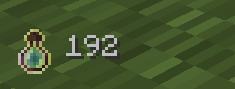
Item Count Tracker
Track the count of any item in your inventory — arrows, potions, food, totems, you name it. Add any item ID and it shows up automatically.
Color-Coded Durability
Items change color as they wear down — green when safe, orange as a warning, red when critical. All thresholds are configurable.
Low Durability Warnings
Optional bounce animation and red pulse background when an item is about to break. Customizable speed, strength, and threshold.
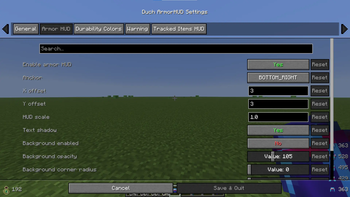
Fully Configurable Layout
Anchor to any corner of the screen (top-left, top-right, bottom-left, bottom-right)
Custom X/Y offset and scale
Row spacing and icon spacing
Optional semi-transparent background with rounded corners and adjustable opacity
Text shadow toggle
ModMenu Integration
All settings are available through a clean in-game config screen — no need to edit any files manually.
📦 Dependencies
Fabric API
ModMenu (optional, for in-game config)
Duchessentials
🎮 Designed for Survival & SMP
Built for players who want to stay focused on the game without constantly opening their inventory to check gear. Lightweight, minimal, and stays out of your way.
Available Versions
How to Install Duch-ArmorHUD on Your Server
Order Server
Order a Minecraft Java server with at least 3 GB RAM (4 GB recommended).
Set fabric Loader
In the panel under "Egg", select the fabric loader and matching Minecraft version (1.21.11).
Install Mod
Open the mod browser in the dashboard and search for "Duch-ArmorHUD". Click "Install" – done! Alternatively, upload the .jar via SFTP to the /mods folder.
Compatibility
Mod Loaders
Minecraft Versions
1.21.11
Server-side
✗ UnsupportedRecommended RAM
4 GB(min. 3 GB)Frequently Asked Questions
Duch-ArmorHUD server crashes on startup – what to do?
Most common cause: wrong fabric version or insufficient RAM. Check the server log (latest.log) for "OutOfMemoryError" or "Mixin" errors. With Mado Hosting: ensure at least 3 GB RAM is allocated and the loader matches the mod version (1.21.11). You can switch loaders with one click in the panel.
Is Duch-ArmorHUD compatible with fabric?
Duch-ArmorHUD officially supports fabric for Minecraft 1.21.11. The Mado dashboard automatically detects incompatible loader combinations.
Server lagging with Duch-ArmorHUD – how to optimize performance?
Recommended RAM: 4 GB (per 8 players). Use /spark profiler to check if Duch-ArmorHUD consumes the most tick time. Common fixes: reduce server view-distance to 8-10, install "performant" or "starlight" as supplementary mods on Forge. With Mado Hosting, your server runs on NVMe SSDs with dedicated CPU cores for minimal latency.
Similar Mods




![[TaCZ] Timeless and Classics Zero](https://cdn.modrinth.com/data/SzzJttH8/fd27766d2bb8390d284696b1dbd358f87e081439_96.webp)

Rent Modded Server
Install Duch-ArmorHUD with just one click on your server.