
Durabarity
Yet another durability utility.
Screenshots
About this Mod
General
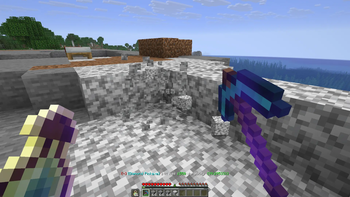
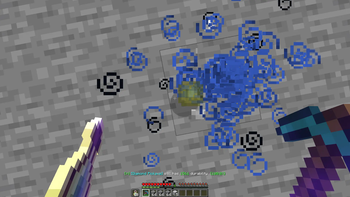
Just another way to show item durability. This particular one aims to stick to Minecraft's look and feel.
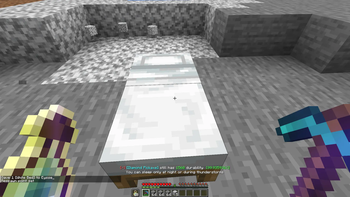
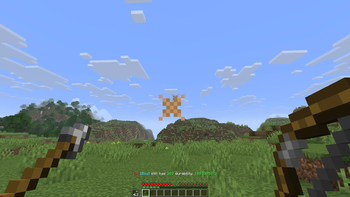
It displays a message at the location where the action bar normally appears when durability is added or removed from the item in your main hand. It shows the current durability, as well as whether it has lost or gained durability, and the percentage remaining.
It supports any item.
Configuration
You can customize the messages send on durability change in the config file of the mod, which you need modmenu for to access.
Durability being added and being removed have two different formats you can set, where every text is possible. You can make it have colors with minecraft's color codes, using &, for example, green would be &a. You can find other color codes on this site.
It also has some information you can parse into it. They are the following:
- %item% -> shows the display name of the item of which the durability has changed
- %durability% -> shows the current durability of the tool, so after the change
- %percentage% -> shows the current percentage of the full durability that is left on the tool
Suggestions
If you have ideas on how I could further improve this mod, I would be happy to consider your suggestions. Just add an issue on GitHub.
A special thanks to:
- SandWhoop, for coming up with the mod
- NotchArrow, for making the mod icon
Available Versions
How to Install Durabarity on Your Server
Order Server
Order a Minecraft Java server with at least 3 GB RAM (4 GB recommended).
Set fabric Loader
In the panel under "Egg", select the fabric loader and matching Minecraft version (1.21.11).
Install Mod
Open the mod browser in the dashboard and search for "Durabarity". Click "Install" – done! Alternatively, upload the .jar via SFTP to the /mods folder.
Compatibility
Mod Loaders
Minecraft Versions
1.21.11
Server-side
~ OptionalRecommended RAM
4 GB(min. 3 GB)Frequently Asked Questions
Durabarity server crashes on startup – what to do?
Most common cause: wrong fabric version or insufficient RAM. Check the server log (latest.log) for "OutOfMemoryError" or "Mixin" errors. With Mado Hosting: ensure at least 3 GB RAM is allocated and the loader matches the mod version (1.21.11). You can switch loaders with one click in the panel.
Is Durabarity compatible with fabric?
Durabarity officially supports fabric for Minecraft 1.21.11. The Mado dashboard automatically detects incompatible loader combinations.
Server lagging with Durabarity – how to optimize performance?
Recommended RAM: 4 GB (per 8 players). Use /spark profiler to check if Durabarity consumes the most tick time. Common fixes: reduce server view-distance to 8-10, install "performant" or "starlight" as supplementary mods on Forge. With Mado Hosting, your server runs on NVMe SSDs with dedicated CPU cores for minimal latency.
Similar Mods





Rent Modded Server
Install Durabarity with just one click on your server.