
Durability Alert
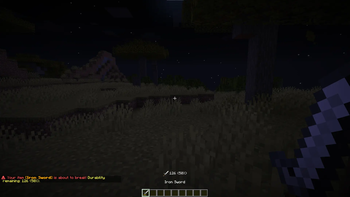
Warns you in chat when your tools, weapons, or armor are about to break. Configurable thresholds, HUD display, sound alerts, and action bar support.
Screenshots
About this Mod
Durability Alert
Never accidentally break your favorite tools again. Durability Alert tracks the
durability of your tools, weapons, and armor in real time — and warns you before
it's too late.
Features
🔔 Smart Warnings
Get notified the moment your item crosses a durability threshold. By default the
mod alerts you at 50%, 25%, 10%, 5%, 1%, and when only 1 durability remains
— but you can set your own thresholds in the config.
📍 Flexible Output
Choose where the warning appears:
- Chat — a styled message with the item name and remaining durability
- Action Bar — a quick heads-up above your hotbar without cluttering chat
- Both — why not
🛡️ Armor Tracking
Enable armor monitoring to get warned when your helmet, chestplate, leggings,
or boots are wearing out. All four slots are tracked independently.
🖥️ HUD Display
Show live durability info above the hotbar. Fully customizable:
- Item icon next to the durability readout
- Progress bar with color that shifts from white → orange → red
- Multiple text formats:
125/251,125,125/251 (50%),125 (50%) - Offhand item support
- Armor row with icons for all four slots
- Adjustable X/Y position
🔊 Sound Alerts
Plays a sound when a threshold is crossed. Choose from:
- Note Block Pling, Note Block Bell, Item Break, or Anvil Land
- Adjustable volume (0–100%)
⚙️ In-Game Config
All settings are accessible in-game via Mod Menu — no config file editing needed.
Requirements
- Fabric Loader 0.19.3+
- Fabric API
- Cloth Config
- Mod Menu (optional, for in-game config screen)
Available Versions
How to Install Durability Alert on Your Server
Order Server
Order a Minecraft Java server with at least 3 GB RAM (4 GB recommended).
Set fabric Loader
In the panel under "Egg", select the fabric loader and matching Minecraft version (26.1.2).
Install Mod
Open the mod browser in the dashboard and search for "Durability Alert". Click "Install" – done! Alternatively, upload the .jar via SFTP to the /mods folder.
Compatibility
Mod Loaders
Minecraft Versions
26.1.2, 26.1.1, 26.1
Server-side
✗ UnsupportedRecommended RAM
4 GB(min. 3 GB)Frequently Asked Questions
Durability Alert server crashes on startup – what to do?
Most common cause: wrong fabric version or insufficient RAM. Check the server log (latest.log) for "OutOfMemoryError" or "Mixin" errors. With Mado Hosting: ensure at least 3 GB RAM is allocated and the loader matches the mod version (26.1.2). You can switch loaders with one click in the panel.
Is Durability Alert compatible with fabric?
Durability Alert officially supports fabric for Minecraft 26.1.2, 26.1.1, 26.1. The Mado dashboard automatically detects incompatible loader combinations.
Server lagging with Durability Alert – how to optimize performance?
Recommended RAM: 4 GB (per 8 players). Use /spark profiler to check if Durability Alert consumes the most tick time. Common fixes: reduce server view-distance to 8-10, install "performant" or "starlight" as supplementary mods on Forge. With Mado Hosting, your server runs on NVMe SSDs with dedicated CPU cores for minimal latency.
Similar Mods




![[TaCZ] Timeless and Classics Zero](https://cdn.modrinth.com/data/SzzJttH8/fd27766d2bb8390d284696b1dbd358f87e081439_96.webp)

Rent Modded Server
Install Durability Alert with just one click on your server.