
DurabilityInfo
See your item's durability in the tooltip — numbers, percentage, and a color-coded bar.
About this Mod
Welcome to DurabilityInfo — the mod that shows your item durability exactly where you need it.
Simply put your cursor over any tool, weapon, or piece of armor and you will instantly see exactly how much life it has left. In numbers, percentage, or a color-coded bar — you decide which parts to see.
Features
📊 Tooltip Display
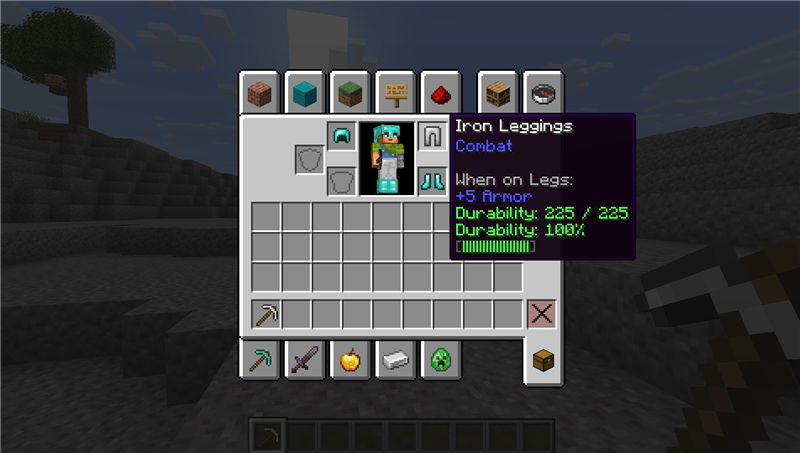
Every damageable item gets extra information added directly to its tooltip:
• Durability Numbers — shows the exact remaining durability (e.g. Durability: 235 / 500)
• Percentage — displays a clean percentage (e.g. Durability: 47%)
• Color Bar — a visual bar that changes from green → yellow → red as durability decreases
Each of these three elements can be turned on or off independently. You can show just the numbers, just the percentage, just the bar, or any combination.
🖥️ Heads-Up Display (HUD)
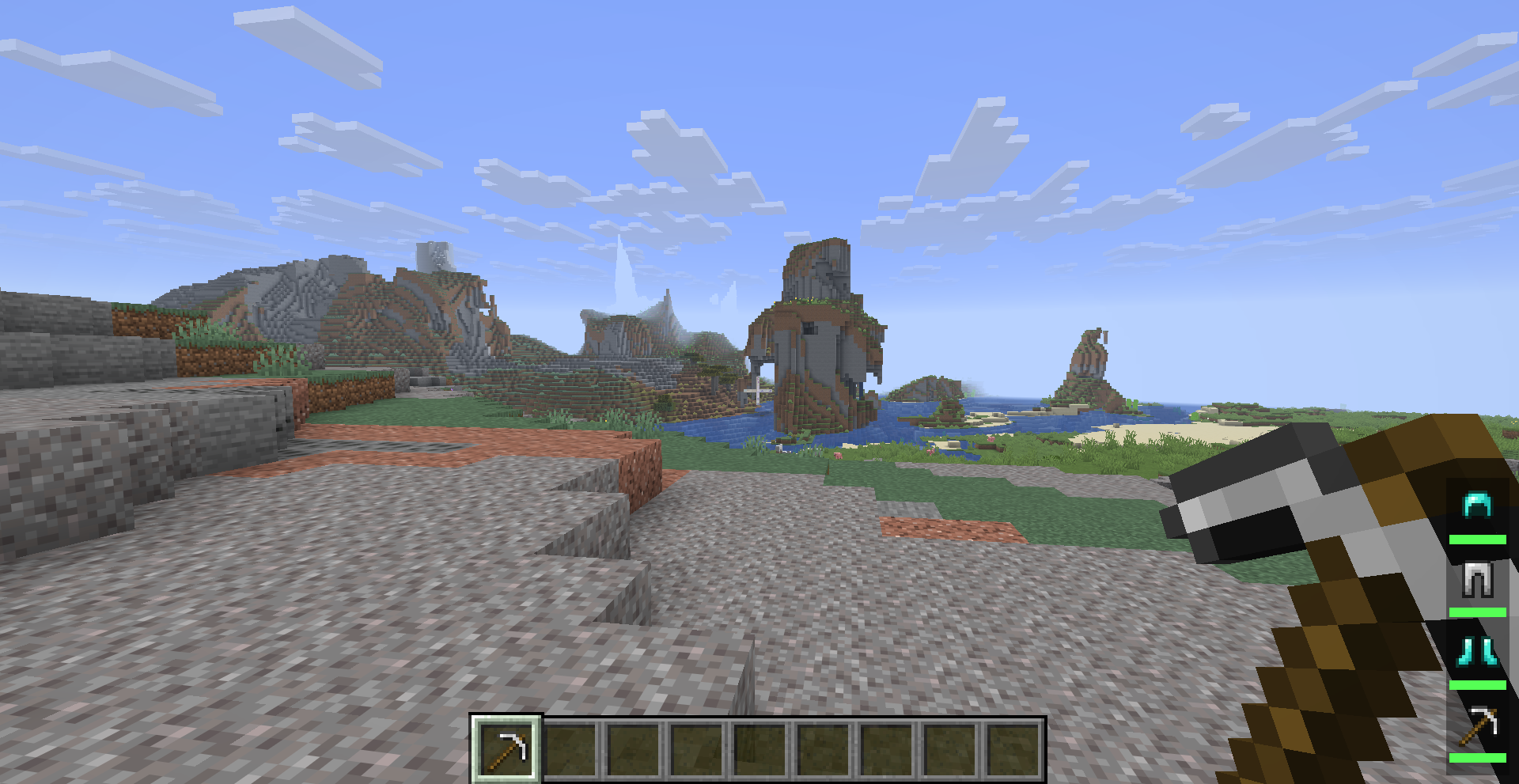
An always-visible durability display on your screen that tracks everything you are wearing and holding:
| Position | Item | What It Shows |
|---|---|---|
| 1 | Helmet | Durability bar + icon |
| 2 | Chestplate | Durability bar + icon |
| 3 | Leggings | Durability bar + icon |
| 4 | Boots | Durability bar + icon |
| 5 | Main Hand | Durability bar + icon |
| 6 | Offhand | Durability bar + icon |
Each item is shown as a small icon with a colored bar underneath. The bar shrinks as durability drops and changes color — green when healthy, yellow when worn, red when almost broken.
Customize the HUD:
• Move it to any corner (Top-Left, Top-Right, Bottom-Left, Bottom-Right)
• Adjust its position with X and Y pixel offsets
• Switch between Bar mode or Percentage text mode
• A semi-transparent background keeps it readable on any terrain
⚠️ Low Durability Warning
No more sudden breakage. When any equipped item falls below your chosen durability threshold:
• The bar starts flashing bright red to catch your attention immediately
• A warning sound plays (the item break sound) so you hear it even while fighting or mining
• The sound has a 2-second cooldown — it warns you without becoming annoying
• The threshold is fully adjustable — set it to 5% for a late warning, 20% for early notice, or whatever feels right to you
🔧 Damage-Dealt Mode
Prefer to see how much you have used an item instead of how much is left? Toggle showDamageDealt on, and the HUD will display the amount of damage your item has taken. This is especially useful for players who think in terms of "this pickaxe has 500 uses left" versus "this pickaxe has been used 150 times."
Configuration
In-Game (Recommended)
If you have Mod Menu and Cloth Config installed, just open the Mods menu, find DurabilityInfo, and click the gear icon. All settings can be changed from there.
Config File
Located at .minecraft/config/durabilityinfo.json. You can edit it manually.
Tooltip Settings:
| Setting | Default | Description |
|---|---|---|
| showDurabilityNumbers | true | Shows remaining durability as a fraction |
| showPercentage | true | Shows durability as a percentage |
| showBar | true | Shows a colored bar |
| showOnUnbreakable | false | Also show info on unbreakable items |
HUD Settings:
| Setting | Default | Description |
|---|---|---|
| warningThreshold | 10 | Percentage at which the warning activates |
| hudAnchor | BOTTOM_RIGHT | Screen corner for the HUD |
| hudOffsetX | 4 | Horizontal offset from the edge |
| hudOffsetY | 4 | Vertical offset from the edge |
| hudDisplayMode | BAR | Switch between BAR and PERCENTAGE view |
| showDamageDealt | false | Show damage taken instead of remaining |
Requirements
- Minecraft 26.1.x (any sub-version)
- Fabric Loader 0.18.5 or newer
- Fabric API (any recent version)
Optional (Recommended)
- Mod Menu — browse and configure your mods
- Cloth Config — provides the configuration screen
Both are free and available on Modrinth and CurseForge.
License
This project is licensed under the MIT License — you are free to use, modify, and distribute it.
Available Versions
How to Install DurabilityInfo on Your Server
Order Server
Order a Minecraft Java server with at least 3 GB RAM (4 GB recommended).
Set fabric Loader
In the panel under "Egg", select the fabric loader and matching Minecraft version (26.1.2).
Install Mod
Open the mod browser in the dashboard and search for "DurabilityInfo". Click "Install" – done! Alternatively, upload the .jar via SFTP to the /mods folder.
Compatibility
Mod Loaders
Minecraft Versions
26.1.2, 26.1.1, 26.1
Server-side
✗ UnsupportedRecommended RAM
4 GB(min. 3 GB)Frequently Asked Questions
DurabilityInfo server crashes on startup – what to do?
Most common cause: wrong fabric version or insufficient RAM. Check the server log (latest.log) for "OutOfMemoryError" or "Mixin" errors. With Mado Hosting: ensure at least 3 GB RAM is allocated and the loader matches the mod version (26.1.2). You can switch loaders with one click in the panel.
Is DurabilityInfo compatible with fabric and forge and neoforge?
DurabilityInfo officially supports fabric, forge, neoforge for Minecraft 26.1.2, 26.1.1, 26.1. Note: Forge and Fabric mods are NOT cross-compatible – pick one loader and stick with it. The Mado dashboard automatically detects incompatible loader combinations.
Server lagging with DurabilityInfo – how to optimize performance?
Recommended RAM: 4 GB (per 8 players). Use /spark profiler to check if DurabilityInfo consumes the most tick time. Common fixes: reduce server view-distance to 8-10, install "performant" or "starlight" as supplementary mods on Forge. With Mado Hosting, your server runs on NVMe SSDs with dedicated CPU cores for minimal latency.
Similar Mods



![[TaCZ] Timeless and Classics Zero](https://cdn.modrinth.com/data/SzzJttH8/fd27766d2bb8390d284696b1dbd358f87e081439_96.webp)


Rent Modded Server
Install DurabilityInfo with just one click on your server.