
DuraPing
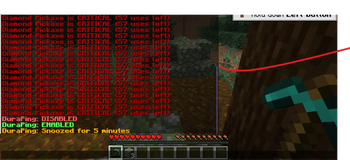
Client-side quality-of-life mod that helps you never break your favorite tools, armor, or elytra again. Frustrating, right!? With DuraPing, you get alerts through chat, sound, screen flash and more when your gear is running low on durability.
Screenshots
About this Mod
DuraPing
Never break your favorite gear again. Timely durability alerts through chat, sound, screen flash, or hotbar toast, the moment a tool, weapon, or armor piece runs low.





DuraPing is a client-side quality-of-life mod that watches the durability of everything you have equipped and warns you before it breaks. Pick how you want to be told (chat, sound, a screen flash, or a hotbar toast), set the thresholds that matter to you, and stop losing enchanted gear to one swing too many. It runs on Fabric and NeoForge, needs nothing on the server, and stays out of your way until your gear is actually in danger.
At a glance
| 🔔 Multi-tier alerts | Warn, Danger, and Critical thresholds, plus an emergency alert at 2 durability that bypasses snooze. |
| 📺 Four alert channels | Chat, custom sound, screen flash, and hotbar toast. Each one toggles independently. |
| 🎒 Every slot watched | Main hand, offhand, and all four armor pieces, every tick. |
| 🤫 Smart anti-spam | Per-tier cooldowns, hysteresis re-arming, and activity-aware quieting while you mine. |
| 🎚️ Per-item thresholds | Override warn, danger, and critical percentages for specific items by id. |
| ⏱️ Snooze and toggle | Keybinds to silence alerts for a few minutes or switch the mod off entirely. |
| 🧩 In-game config | A clean Mod Menu + Cloth Config screen on Fabric; a plain JSON file on both loaders. |
| 🌍 Client-side only | Works on vanilla servers, modded servers, and singleplayer. No server install. |
Every feature
Alerts
- Multi-tier thresholds: Warn (25%), Danger (10%), and Critical (5%) by default, each with its own color and cooldown.
- Emergency alert at 2 durability: ignores snooze, flashes the screen, repeats the critical sound, and prints a banner so you cannot miss it.
- Chat messages with the item name and exact uses remaining.
- Custom sounds for warn and critical, with subtitle support.
- Screen flash: a brief, low-opacity vignette for a glance-free heads-up.
- Hotbar toast messages for a quieter, text-only nudge.
Smart monitoring
- Watches the main hand, offhand, and all armor continuously.
- Fires once on a downward threshold crossing, then re-arms only after you recover, with configurable hysteresis for Mending or modded durability regen.
- Activity-aware mode stretches warn and danger cooldowns while you are continuously mining, so a long dig does not spam you.
- Optional quiet-below-warn: visual-only alerts in the warn tier, no sound or chat.
Customization
- Per-item overrides: different thresholds for an elytra, a netherite pickaxe, or anything else, keyed by item id.
- Tunable thresholds, per-tier cooldowns, and snooze duration.
- In-game config screen on Fabric via Mod Menu and Cloth Config. On NeoForge, edit the config file directly.
Controls
- Keybinds to toggle, snooze or cancel, and show main-hand durability on demand (defaults on the numpad, fully rebindable).
Auto-swap (off by default)
- Swaps a worn-down tool or armor piece for a more durable copy from your inventory, through server-synced inventory actions that hold up on real servers.
Configuration
The config lives at config/duraping.json and is created on first launch.
{
  "enabled": true,
  "chat": true,
  "sound": true,
  "flash": false,
  "toast": false,
  "warn": 25,
  "danger": 10,
  "critical": 5,
  "warnCooldownSec": 30,
  "dangerCooldownSec": 15,
  "criticalCooldownSec": 7,
  "overrides": {
    "minecraft:elytra": { "warn": 15, "danger": 7, "critical": 1 }
  }
}
On Fabric you can edit everything live from Escape, Mods, DuraPing, Config (requires Mod Menu and Cloth Config). Per-item overrides use the namespaced item id, for example minecraft:netherite_pickaxe.
Keybinds
| Key | Action |
|---|---|
| Numpad 7 | Toggle DuraPing on or off |
| Numpad 8 | Snooze for 5 minutes, or cancel an active snooze |
| Numpad 9 | Show current main-hand durability |
| Numpad 0 | Manual auto-swap trigger |
Rebind any of these under Options, Controls, DuraPing.
Requirements
| Loader | Fabric or NeoForge |
| Minecraft | 1.21.9, 1.21.10, or 1.21.11 |
| Java | 21 |
Optional (Fabric): Mod Menu and Cloth Config for the in-game settings screen. Everything works without them through the config file.
Multiplayer
DuraPing is fully client-side. It reads only your own inventory and never talks to the server, so it works on vanilla servers, modded servers that do not have it, and in singleplayer, with no permissions or server-side install required.
Found a bug? Have an idea?
Bug reports and feature ideas are welcome. Open a GitHub issue with your loader and Minecraft version, your DuraPing version, and any relevant console output. For quick questions or to help test, join the Discord.
Released under the MIT License.
Available Versions
How to Install DuraPing on Your Server
Order Server
Order a Minecraft Java server with at least 3 GB RAM (4 GB recommended).
Set fabric Loader
In the panel under "Egg", select the fabric loader and matching Minecraft version (26.1.2).
Install Mod
Open the mod browser in the dashboard and search for "DuraPing". Click "Install" – done! Alternatively, upload the .jar via SFTP to the /mods folder.
Compatibility
Mod Loaders
Minecraft Versions
26.1.2, 1.21.11, 1.21.10 (+1 more)
Server-side
✗ UnsupportedRecommended RAM
4 GB(min. 3 GB)Frequently Asked Questions
DuraPing server crashes on startup – what to do?
Most common cause: wrong fabric version or insufficient RAM. Check the server log (latest.log) for "OutOfMemoryError" or "Mixin" errors. With Mado Hosting: ensure at least 3 GB RAM is allocated and the loader matches the mod version (26.1.2). You can switch loaders with one click in the panel.
Is DuraPing compatible with fabric and neoforge?
DuraPing officially supports fabric, neoforge for Minecraft 26.1.2, 1.21.11, 1.21.10. The Mado dashboard automatically detects incompatible loader combinations.
Server lagging with DuraPing – how to optimize performance?
Recommended RAM: 4 GB (per 8 players). Use /spark profiler to check if DuraPing consumes the most tick time. Common fixes: reduce server view-distance to 8-10, install "performant" or "starlight" as supplementary mods on Forge. With Mado Hosting, your server runs on NVMe SSDs with dedicated CPU cores for minimal latency.
Similar Mods



![[TaCZ] Timeless and Classics Zero](https://cdn.modrinth.com/data/SzzJttH8/fd27766d2bb8390d284696b1dbd358f87e081439_96.webp)


Rent Modded Server
Install DuraPing with just one click on your server.