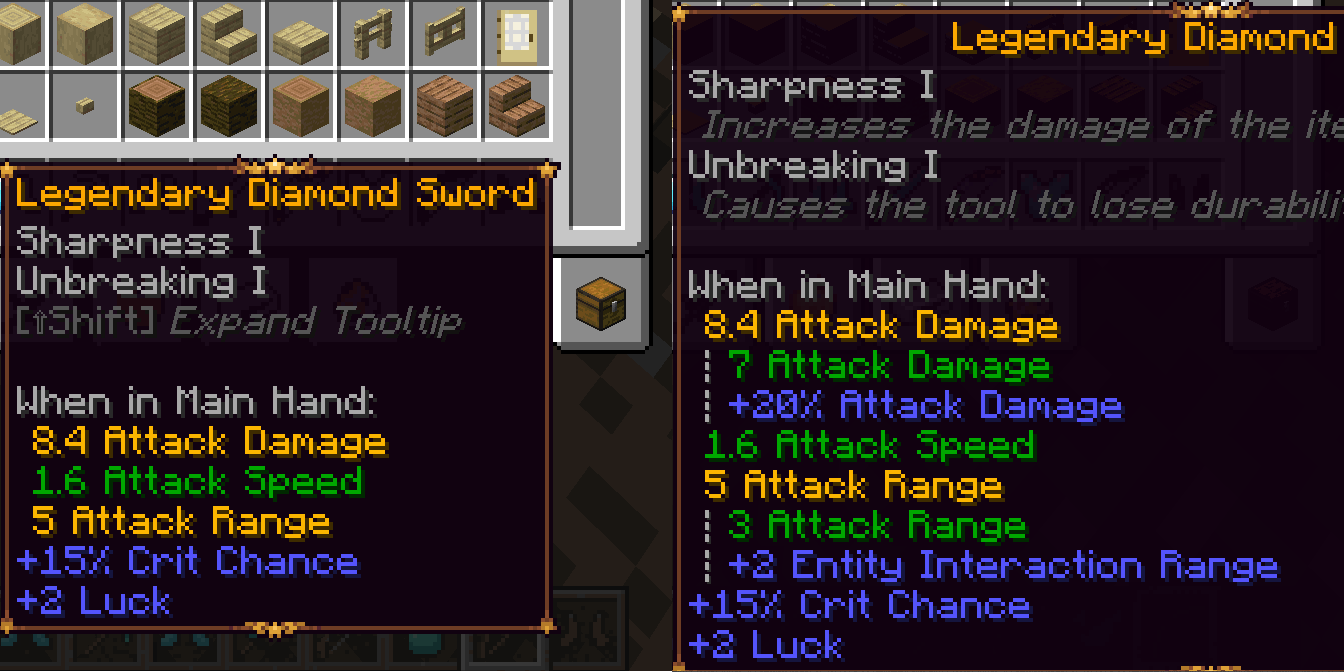
Dynamic Tooltips
Cleaner (Expandable) Item Tooltips!
About this Mod
Dynamic Tooltips
A client-side mod for Fabric (inspired by Neoforge!) revamping Minecraft's tooltips for attributes and enchantments, providing a clearer, merged view, and reducing tooltip clutter.
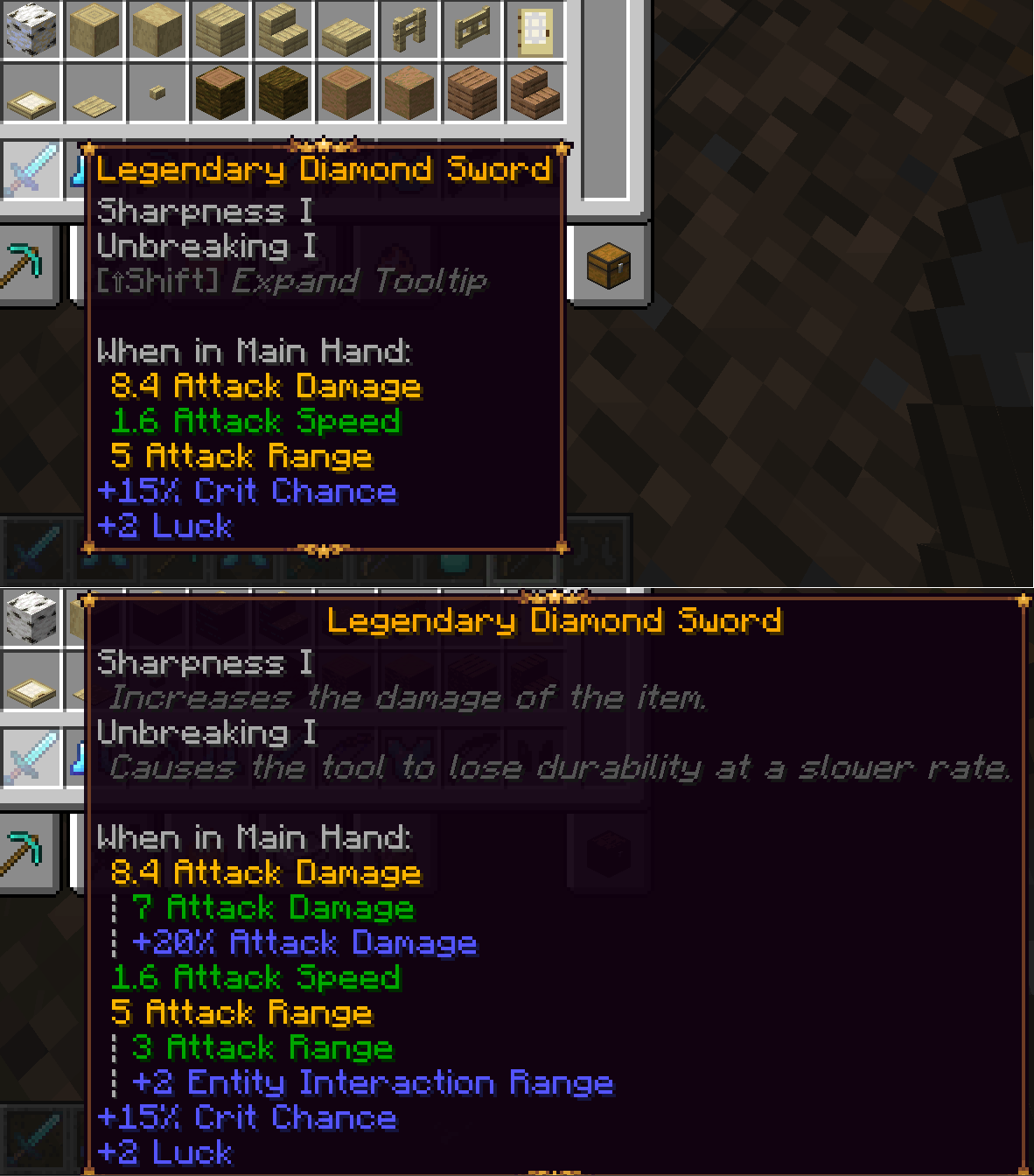




Features:
- Merged Attribute View: Combines attribute modifiers (e.g., +10 Attack Damage, +20% Attack Damage) into a single line reflecting the final calculated value. Easier to understand and takes up less space!
- Detailed Breakdown: Hold [Shift] to expand merged attributes and see the original base value plus all contributing modifiers individually.
- Intelligent Coloring: Modifiers are colored based on their impact (positive, negative, or neutral), respecting "sentiments" (e.g., scale is neutral gray, burning time treats lower values as better).
- Enchantment Descriptions: Displays enchantment descriptions directly below the enchantment name when holding [Shift] (or always for Enchanted Books).
- Canonical Headers: Cleans up redundant headers (e.g., "When on Body:", "When Worn:") into a single appropriate header when modifiers for multiple slots are present on an item, but only one slot is relevant.
Client-Side Only. Fabric only, no Neoforge port is planned. (Neoforge already has a very similar feature built-in!)
Compatibility:
Compatible with Legendary Tooltips. Probably compatible with other tooltip mods (but try it out!)
Includes dedicated integration for:
- Better Combat: Displays Attack Range on Better Combat weapons (if enabled in BC's config), intelligently merging in relevant Entity Interaction Range modifiers.
- Enchantment Descriptions: Dynamic Tooltips will use description keys provided by this mod, and from other mods providing the Enchantment Descriptions lang format.
- Ranged Weapon API: Always display Ranged Damage and Pull Time modifiers on RWA weapons, formatting them as "base" modifiers (green/gold when merged).
- TieredZ: Works with tooltips modified by TieredZ
Available Versions
How to Install Dynamic Tooltips on Your Server
Order Server
Order a Minecraft Java server with at least 3 GB RAM (4 GB recommended).
Set fabric Loader
In the panel under "Egg", select the fabric loader and matching Minecraft version (26.1.2).
Install Mod
Open the mod browser in the dashboard and search for "Dynamic Tooltips". Click "Install" – done! Alternatively, upload the .jar via SFTP to the /mods folder.
Compatibility
Mod Loaders
Minecraft Versions
26.1.2, 1.21.11, 1.21.10 (+1 more)
Server-side
✗ UnsupportedRecommended RAM
4 GB(min. 3 GB)Frequently Asked Questions
Dynamic Tooltips server crashes on startup – what to do?
Most common cause: wrong fabric version or insufficient RAM. Check the server log (latest.log) for "OutOfMemoryError" or "Mixin" errors. With Mado Hosting: ensure at least 3 GB RAM is allocated and the loader matches the mod version (26.1.2). You can switch loaders with one click in the panel.
Is Dynamic Tooltips compatible with fabric?
Dynamic Tooltips officially supports fabric for Minecraft 26.1.2, 1.21.11, 1.21.10. The Mado dashboard automatically detects incompatible loader combinations.
Server lagging with Dynamic Tooltips – how to optimize performance?
Recommended RAM: 4 GB (per 8 players). Use /spark profiler to check if Dynamic Tooltips consumes the most tick time. Common fixes: reduce server view-distance to 8-10, install "performant" or "starlight" as supplementary mods on Forge. With Mado Hosting, your server runs on NVMe SSDs with dedicated CPU cores for minimal latency.
Rent Modded Server
Install Dynamic Tooltips with just one click on your server.