
Easy Diary
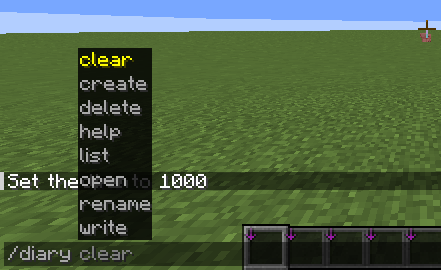
Adds a /diary command that lets players create, access, and store their own custom diaries in-game.
Screenshots
About this Mod
📖 About the Mod
The Diary Command Mod introduces a fully customizable diary system into Minecraft, giving players the ability to record their journey, discoveries, and personal notes directly in-game. Instead of relying on external notes or remembering everything, this mod provides an immersive way to keep track of your adventures with simple commands.
With the /diary command, players gain access to a book & quill interface that serves as their personal diary. Unlike the vanilla book & quill, this diary comes with unlimited storage, allowing you to write and save as much information as you need without ever running out of space.
✨ Features
✍️ Write Notes – Use /diary notes to write down reminders, ideas, or anything else you want to remember.
📍 Save Coordinates – Store important locations like bases, villages, strongholds, or hidden treasures with /diary coords.
⏰ Track Time – Record the current in-game time using /diary time to keep logs or mark special moments.
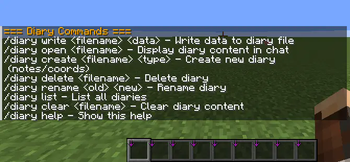
📂 File Management – Create your own diary files with /diary create
📖 Organized Storage – Keep multiple diaries for different purposes, such as exploration logs, building projects, or resource tracking.
🔒 Client-Side Only – All diary files and commands are stored locally, ensuring your notes are personal and not shared with a server.
🗂️ Utility Commands – /diary help lists all commands, and /diary clear lets you wipe everything if you want a fresh start.
🧭 Why Use This Mod?
This mod is perfect for players who love organization, roleplay, or storytelling. You can use it as a travel journal, a project planner, or even a roleplay diary that grows with your character. Whether you’re documenting your first diamond find, logging coordinates of your secret base, or keeping a daily survival journal, the Diary Command Mod makes it seamless and fun.
Available Versions
How to Install Easy Diary on Your Server
Order Server
Order a Minecraft Java server with at least 3 GB RAM (4 GB recommended).
Set fabric Loader
In the panel under "Egg", select the fabric loader and matching Minecraft version (1.21.10).
Install Mod
Open the mod browser in the dashboard and search for "Easy Diary". Click "Install" – done! Alternatively, upload the .jar via SFTP to the /mods folder.
Compatibility
Mod Loaders
Minecraft Versions
1.21.10, 1.21.9, 1.21.8 (+2 more)
Server-side
✗ UnsupportedRecommended RAM
4 GB(min. 3 GB)Frequently Asked Questions
Easy Diary server crashes on startup – what to do?
Most common cause: wrong fabric version or insufficient RAM. Check the server log (latest.log) for "OutOfMemoryError" or "Mixin" errors. With Mado Hosting: ensure at least 3 GB RAM is allocated and the loader matches the mod version (1.21.10). You can switch loaders with one click in the panel.
Is Easy Diary compatible with fabric?
Easy Diary officially supports fabric for Minecraft 1.21.10, 1.21.9, 1.21.8. The Mado dashboard automatically detects incompatible loader combinations.
Server lagging with Easy Diary – how to optimize performance?
Recommended RAM: 4 GB (per 8 players). Use /spark profiler to check if Easy Diary consumes the most tick time. Common fixes: reduce server view-distance to 8-10, install "performant" or "starlight" as supplementary mods on Forge. With Mado Hosting, your server runs on NVMe SSDs with dedicated CPU cores for minimal latency.
Similar Mods






Rent Modded Server
Install Easy Diary with just one click on your server.