
EasyCoords GUI
Displays your coordinates, daytime, and direction on screen, simplifies location sharing, and shows death coordinates in chat.
Screenshots

About this Mod
EasyCoords - Find Your Way!
A Minecraft Quality of Life datapack mod for versions 1.20 & 1.21. This datapack displays your coordinates, daytime, and direction on screen, simplifies location sharing, and shows death coordinates in chat.
For more information and updates about the project, visit the ketket.dev page.
UTILITIES
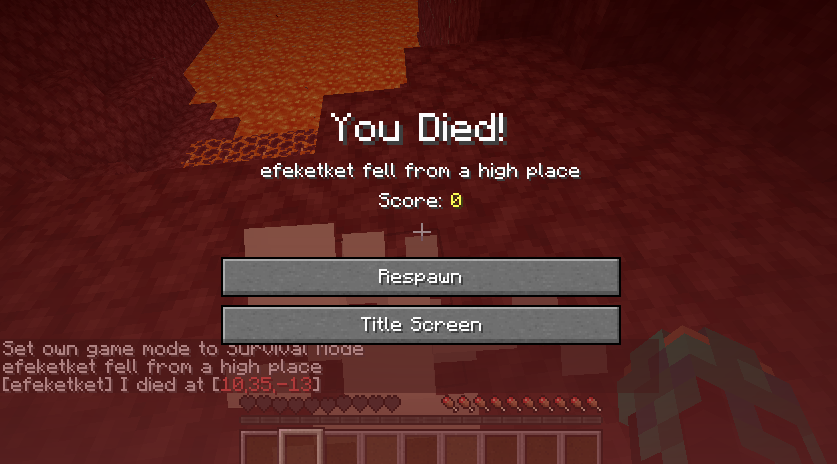
- When a player dies, it sends their death location in chat.
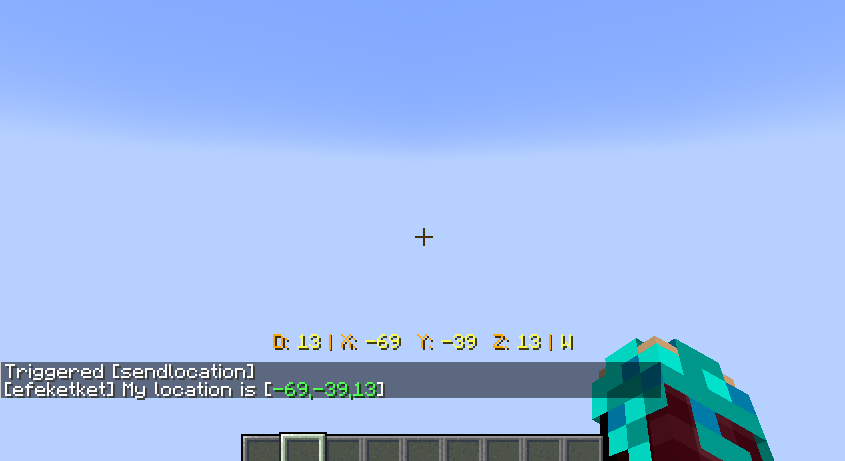
/trigger sendlocationWith this command, you can easily share your location in chat.
GUI COMMANDS
/trigger showcoordinatesEnables the EasyCoords GUI display on screen./trigger hidecoordinatesDisables the EasyCoords GUI display on screen./trigger guicolor set <amount>There are 7 different color variations for the GUI. The default is yellow.
Currently, EasyCoords GUI displays the passed day count, coordinates, and the player's current direction.
SCREENSHOOTS
Check My Other Projects
Silk/Fortune Switch - Instantly switch between Fortune and Silk Touch enchantments on your tools with a simple right-click.
Display Cases - Interactive display cases that can store items, change appearance, and emit redstone signals when occupied.
Better Cauldrons - Throw dirt or concrete powder into a water-filled cauldron to instantly create mud or concrete. Wash dyed blocks and items back to their clean form with an intuitive, vanilla-friendly system.
Mannequins - Add fully customizable mannequins that can hold items, change poses, swap skins, and bring your world to life.
UndyingRefill - Automatically replaces a used Totem of Undying by pulling another one from your inventory—or even from the first shulker box containing a totem. Never fumble your totems again.
Graves - This datapack creates a grave when a player dies, safely storing their items. Retrieve your belongings without worrying about losing them!
Quick Shulker Boxes - Quick Shulker Boxes lets you open Shulker Boxes while holding them, without needing to place them on the ground. Simply shift-right-click to access your shulker boxes.
Stackraft - Compress farm items like sugarcane, gunpowder, and more to save space. Perfect for managing large farms and keeping your inventory organized. Also works with the new Auto Crafters.
EasyCoords - Displays your coordinates, daytime, and direction on screen, simplifies location sharing, and shows death coordinates in chat.
Better Hanging Signs - It will enable your hanging signs to hold items.
FurnniCraft - Furnish your creations with a wide variety of unique furniture in the vanilla style, without the need for any resource packs.
EXTERNAL LINKS



Available Versions
How to Install EasyCoords GUI on Your Server
Order Server
Order a Minecraft Java server with at least 3 GB RAM (4 GB recommended).
Set datapack Loader
In the panel under "Egg", select the datapack loader and matching Minecraft version (26.1).
Install Mod
Open the mod browser in the dashboard and search for "EasyCoords GUI". Click "Install" – done! Alternatively, upload the .jar via SFTP to the /mods folder.
Compatibility
Mod Loaders
Minecraft Versions
26.1, 1.21.11, 1.21 (+8 more)
Server-side
✓ RequiredRecommended RAM
4 GB(min. 3 GB)Frequently Asked Questions
EasyCoords GUI server crashes on startup – what to do?
Most common cause: wrong datapack version or insufficient RAM. Check the server log (latest.log) for "OutOfMemoryError" or "Mixin" errors. With Mado Hosting: ensure at least 3 GB RAM is allocated and the loader matches the mod version (26.1). You can switch loaders with one click in the panel.
Is EasyCoords GUI compatible with datapack and fabric and forge and neoforge and quilt?
EasyCoords GUI officially supports datapack, fabric, forge, neoforge, quilt for Minecraft 26.1, 1.21.11, 1.21. Note: Forge and Fabric mods are NOT cross-compatible – pick one loader and stick with it. The Mado dashboard automatically detects incompatible loader combinations.
Server lagging with EasyCoords GUI – how to optimize performance?
Recommended RAM: 4 GB (per 8 players). Use /spark profiler to check if EasyCoords GUI consumes the most tick time. Common fixes: reduce server view-distance to 8-10, install "performant" or "starlight" as supplementary mods on Forge. With Mado Hosting, your server runs on NVMe SSDs with dedicated CPU cores for minimal latency.
Similar Mods




Rent Modded Server
Install EasyCoords GUI with just one click on your server.