
EasyDrawers
Infinite-storage drawers for every vanilla wood type — break them and keep your stored items, fully compatible with Open Parties and Claims.
Screenshots
About this Mod
Easy Drawers
Easy Drawers adds simple, lightweight storage drawers for every vanilla wood type in Minecraft — store unlimited amounts of a single item per drawer, no more chest spam.
Features
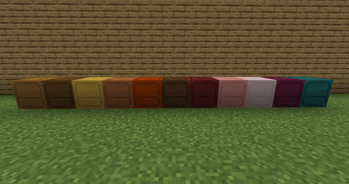
- 11 wood variants — Oak, Spruce, Birch, Jungle, Acacia, Dark Oak, Mangrove, Cherry, Pale Oak, Crimson and Warped drawers, matching every vanilla wood type.
- Infinite single-item storage — each drawer holds unlimited quantities of one item type, perfect for bulk resources like cobblestone, dirt, or saplings.
- Quick interactions — left-click to deposit/withdraw a single item, right-click for stack-based interactions (no GUI needed).
- Comparator support — drawers output a redstone signal based on their fill level, just like vanilla storage blocks.
- Safe to break — destroying a drawer drops it as an item with its contents intact, so you'll never lose your stored items by accident.
- Claim-friendly — full compatibility with Open Parties and Claims, drawers respect claim permissions like any other protected block.
How it works
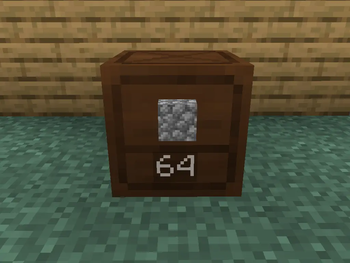
Place a drawer of your chosen wood type, then interact with it to start storing items. Each drawer is tied to a single item type at a time — once it's empty, you can store something else in it. The front face displays the stored item and quantity, so you always know what's inside at a glance.
Compatibility
- Minecraft 26.1.2
- Fabric Loader
- Works alongside Open Parties and Claims — claimed drawers are protected the same way as vanilla blocks.
Planned / Ideas
- Auto-sorting network — shift-right-click while holding an item to scan nearby blocks and automatically deposit it into a drawer already storing that item. If no matching drawer is found nearby, you'll get a clear message instead.
- Connectors — extend the auto-sorting range by linking drawers together through a chain of connector blocks (drawer → connector → connector → ... → drawer), letting you build larger sorting networks across your base.
- Dye support — color the drawer's frame using vanilla dyes for better organization and visual customization (experimental, still investigating feasibility).
- Long-term support — the mod will be kept up to date with future Minecraft versions, with a 26.2 compatibility update planned soon.
Available Versions
How to Install EasyDrawers on Your Server
Order Server
Order a Minecraft Java server with at least 3 GB RAM (4 GB recommended).
Set fabric Loader
In the panel under "Egg", select the fabric loader and matching Minecraft version (26.2).
Install Mod
Open the mod browser in the dashboard and search for "EasyDrawers". Click "Install" – done! Alternatively, upload the .jar via SFTP to the /mods folder.
Compatibility
Mod Loaders
Minecraft Versions
26.2, 26.1.2
Server-side
✓ RequiredRecommended RAM
4 GB(min. 3 GB)Frequently Asked Questions
EasyDrawers server crashes on startup – what to do?
Most common cause: wrong fabric version or insufficient RAM. Check the server log (latest.log) for "OutOfMemoryError" or "Mixin" errors. With Mado Hosting: ensure at least 3 GB RAM is allocated and the loader matches the mod version (26.2). You can switch loaders with one click in the panel.
Is EasyDrawers compatible with fabric?
EasyDrawers officially supports fabric for Minecraft 26.2, 26.1.2. The Mado dashboard automatically detects incompatible loader combinations.
Server lagging with EasyDrawers – how to optimize performance?
Recommended RAM: 4 GB (per 8 players). Use /spark profiler to check if EasyDrawers consumes the most tick time. Common fixes: reduce server view-distance to 8-10, install "performant" or "starlight" as supplementary mods on Forge. With Mado Hosting, your server runs on NVMe SSDs with dedicated CPU cores for minimal latency.
Similar Mods


Rent Modded Server
Install EasyDrawers with just one click on your server.
Details
- License
- Creative Commons Attribution Non Commercial 4.0 International
- Server-side
- Required