
Echo Reload
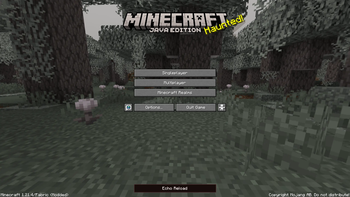
Echo Reload is a client mod that lets you browse installed mods, edit their configs, inspect logs, and restart the game from a hub on the title screen without leaving Minecraft.
Screenshots
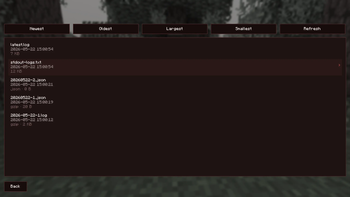
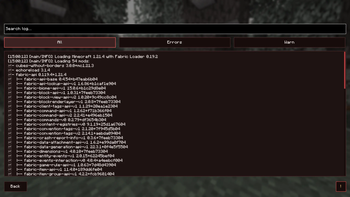
About this Mod
Echo Reload
A full modpack management hub built into Minecraft's main menu. Browse mods, edit configs, read logs, and restart your game — all without touching a single folder.
Features
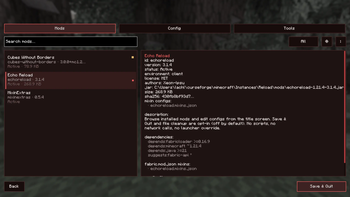
Mod List
Echo Reload gives you a complete view of every mod in your instance — name, version, and status at a glance. Search and filter by name, load state, config files, or problems. Sort by name, ID, size, or status. Simple view hides library mods so the list stays clean, and clicking any mod opens a full detail page with dependencies, authors, config locations, and notes when something looks wrong.
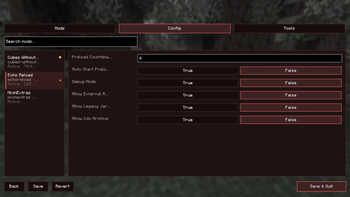
Config Editor
Pick any mod and edit its config files through a simple form interface. Supports common config formats, with Save and Revert options so you can undo changes before they stick. Boolean options use clear True / False buttons — no hand-editing files.
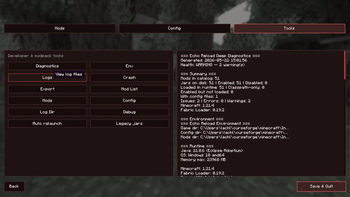
Logs
View every log file from your instance in one place. Read rotated and compressed logs without extra tools, with JSON logs formatted for easy reading. Search by keyword or filter down to just errors and warnings. The Found Issues scanner reads your log and flags likely mod conflicts, mixin problems, and other common causes.
Tools
- Diagnostics — a full check of your instance with clear recommendations
- Crash — review the last crash report with suspected mods and suggested fixes
- Export — generate a shareable mod list for your pack
- Quick shortcuts to open your mods, config, and logs folders directly
Restart from the Hub
Changed a mod or config? Hit Restart from the hub. Echo Reload relaunches the game and brings you back to exactly where you were — same tab, same mod selected, same filters.
Who Is It For?
- Players fixing or tuning a modpack
- Pack makers checking mods, configs, and logs without leaving the game
- Anyone who wants a clearer view of what's installed and what might be going wrong
Requirements
| Minecraft | 1.21.4 |
| Loader | Fabric |
| Dependencies | Fabric API (recommended) |
Open Echo Reload from the main menu and take control of your modpack from one screen.
Available Versions
How to Install Echo Reload on Your Server
Order Server
Order a Minecraft Java server with at least 3 GB RAM (4 GB recommended).
Set fabric Loader
In the panel under "Egg", select the fabric loader and matching Minecraft version (1.21.11).
Install Mod
Open the mod browser in the dashboard and search for "Echo Reload". Click "Install" – done! Alternatively, upload the .jar via SFTP to the /mods folder.
Compatibility
Mod Loaders
Minecraft Versions
1.21.11, 1.21.10, 1.21.9 (+14 more)
Server-side
✗ UnsupportedRecommended RAM
4 GB(min. 3 GB)Frequently Asked Questions
Echo Reload server crashes on startup – what to do?
Most common cause: wrong fabric version or insufficient RAM. Check the server log (latest.log) for "OutOfMemoryError" or "Mixin" errors. With Mado Hosting: ensure at least 3 GB RAM is allocated and the loader matches the mod version (1.21.11). You can switch loaders with one click in the panel.
Is Echo Reload compatible with fabric and forge and neoforge?
Echo Reload officially supports fabric, forge, neoforge for Minecraft 1.21.11, 1.21.10, 1.21.9. Note: Forge and Fabric mods are NOT cross-compatible – pick one loader and stick with it. The Mado dashboard automatically detects incompatible loader combinations.
Server lagging with Echo Reload – how to optimize performance?
Recommended RAM: 4 GB (per 8 players). Use /spark profiler to check if Echo Reload consumes the most tick time. Common fixes: reduce server view-distance to 8-10, install "performant" or "starlight" as supplementary mods on Forge. With Mado Hosting, your server runs on NVMe SSDs with dedicated CPU cores for minimal latency.
Similar Mods






Rent Modded Server
Install Echo Reload with just one click on your server.