
Eerily Slow
Tweaked Recipe For Early Game!
Screenshots
About this Mod
I realized that this is not something i can work on anymore. I will be making datapacks in the future,maybe just not this tyle anymore. But who knows?
only download the datapack version! the mod version is broken at the moment.
Eerily Slow 🐌
Do you want to make your world slower and more challenging?
Eerily Slow is a progression datapack that rebalances some of Minecraft’s core recipes to stretch out the early and mid-game.
!!This datapack supports GeyserMC!!
want to get the resource pack and mappings? go to my discord server and ask for it!
The discord server linked is for bug tracking,reporting and feedbacks.
Changes Include:
Spoiler
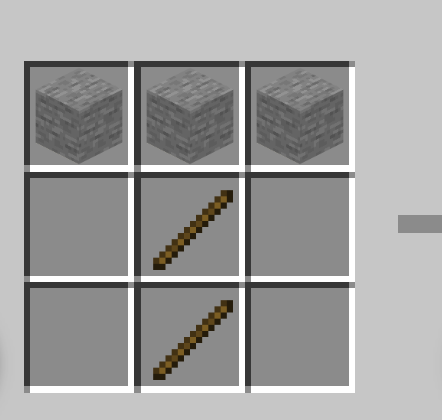
🪨 Stone Tools → now require stone instead of cobblestone.
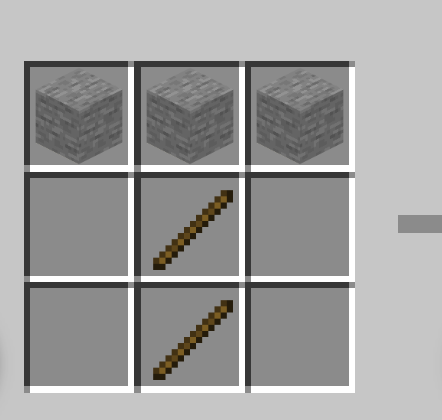
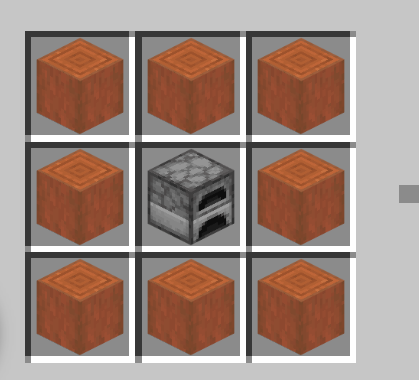
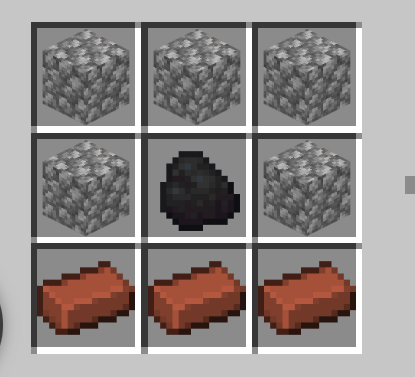
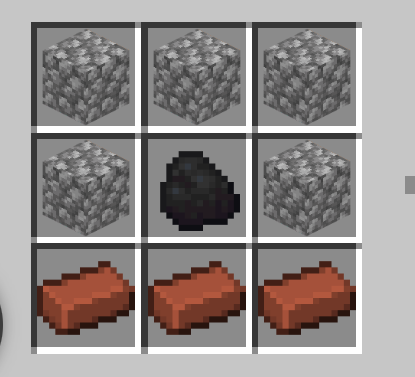
🔥 Furnace → crafted with bricks around coal in the middle.
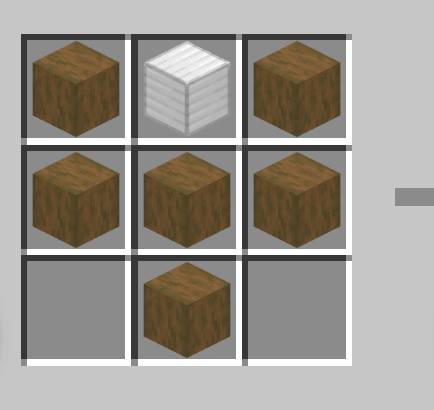
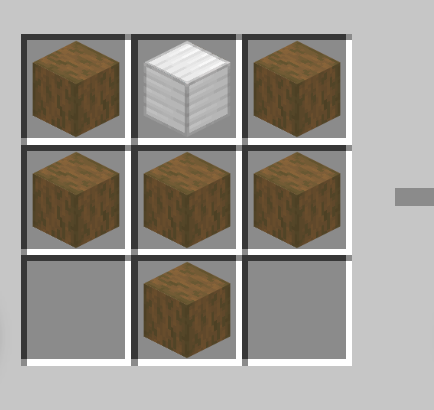
🛡 Shield → needs an iron block plus logs.
🧱 Clay Ball → must be smelted on a campfire to get bricks.
⚒ Blast Furnace → requires an iron block.
🌲 Wood Planks → can only be crafted from the stripped version of their logs.
How do i progress through early game then?
Spoiler
How to Get Started in Eerily Slow
• Collect Flint and Sticks
Break leaves to get sticks.
Find flint from gravel.
• Craft a Flint Blade
Use the flint and sticks you collected to craft your first Flint Blade.
• Gather Saplings for Plant String
Use your Flint Blade to break leaves and collect saplings.
Craft Plant String from the saplings.
• Craft a Flint Axe
Use the Plant String and Flint Blade to craft a Flint Axe.
Chop wood with your Flint Axe to craft a Crafting Table.
• Collect and Smelt Clay
Find clay blocks and break them to get clay balls.
Smelt the clay balls in a campfire for 5 minutes to make Bricks.
• Make a Furnace
Use the Bricks you crafted to build a Furnace.
• Upgrade to Stone Tools
Use your Furnace to smelt cobblestone into stone.
Craft Stone Tools from the stone to continue your progression.
Available Versions
How to Install Eerily Slow on Your Server
Order Server
Order a Minecraft Java server with at least 3 GB RAM (4 GB recommended).
Set datapack Loader
In the panel under "Egg", select the datapack loader and matching Minecraft version (1.21.11).
Install Mod
Open the mod browser in the dashboard and search for "Eerily Slow". Click "Install" – done! Alternatively, upload the .jar via SFTP to the /mods folder.
Compatibility
Mod Loaders
Minecraft Versions
1.21.11, 1.21.9, 1.21.8 (+2 more)
Server-side
✓ RequiredRecommended RAM
4 GB(min. 3 GB)Frequently Asked Questions
Eerily Slow server crashes on startup – what to do?
Most common cause: wrong datapack version or insufficient RAM. Check the server log (latest.log) for "OutOfMemoryError" or "Mixin" errors. With Mado Hosting: ensure at least 3 GB RAM is allocated and the loader matches the mod version (1.21.11). You can switch loaders with one click in the panel.
Is Eerily Slow compatible with datapack and fabric and forge and neoforge and quilt?
Eerily Slow officially supports datapack, fabric, forge, neoforge, quilt for Minecraft 1.21.11, 1.21.9, 1.21.8. Note: Forge and Fabric mods are NOT cross-compatible – pick one loader and stick with it. The Mado dashboard automatically detects incompatible loader combinations.
Server lagging with Eerily Slow – how to optimize performance?
Recommended RAM: 4 GB (per 8 players). Use /spark profiler to check if Eerily Slow consumes the most tick time. Common fixes: reduce server view-distance to 8-10, install "performant" or "starlight" as supplementary mods on Forge. With Mado Hosting, your server runs on NVMe SSDs with dedicated CPU cores for minimal latency.
Similar Mods




Rent Modded Server
Install Eerily Slow with just one click on your server.
Details
- License
- Creative Commons Attribution Share Alike 4.0 International
- Server-side
- Required