
Jellybeans / Effect Beans
A mod that adds Jellybeans to Minecraft. Each colour of Jellybean has different effects!
Screenshots
About this Mod
Jellybeans
Originally apart of my mod Mushroom Stuff, but I decided to make it a separate mod.
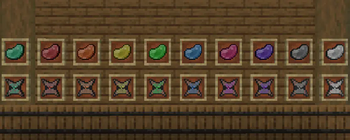
Effect Beans is a mod that adds Jellybeans to Minecraft. They can be crafted with 4 Sugar and a Glow Berry in a + formation. Once eaten, they give the player 10 seconds of Speed II and Jump Boost I. They do not stack.
A Jellybean and a dye will turn the Jellybean into a coloured version. Each of these coloured versions will each provide a special effect that also lasts for 10 seconds. These are:
- Red: Strength
- Orange: Fire Resistance
- Yellow: Haste
- Green: Night Vision
- Blue: Water Breathing
- Pink: Instant Healing (2 hearts instantly)
- Purple: Regeneration II (4 hearts over time)
- Gray: Slow Falling
- White: Invisibility
Any colours not listed will not combine with Jellybeans.
Jellybean Bags
In a crafting table, 2-8 Jellybeans of any type and Paper will create a Jellybean Bag. On use, a Jellybean will be pulled out of the bag into another inventory slot. This acts as a better storage method for the Jellybeans.
Questions
1.21 port?
Maybe, havent decided yet.
Not much should be changed between the 2 versions for a simple mod like this, but I havent looked into it.
New jellybeans/more effects?
No*.
If Minecraft adds another dye, I might make a matching jellybean, but I don't think that's going to happen.
Possible hidden bad effects?
Maybe? You'd have to add the bad effect yourself, if I did add them. probably through a crafting recipe.
Have fun with the funny bean mod!
Available Versions
How to Install Jellybeans / Effect Beans on Your Server
Order Server
Order a Minecraft Java server with at least 3 GB RAM (4 GB recommended).
Set fabric Loader
In the panel under "Egg", select the fabric loader and matching Minecraft version (1.20.2).
Install Mod
Open the mod browser in the dashboard and search for "Jellybeans / Effect Beans". Click "Install" – done! Alternatively, upload the .jar via SFTP to the /mods folder.
Compatibility
Mod Loaders
Minecraft Versions
1.20.2, 1.20.1
Server-side
✓ RequiredRecommended RAM
4 GB(min. 3 GB)Frequently Asked Questions
Jellybeans / Effect Beans server crashes on startup – what to do?
Most common cause: wrong fabric version or insufficient RAM. Check the server log (latest.log) for "OutOfMemoryError" or "Mixin" errors. With Mado Hosting: ensure at least 3 GB RAM is allocated and the loader matches the mod version (1.20.2). You can switch loaders with one click in the panel.
Is Jellybeans / Effect Beans compatible with fabric?
Jellybeans / Effect Beans officially supports fabric for Minecraft 1.20.2, 1.20.1. The Mado dashboard automatically detects incompatible loader combinations.
Server lagging with Jellybeans / Effect Beans – how to optimize performance?
Recommended RAM: 4 GB (per 8 players). Use /spark profiler to check if Jellybeans / Effect Beans consumes the most tick time. Common fixes: reduce server view-distance to 8-10, install "performant" or "starlight" as supplementary mods on Forge. With Mado Hosting, your server runs on NVMe SSDs with dedicated CPU cores for minimal latency.
Similar Mods



Rent Modded Server
Install Jellybeans / Effect Beans with just one click on your server.