
Elder Origins
Adds Origins-style fantasy races with passives and one active ability, synced for multiplayer. Early beta — please report bugs and share feedback.
Screenshots
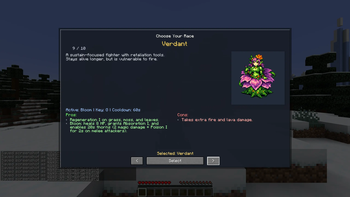
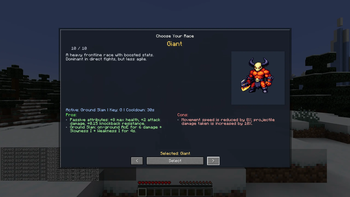
About this Mod
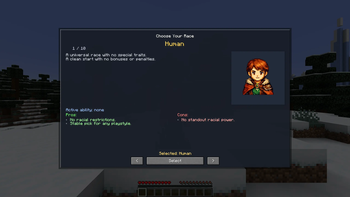
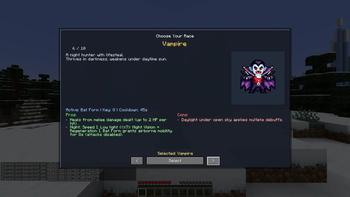
🧬 Elder Origins is an early beta Fabric mod that adds Origins-style fantasy races. Each race comes with passive traits and a dedicated active ability, and player race data is synced server-side to keep multiplayer consistent.
✨ What you get
• A race selection screen when you join without a race
• An in-game Race Profile screen (open it with H)
• A configurable ability keybind (set it in Controls)
• Server-authoritative race syncing for multiplayer
• Admin commands for managing races on servers
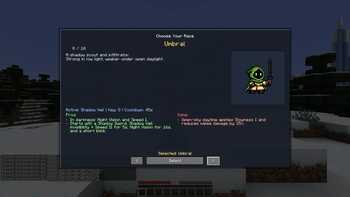
• A custom starter item for Umbral: Shadow Sword
🌍Included races
• Human — simple, vanilla-like experience
• Elf — agile ranger with a movement-focused active ability
• Dwarf — sturdy defender with a protective stance ability
• Orc — aggressive brawler with a temporary combat surge
• Merfolk — water specialist with aquatic mobility and a water/rain-based ability
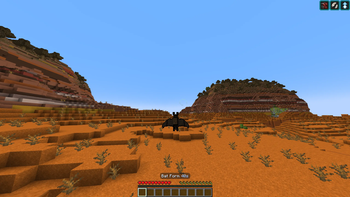
• Vampire — night hunter with survival-oriented traits and a mobility form
• Stormtouched — storm-powered fighter that shines during bad weather
• Umbral — shadow-themed scout with darkness bonuses and a stealthy active ability
• Verdant — nature-aligned sustain with a healing burst-style ability
• Giant — heavy bruiser with a ground-impact style ability and slower movement
🎮 How to play
- Join a world or server and pick a race in the selection UI
- Press H to open your Race Profile anytime
- Set the “Use ability” keybind in Controls and use it in-game
🛠️ Server / Admin
These commands require admin permissions:
• /elderorigins set
• /elderorigins reset
• /elderorigins reload
🤝 Multiplayer notes
For full functionality, install the mod on both the server and the client. If the server doesn’t support the mod, the client can’t sync race data correctly.
🧪 Early beta disclaimer
This is an early beta build. Balance may shift and bugs may exist. Please report issues and include steps to reproduce (plus logs if possible).
Available Versions
How to Install Elder Origins on Your Server
Order Server
Order a Minecraft Java server with at least 3 GB RAM (4 GB recommended).
Set fabric Loader
In the panel under "Egg", select the fabric loader and matching Minecraft version (1.20.1).
Install Mod
Open the mod browser in the dashboard and search for "Elder Origins". Click "Install" – done! Alternatively, upload the .jar via SFTP to the /mods folder.
Compatibility
Mod Loaders
Minecraft Versions
1.20.1
Server-side
✓ RequiredRecommended RAM
4 GB(min. 3 GB)Frequently Asked Questions
Elder Origins server crashes on startup – what to do?
Most common cause: wrong fabric version or insufficient RAM. Check the server log (latest.log) for "OutOfMemoryError" or "Mixin" errors. With Mado Hosting: ensure at least 3 GB RAM is allocated and the loader matches the mod version (1.20.1). You can switch loaders with one click in the panel.
Is Elder Origins compatible with fabric?
Elder Origins officially supports fabric for Minecraft 1.20.1. The Mado dashboard automatically detects incompatible loader combinations.
Server lagging with Elder Origins – how to optimize performance?
Recommended RAM: 4 GB (per 8 players). Use /spark profiler to check if Elder Origins consumes the most tick time. Common fixes: reduce server view-distance to 8-10, install "performant" or "starlight" as supplementary mods on Forge. With Mado Hosting, your server runs on NVMe SSDs with dedicated CPU cores for minimal latency.
Similar Mods




Rent Modded Server
Install Elder Origins with just one click on your server.