
Elemental-Relics
Elemental Relics for a pvp enabled SMP
Screenshots

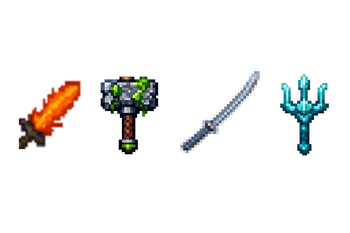
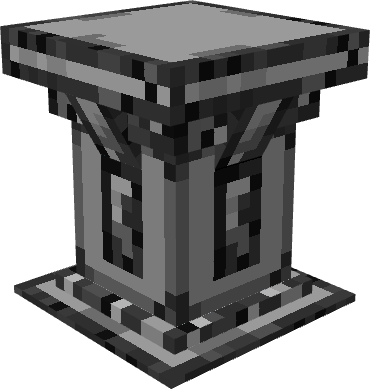


About this Mod
Relics adds a set of powerful end-game weapons crafted through elemental altars, designed to give PvP servers an extra layer of challenge and progression.
There are four relics to obtain, each tied to an element — Fire, Water, Earth, and Air. Each relic has unique combat abilities that unlock as you level it up through player kills, rewarding aggressive playstyles and making each relic feel increasingly dangerous in the right hands.
Crafting is intentional and costly. Relics are not found in loot or dropped by mobs — they must be crafted at an elemental altar using rare and hard-to-obtain materials, including player heads. Gathering everything you need will require defeating other players and venturing deep into dangerous areas.
Getting Started
Altars do not generate naturally in the world. Server operators must place them manually using
/altar place
Once placed, players can interact with the altar to begin crafting.
If you have already crafted a relic and lost it due to death, a bug, or any other reason, use
/altar unlock
to reset your crafting lock and craft it again.
The /relics shop command opens a gui to purchase a compass which points to the specified relic
The coordinates for said relic are set by server admins with the /relics compass <element> <coords>
Duel Functionality!
/relics duel <player>
/relics duel setarena <cx> <cy> <cz> <p1x> <p1y> <p1z> <p2x> <p2y> <p2z> <specx> <specy> <specz>
c <x,y,and z> coordinates being the center of a 60 block radius, p1 and p2 <x,y,and z> coordinates are for player 1 and 2 in the duel, and spec <x,y,and z> coordinates are for spectators
place player 1 and 2 inside the 60 block radius on opposite sides, and put spectators outside the 60 block radius in any spot
/relics setlevel <int, 1-5> to set weapon level manually (admin only)
/relics duel forfeit
/relics duel spectate <player> player = either player thats in the duel
/relics duel leavespectate
/relics duel restoreinventory <player> incase inventory loss (admin only)
/relics duel accept <player> for incoming duel requests
Available Versions
How to Install Elemental-Relics on Your Server
Order Server
Order a Minecraft Java server with at least 3 GB RAM (4 GB recommended).
Set fabric Loader
In the panel under "Egg", select the fabric loader and matching Minecraft version (1.21.11).
Install Mod
Open the mod browser in the dashboard and search for "Elemental-Relics". Click "Install" – done! Alternatively, upload the .jar via SFTP to the /mods folder.
Compatibility
Mod Loaders
Minecraft Versions
1.21.11
Server-side
✓ RequiredRecommended RAM
4 GB(min. 3 GB)Frequently Asked Questions
Elemental-Relics server crashes on startup – what to do?
Most common cause: wrong fabric version or insufficient RAM. Check the server log (latest.log) for "OutOfMemoryError" or "Mixin" errors. With Mado Hosting: ensure at least 3 GB RAM is allocated and the loader matches the mod version (1.21.11). You can switch loaders with one click in the panel.
Is Elemental-Relics compatible with fabric?
Elemental-Relics officially supports fabric for Minecraft 1.21.11. The Mado dashboard automatically detects incompatible loader combinations.
Server lagging with Elemental-Relics – how to optimize performance?
Recommended RAM: 4 GB (per 8 players). Use /spark profiler to check if Elemental-Relics consumes the most tick time. Common fixes: reduce server view-distance to 8-10, install "performant" or "starlight" as supplementary mods on Forge. With Mado Hosting, your server runs on NVMe SSDs with dedicated CPU cores for minimal latency.
Similar Mods




Rent Modded Server
Install Elemental-Relics with just one click on your server.