
Elements of Beta
Elements of Beta is a totally normal datapack that brings features from Beta 1.7.3 into modern versions, such as: no hunger, no sprinting, no experience, and the classic UI of old Minecraft.
Screenshots

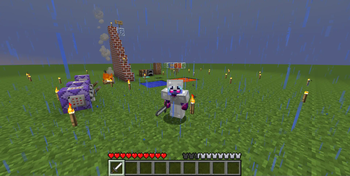


About this Mod
Elements of Beta
Please read the entire page so that you do not miss any key information that may impact your experience.
THIS ADDS CUSTOM CONTENT
The datapack Purely Beta, focuses solely on recreating Vanilla beta. Stay tuned! As of EOB 1.8, you can still disable custom content features using:
/scoreboard players allowthirddimension eobmain_globalconfig 0
1.2.1 Video (legacy) (latest is 1.8)
1.0.1 Video (legacy)Elements of Beta ("EOB") is a datapack and resource pack that brings Elements of Beta to modern Minecraft servers. EOB also adds custom content which must be found in the ??? dimension. With no mods!
The EOB datapack must be used with EOB Assets.
Major Changes: (As of 1.8)
- Experience and hunger removed
- Attack delay removed
- Beta 1.7.3 Food System
- Sprinting removed
- Golden Days and Beta Recipes are integrated within EOB. Using the plugin OldGenerator is heavily recommended.
- End removed...?
- EOB Filter: all modern blocks, mobs, items, and recipes are removed.
- Sand and Gravel duping (like Beta)
- Slab and (simple) wool Transmutation
- Blockstate checker (e.g. upside-down stairs)
- Look at the Changelog page.
EOB is used best in tandem with other mods/datapacks/plugins that emulate Beta minecraft.
Here's the best ones:
- OldGenerator plugin or modified version of Such
- Nostalgic Tweaks
EOB datapacks may be incompatible with:
(NT = nostalgic tweaks mod)
- NT Prevent hunger <-- IS incompatible.
- NT Old Drops <-- IS incompatible.
- Modern(er) Beta World Generation (may be configurable to work)
- Other datapacks/mods that affect the datapack's scopes.
- Mods that use the default Heart icon
Known issues:
- Transmuting beds may cause unstable behavior (if you have allowthirddimension on in the eobmain_globalconfig scoreboard)
- Weak compatibility with Moderner Beta
Any issues? my discord is @optim00se
Dm me! :)
Available Versions
How to Install Elements of Beta on Your Server
Order Server
Order a Minecraft Java server with at least 3 GB RAM (4 GB recommended).
Set datapack Loader
In the panel under "Egg", select the datapack loader and matching Minecraft version (1.21.1).
Install Mod
Open the mod browser in the dashboard and search for "Elements of Beta". Click "Install" – done! Alternatively, upload the .jar via SFTP to the /mods folder.
Compatibility
Mod Loaders
Minecraft Versions
1.21.1, 1.21
Server-side
✓ RequiredRecommended RAM
4 GB(min. 3 GB)Frequently Asked Questions
Elements of Beta server crashes on startup – what to do?
Most common cause: wrong datapack version or insufficient RAM. Check the server log (latest.log) for "OutOfMemoryError" or "Mixin" errors. With Mado Hosting: ensure at least 3 GB RAM is allocated and the loader matches the mod version (1.21.1). You can switch loaders with one click in the panel.
Is Elements of Beta compatible with datapack and fabric and forge and neoforge and quilt?
Elements of Beta officially supports datapack, fabric, forge, neoforge, quilt for Minecraft 1.21.1, 1.21. Note: Forge and Fabric mods are NOT cross-compatible – pick one loader and stick with it. The Mado dashboard automatically detects incompatible loader combinations.
Server lagging with Elements of Beta – how to optimize performance?
Recommended RAM: 4 GB (per 8 players). Use /spark profiler to check if Elements of Beta consumes the most tick time. Common fixes: reduce server view-distance to 8-10, install "performant" or "starlight" as supplementary mods on Forge. With Mado Hosting, your server runs on NVMe SSDs with dedicated CPU cores for minimal latency.
Similar Mods





Rent Modded Server
Install Elements of Beta with just one click on your server.