
Elytra HUD Health
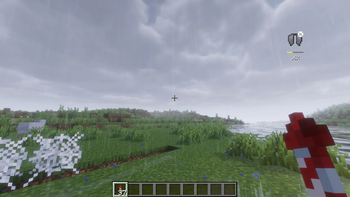
Elytra HUD Health keeps you updated on the exact durability of your wings without opening the inventory
Screenshots
About this Mod
✨ Elytra HUD Health ❤️
Minimal, pixel-perfect durability HUD for your elytra with live warnings, localization, and a nostalgic vanilla-style config screen.

🧭 Overview
Elytra HUD Health keeps you updated on the exact durability of your wings without opening the inventory. The HUD mimics the original Minecraft UI, can be placed anywhere on screen, and even removes elytra automatically before they shatter. Built for Fabric-based clients (1.21.x, tested on 1.21.4) with full localization (EN / RU / UK / JA) and optional chat warnings.

🚀 Features
- Vanilla-styled HUD – Icon, bar, and percentage share Minecraft's original beveled borders so the overlay feels native.
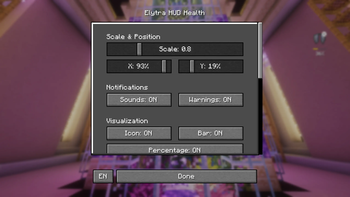
- Precise positioning & scaling – Offset the HUD using percentage-based sliders and tweak icon/bar height individually.
- Configurable notifications – Toggle chat warnings, sounds, percentage text, icon, and progress bar independently.
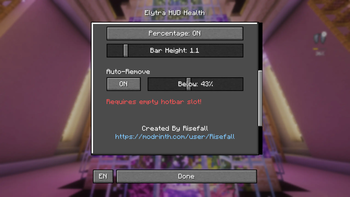
- Auto-remove safety – Automatically swap elytra into the hotbar once durability hits a custom threshold; warns you 10% before removal.
- Localization ready – Built-in English, Russian, Ukrainian, and Japanese translations for both UI and chat; one-click language cycle inside the config.
- Slider preview dimming – Adjusting sliders momentarily dims the world to improve readability without freezing gameplay.
📦 Requirements
| Dependency | Version | Notes |
|---|---|---|
| Fabric Loader | 0.16+ | Matches your Minecraft version |
| Fabric API | Latest for 1.21.x | Needed for HUD events and keybinding |
Optional: Mod Menu for easily opening the config screen in-game.
🧑💻 Installation
- Install Fabric Loader for your Minecraft version.
- Drop Fabric API and
elytra_hud_health-x.y.z.jarinto/.minecraft/mods(client-side only). - Launch Minecraft once to let the config file
config/elytra_health.jsongenerate. - Press the configured hotkey (default: bound to your existing ElytraBar key) or open via Mod Menu to access the UI.
🎛️ Configuration Highlights
| Setting | Location | Description |
|---|---|---|
scale, offsetX, offsetY |
Config screen / elytra_health.json |
Move and resize the HUD per your resolution |
showIcon, showProgressBar, showPercentage |
Same | Toggle individual HUD elements |
soundsEnabled, showWarnings |
Same | Enable ping sounds and chat notifications |
autoRemove + autoRemoveThreshold |
Same | Auto unequip elytra when below threshold, warning 10% prior |
locale |
Config screen | Cycle between EN / RU / UK / JA; defaults to Minecraft language or EN |
Tip: The config screen uses scrollable sections, a footer credit link, and a dedicated language button. "Done" applies immediately and saves the JSON file.
🔊 Chat & Sound Alerts
- Below 50% / 25% durability: subtle bell sounds (configurable via
soundsEnabled). - At 10% durability: localized chat warning + yellow highlight.
- At 0% durability: break sound and red chat alert.
- Auto-remove imminent: red chat warning if you're airborne.
- Hotbar full: localized error message if auto-remove finds no empty slot.
All chat messages are prefixed with [EHH] and translate according to the selected locale.
🛠️ Development
- Language files live in
src/main/resources/assets/elytrabar/lang/. Add more by copyingen_us.jsonand updatingLocalization.java. - Building:
./gradlew build(requires JDK 21+ or JDK 22 as configured in the repo). - Testing: Launch the mod in a Fabric dev environment via
./gradlew runClientto quickly iterate on HUD tweaks. - Code style: Vanilla-inspired UI uses manual
DrawContextrectangles. Comments are intentionally sparse to match the pixel-art workflow.
🤝 Contributions & License
- Author: Risefall (concept + design) • README curated with ❤️ by the Elytra HUD Health maintainers.
- License: MIT (see
LICENSE).
Fly safe! 🪽
Available Versions
How to Install Elytra HUD Health on Your Server
Order Server
Order a Minecraft Java server with at least 3 GB RAM (4 GB recommended).
Set fabric Loader
In the panel under "Egg", select the fabric loader and matching Minecraft version (1.21.11).
Install Mod
Open the mod browser in the dashboard and search for "Elytra HUD Health". Click "Install" – done! Alternatively, upload the .jar via SFTP to the /mods folder.
Compatibility
Mod Loaders
Minecraft Versions
1.21.11, 1.21.10, 1.21.9 (+9 more)
Server-side
✗ UnsupportedRecommended RAM
4 GB(min. 3 GB)Frequently Asked Questions
Elytra HUD Health server crashes on startup – what to do?
Most common cause: wrong fabric version or insufficient RAM. Check the server log (latest.log) for "OutOfMemoryError" or "Mixin" errors. With Mado Hosting: ensure at least 3 GB RAM is allocated and the loader matches the mod version (1.21.11). You can switch loaders with one click in the panel.
Is Elytra HUD Health compatible with fabric?
Elytra HUD Health officially supports fabric for Minecraft 1.21.11, 1.21.10, 1.21.9. The Mado dashboard automatically detects incompatible loader combinations.
Server lagging with Elytra HUD Health – how to optimize performance?
Recommended RAM: 4 GB (per 8 players). Use /spark profiler to check if Elytra HUD Health consumes the most tick time. Common fixes: reduce server view-distance to 8-10, install "performant" or "starlight" as supplementary mods on Forge. With Mado Hosting, your server runs on NVMe SSDs with dedicated CPU cores for minimal latency.
Similar Mods




![[TaCZ] Timeless and Classics Zero](https://cdn.modrinth.com/data/SzzJttH8/fd27766d2bb8390d284696b1dbd358f87e081439_96.webp)

Rent Modded Server
Install Elytra HUD Health with just one click on your server.