
ElytraRenderFix
This mod fixes a bug in Minecraft's code that causes elytras to have a missingno texture when an item renders a trimmed armor piece AND an elytra via resource pack and minecraft:equippable component.
Screenshots
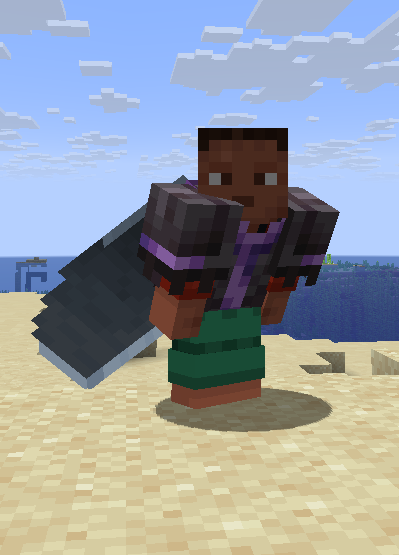
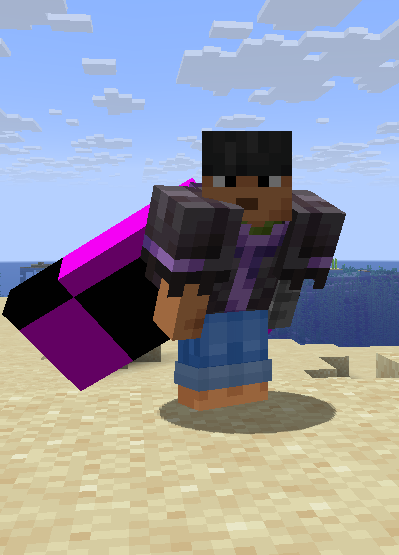
About this Mod
ElytraRenderFix
With the minecraft:equippable component, it is possible to determine the layers that an item renders when it is equipped. This mod fixes a bug that occurs when rendering a chestplate layer and an elytra together. If the chestplate has a trim, the Elytra has a missingno texture because Minecraft's rendering code tries to apply the trim to the Elytra layer. This mod fixes this bug by simply preventing the trims from being rendered on the Elytra layer (wings). This ensures that the chestplate, trim, and Elytra are rendered correctly.
Please note that mods requiring trims to render on top of the elytra (like Elytra Trim mods) might be incompatible with this one, since it skips part of the elytra rendering process.
If you experience issues, try removing this mod first — that might already fix it.
For example, the following JSON code is an equipment model (see Minecraft Wiki). This specifies that any item with the corrosponding asset_id in the item component minecraft:equippable (see Minecraft Wiki) should render normal netherite armor on the humanoid and humanoid_leggings layers (armor layers for helmet, chestplate, leggings, and boots) and, in addition, an elytra on the wings layer (using the player's cape if available).
netherite_armor_with_elytra.json:
{
  "layers": {
    "humanoid": [
      {
        "texture": "minecraft:netherite"
      }
    ],
    "humanoid_leggings": [
      {
        "texture": "minecraft:netherite"
      }
    ],
	"wings": [
      {
        "texture": "minecraft:elytra",
        "use_player_texture": true
      }
    ]
  }
}
minecraft:equippable component of the item (here a netherite chestplate):
{
  "slot": "chest",
  "asset_id": "mynamespace:netherite_armor_with_elytra"
}
If this item now has an armor trim, Minecraft attempts to render the trim over the normal armor layer (humanoid / humanoid_leggings) as well as over the wings layer. However, since the wings layer cannot accept a trim, it receives a missingno texture in its entirety.
This mod does nothing more than prevent trims from being rendered on the wings layer. This way, armor with trim also works with such a resource pack. (See below for example)
 |
 |
|---|---|
| With the mod | Without the Mod |
(I had to create a new repository because I needed to set up a brand-new project for the major version update to 26.1, Click here for the old repo, the new one is linked via modrinth)
Available Versions
How to Install ElytraRenderFix on Your Server
Order Server
Order a Minecraft Java server with at least 3 GB RAM (4 GB recommended).
Set fabric Loader
In the panel under "Egg", select the fabric loader and matching Minecraft version (26.1).
Install Mod
Open the mod browser in the dashboard and search for "ElytraRenderFix". Click "Install" – done! Alternatively, upload the .jar via SFTP to the /mods folder.
Compatibility
Mod Loaders
Minecraft Versions
26.1, 1.21.11, 1.21.10
Server-side
✗ UnsupportedRecommended RAM
4 GB(min. 3 GB)Frequently Asked Questions
ElytraRenderFix server crashes on startup – what to do?
Most common cause: wrong fabric version or insufficient RAM. Check the server log (latest.log) for "OutOfMemoryError" or "Mixin" errors. With Mado Hosting: ensure at least 3 GB RAM is allocated and the loader matches the mod version (26.1). You can switch loaders with one click in the panel.
Is ElytraRenderFix compatible with fabric?
ElytraRenderFix officially supports fabric for Minecraft 26.1, 1.21.11, 1.21.10. The Mado dashboard automatically detects incompatible loader combinations.
Server lagging with ElytraRenderFix – how to optimize performance?
Recommended RAM: 4 GB (per 8 players). Use /spark profiler to check if ElytraRenderFix consumes the most tick time. Common fixes: reduce server view-distance to 8-10, install "performant" or "starlight" as supplementary mods on Forge. With Mado Hosting, your server runs on NVMe SSDs with dedicated CPU cores for minimal latency.
Similar Mods




![[TaCZ] Timeless and Classics Zero](https://cdn.modrinth.com/data/SzzJttH8/fd27766d2bb8390d284696b1dbd358f87e081439_96.webp)

Rent Modded Server
Install ElytraRenderFix with just one click on your server.