Elytra Pitch
Adds an elytra HUD for maintaining optimal pitch.
Screenshots
About this Mod
Elytra Pitch



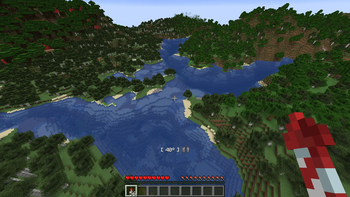
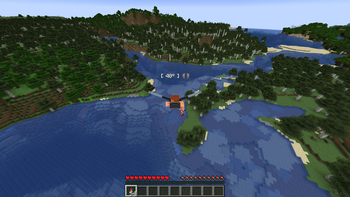
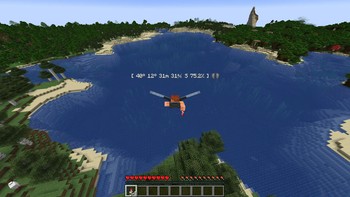
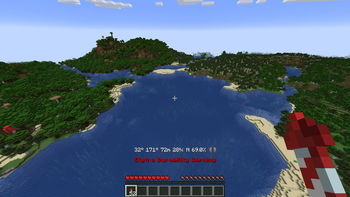
Elytra Pitch is a Minecraft mod that helps players fly more efficiently with elytra. By maintaining a pitch angle of around 40 degrees, players can glide much farther while using fewer rockets. The mod adds a customizable HUD that displays your current pitch during elytra flight, along with an indicator for the optimal angle.
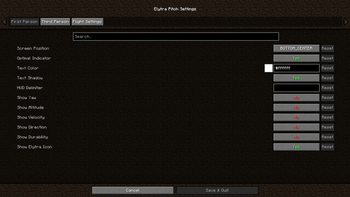
Several optional features include an in-game settings menu via Mod Menu for extensive customization, as well as support for accessory mods like Elytra Slot that use Trinkets or Accessories. Additional HUD elements can be enabled to display yaw, altitude, speed, direction, and elytra durability.
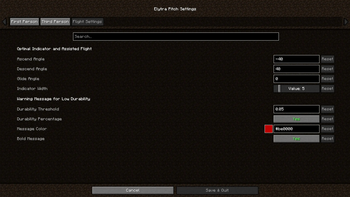
Elytra Pitch also offers optional keybindings for assisted flight, allowing players to lock their pitch or snap to the optimal angle. This functionality revives and expands on the now-unmaintained FlightHelper mod.

Changelog
- ElytraPitch 1.1.0 added separate settings for FP and TP, as well as text color and shadow settings.
- ElytraPitch 1.2.0 added optional HUD elements for yaw, altitude, speed, and direction.
- ElytraPitch 1.3.0 added keybindings to lock the player's pitch and snap to the optimal angle.
- ElytraPitch 1.3.1 added settings for flight angles, toggle messages and assisted flight.
- ElytraPitch 1.4.0 added an optional HUD element for durability and a warning message.
- ElytraPitch 1.4.1 added Trinkets support (e.g., Elytra Slot) and an optional HUD delimiter.
- ElytraPitch 1.4.2 fixed crashes due to the absence of Trinkets and/or presence of Origins.
- ElytraPitch 1.4.3 moved the position of the optional elytra item above the HUD elements.
- ElytraPitch 1.4.4 added Accessories support for Elytra Slot and refactored rendering code.
- ElytraPitch 1.4.5 added Trinkets Canary support (e.g., Elytra Trinket) for Minecraft 1.21.8+.
- ElytraPitch 1.4.6 added Trinkets Continued support (updated Canary) for Minecraft 26.1+.
Available Versions
How to Install Elytra Pitch on Your Server
Order Server
Order a Minecraft Java server with at least 3 GB RAM (4 GB recommended).
Set fabric Loader
In the panel under "Egg", select the fabric loader and matching Minecraft version (26.1.2).
Install Mod
Open the mod browser in the dashboard and search for "Elytra Pitch". Click "Install" – done! Alternatively, upload the .jar via SFTP to the /mods folder.
Compatibility
Mod Loaders
Minecraft Versions
26.1.2, 26.1.1, 26.1 (+18 more)
Server-side
✗ UnsupportedRecommended RAM
4 GB(min. 3 GB)Frequently Asked Questions
Elytra Pitch server crashes on startup – what to do?
Most common cause: wrong fabric version or insufficient RAM. Check the server log (latest.log) for "OutOfMemoryError" or "Mixin" errors. With Mado Hosting: ensure at least 3 GB RAM is allocated and the loader matches the mod version (26.1.2). You can switch loaders with one click in the panel.
Is Elytra Pitch compatible with fabric?
Elytra Pitch officially supports fabric for Minecraft 26.1.2, 26.1.1, 26.1. The Mado dashboard automatically detects incompatible loader combinations.
Server lagging with Elytra Pitch – how to optimize performance?
Recommended RAM: 4 GB (per 8 players). Use /spark profiler to check if Elytra Pitch consumes the most tick time. Common fixes: reduce server view-distance to 8-10, install "performant" or "starlight" as supplementary mods on Forge. With Mado Hosting, your server runs on NVMe SSDs with dedicated CPU cores for minimal latency.
Similar Mods




![[TaCZ] Timeless and Classics Zero](https://cdn.modrinth.com/data/SzzJttH8/fd27766d2bb8390d284696b1dbd358f87e081439_96.webp)

Rent Modded Server
Install Elytra Pitch with just one click on your server.