
ElytraWEEE
Hold a firework, jump, and fly — your elytra equips itself and you glide instantly. Safe chestplate swap, plus a mid-air fast-swap key for mace PvP.
Screenshots

About this Mod
ElytraWEEE
Hold a firework. Jump. Fly. Your elytra equips itself and you start gliding instantly — chestplate swapped out safely, never dropped, and put back on when you land.
Client-only Fabric mod for Minecraft 26.1.2. Works on servers, no server install needed.
Why firework-triggered, not jump-triggered?
Most auto-elytra mods deploy the elytra every time you jump — which wrecks combat: every jump-crit you land on an enemy accidentally throws your elytra on. ElytraWEEE only deploys when you're holding a firework and jump, so your normal combat jumps and jump-crit attacks stay completely untouched. You fly only when you actually mean to.
What it does
- Jump + firework -> instant flight. One jump. You glide right away — no second tap.
- Land -> chestplate comes back. Drop the firework after landing and your chestplate returns automatically.
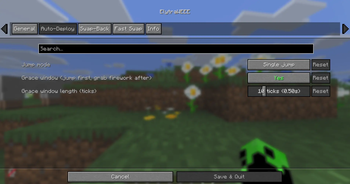
- Grace window. Jumped a hair too early? Grab the firework within ~0.5s and it still launches.
- Never drops your gear. All swaps are safe. No chestplate? The elytra just goes back where it came from. Inventory full? It stays on.
Fast swap (mace PvP)
One key to flip elytra <-> chestplate instantly — even mid-air. Swap to chestplate, hit, swap back, and you keep gliding automatically (no re-jump). Works even with auto-deploy off.
Keybinds
Under Options -> Controls -> ElytraWEEE (all unbound by default — set your own): Fast swap, Toggle on/off, Open settings.
Settings
Mod Menu -> ElytraWEEE — tabs for General, Auto-Deploy, Swap-Back, Fast Swap, and Info.
The mod only manages an elytra it deployed. Put one on yourself? It leaves your gear alone.
Requirements
- Fabric API
- Cloth Config
- Mod Menu (optional — opens the settings screen)
by dev-limucc · MIT
Available Versions
How to Install ElytraWEEE on Your Server
Order Server
Order a Minecraft Java server with at least 3 GB RAM (4 GB recommended).
Set fabric Loader
In the panel under "Egg", select the fabric loader and matching Minecraft version (26.1.2).
Install Mod
Open the mod browser in the dashboard and search for "ElytraWEEE". Click "Install" – done! Alternatively, upload the .jar via SFTP to the /mods folder.
Compatibility
Mod Loaders
Minecraft Versions
26.1.2
Server-side
✗ UnsupportedRecommended RAM
4 GB(min. 3 GB)Frequently Asked Questions
ElytraWEEE server crashes on startup – what to do?
Most common cause: wrong fabric version or insufficient RAM. Check the server log (latest.log) for "OutOfMemoryError" or "Mixin" errors. With Mado Hosting: ensure at least 3 GB RAM is allocated and the loader matches the mod version (26.1.2). You can switch loaders with one click in the panel.
Is ElytraWEEE compatible with fabric?
ElytraWEEE officially supports fabric for Minecraft 26.1.2. The Mado dashboard automatically detects incompatible loader combinations.
Server lagging with ElytraWEEE – how to optimize performance?
Recommended RAM: 4 GB (per 8 players). Use /spark profiler to check if ElytraWEEE consumes the most tick time. Common fixes: reduce server view-distance to 8-10, install "performant" or "starlight" as supplementary mods on Forge. With Mado Hosting, your server runs on NVMe SSDs with dedicated CPU cores for minimal latency.
Similar Mods



![[TaCZ] Timeless and Classics Zero](https://cdn.modrinth.com/data/SzzJttH8/fd27766d2bb8390d284696b1dbd358f87e081439_96.webp)


Rent Modded Server
Install ElytraWEEE with just one click on your server.