
Emerald Tools & More
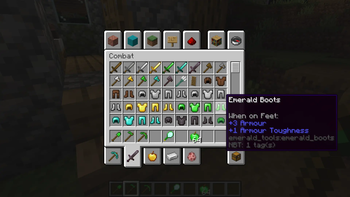
Think emeralds are just for trading? NO! With this mod, you can craft armor and tools from emeralds, as well as emerald apples and mystical mirrors!
Screenshots
About this Mod
💎 Emerald Expansion
Ever felt like emeralds are only good for trading? This mod breathes new life into these green gems.
⚔️ Features:
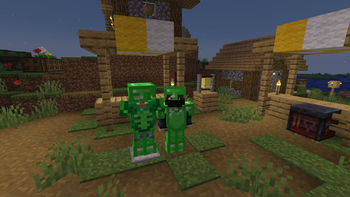
- Emerald Equipment: Craft a full set of tools and armor. The armor supports forging templates.
- Horse Armor: Protect your loyal steed with emerald plates.
- Emerald Apple: Great food! Grants Village Hero and Regeneration.
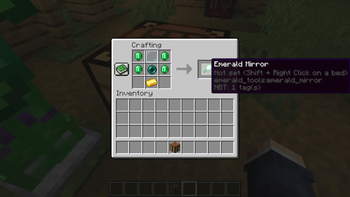
- Emerald Mirror: Teleport back to your bed instantly.
Cool armor feature
- Residents will offer discounts on goods when wearing a full set of emerald armor.
🌍 Multilingual Support:
This mod is fully localized and supports the following languages:
🇷🇺 Russian, 🇬🇧 English, 🇪🇸 Spanish, 🇮🇹 Italian, 🇩🇪 German, 🇫🇷 French, 🇨🇳 Chinese, 🇯🇵 Japanese, 🇰🇷 Korean, 🇧🇷 Portuguese (Brazilian).
Permissions
- Modpacks: You are free to include this mod in any modpack, as long as you provide a link back to this page and credit me as the author.
- Re-uploading: Do not re-upload the mod to other websites.
- Modifying: You may not redistribute modified versions of this mod without my permission.
Versions
- Currently, only Forge 1.20.1 is available.
- However, in the future, Forge 1.12.2, Forge 1.16.5, NeoForge 1.21.1, NeoForge 1.21.11, and possibly Fabric and Forge 1.7.10 will be supported.
Available Versions
How to Install Emerald Tools & More on Your Server
Order Server
Order a Minecraft Java server with at least 3 GB RAM (4 GB recommended).
Set forge Loader
In the panel under "Egg", select the forge loader and matching Minecraft version (1.20.1).
Install Mod
Open the mod browser in the dashboard and search for "Emerald Tools & More". Click "Install" – done! Alternatively, upload the .jar via SFTP to the /mods folder.
Compatibility
Mod Loaders
Minecraft Versions
1.20.1
Server-side
✓ RequiredRecommended RAM
4 GB(min. 3 GB)Frequently Asked Questions
Emerald Tools & More server crashes on startup – what to do?
Most common cause: wrong forge version or insufficient RAM. Check the server log (latest.log) for "OutOfMemoryError" or "Mixin" errors. With Mado Hosting: ensure at least 3 GB RAM is allocated and the loader matches the mod version (1.20.1). You can switch loaders with one click in the panel.
Is Emerald Tools & More compatible with forge?
Emerald Tools & More officially supports forge for Minecraft 1.20.1. The Mado dashboard automatically detects incompatible loader combinations.
Server lagging with Emerald Tools & More – how to optimize performance?
Recommended RAM: 4 GB (per 8 players). Use /spark profiler to check if Emerald Tools & More consumes the most tick time. Common fixes: reduce server view-distance to 8-10, install "performant" or "starlight" as supplementary mods on Forge. With Mado Hosting, your server runs on NVMe SSDs with dedicated CPU cores for minimal latency.
Similar Mods




Rent Modded Server
Install Emerald Tools & More with just one click on your server.