
EmoteSpecific
An Emotecraft addon featuring 70 emote pages, custom render distances, and an instant sync button.
Screenshots
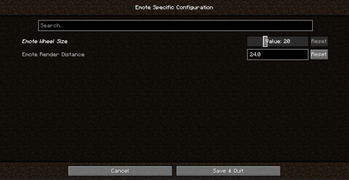
About this Mod
🕺 Emote Specific
Take your Emotecraft experience to the next level! Emote Specific is a client-side addon designed to give you ultimate control over your emotes, removing default limits and adding highly requested quality-of-life features.
✨ Key Features
- 🚀 Massive 70-Page Emote Wheel: Never run out of space again! We've expanded the default emote wheel capacity up to 70 pages, allowing you to store, organize, and access an unlimited number of custom animations.
- 👯 Instant Emote Syncing: See a friend dancing and want to join in? Just get close (within 5 blocks), open your wheel, and click the new "Sync Emote" button. Your character will instantly match their animation and timing!
- 👁️ Custom Render Distance: Take control of your screen. Adjust the emote visibility range anywhere from 1 to 128 blocks (Default: 32). Extend it to see concerts from afar, or lower it to keep your screen clean in crowded areas.
⚙️ How It Works
Everything is completely customizable in-game! Simply install ModMenu and navigate to the Emote Specific settings to tweak your wheel size, toggle the sync button, or adjust the render distance on the fly.
No server installation required—it works perfectly on any vanilla or modded server!
📦 Requirements
- Fabric Loader
- Emotecraft (Required)
- ModMenu (Highly recommended for easy configuration)
- Environment: Client-side only ✅
Available Versions
How to Install EmoteSpecific on Your Server
Order Server
Order a Minecraft Java server with at least 3 GB RAM (4 GB recommended).
Set fabric Loader
In the panel under "Egg", select the fabric loader and matching Minecraft version (1.20.1).
Install Mod
Open the mod browser in the dashboard and search for "EmoteSpecific". Click "Install" – done! Alternatively, upload the .jar via SFTP to the /mods folder.
Compatibility
Mod Loaders
Minecraft Versions
1.20.1
Server-side
✗ UnsupportedRecommended RAM
4 GB(min. 3 GB)Frequently Asked Questions
EmoteSpecific server crashes on startup – what to do?
Most common cause: wrong fabric version or insufficient RAM. Check the server log (latest.log) for "OutOfMemoryError" or "Mixin" errors. With Mado Hosting: ensure at least 3 GB RAM is allocated and the loader matches the mod version (1.20.1). You can switch loaders with one click in the panel.
Is EmoteSpecific compatible with fabric?
EmoteSpecific officially supports fabric for Minecraft 1.20.1. The Mado dashboard automatically detects incompatible loader combinations.
Server lagging with EmoteSpecific – how to optimize performance?
Recommended RAM: 4 GB (per 8 players). Use /spark profiler to check if EmoteSpecific consumes the most tick time. Common fixes: reduce server view-distance to 8-10, install "performant" or "starlight" as supplementary mods on Forge. With Mado Hosting, your server runs on NVMe SSDs with dedicated CPU cores for minimal latency.
Similar Mods






Rent Modded Server
Install EmoteSpecific with just one click on your server.