
Emulyte (Old)
Do you love pink and purple? Then why not install Emulyte ?
Screenshots



About this Mod
INTRODUCTION
Welcome on the page of my Mod: Emulyte : Old !
I don't see this project as a big mod. I did it to have fun and fulfill my desires!
If I could describe this project in one sentence, it would be: "A more or less vanilla mod, adding a bit of content for the bored".
Finally, I think my mod would be ideal in a small modpack.
DISCOVER
As I see it, my mod can be divided into three parts, which we'll detail below!
Rosium desert
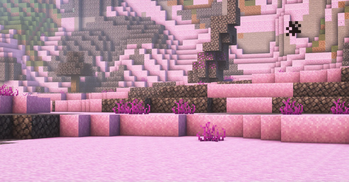
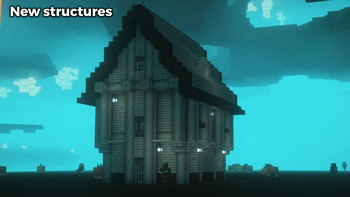
The Rosium Desert is a new biome, with pink (sand) and black (basalt) colors. Here you'll find new blocks, new mobs, a temple, a house and a dungeon in the sky. In the basalt is a strange new coal...
Emulyte ore
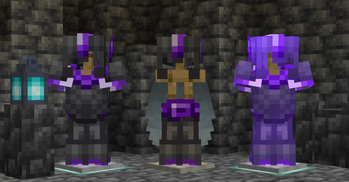
Emulyte is the new purple mineral in this mod! It's found deep in the caves of the overworld, and building armor with it is a real challenge.
Some Rosium Coal can also be found in Tuff.
Soul stone forest
Just a new nether biome? Hell no! The soul sand now has its own stone, and the biome is home to a new structure and a silver tree. But be prepared, because tormented souls leave no one in peace.
IMPORTANT
1 - I strongly advise you to use the JEI mod for crafts. Enjoy the game !
2 - I own this mod (ThommyzTV on CurseForge, the first versions of the mod were released there).
3 - A more recent and modified version is in preparation and will not be on this page, so follow my profile to find out what's next.
See you soon...
Available Versions
How to Install Emulyte (Old) on Your Server
Order Server
Order a Minecraft Java server with at least 3 GB RAM (4 GB recommended).
Set forge Loader
In the panel under "Egg", select the forge loader and matching Minecraft version (1.18.2).
Install Mod
Open the mod browser in the dashboard and search for "Emulyte (Old)". Click "Install" – done! Alternatively, upload the .jar via SFTP to the /mods folder.
Compatibility
Mod Loaders
Minecraft Versions
1.18.2
Server-side
✓ RequiredRecommended RAM
4 GB(min. 3 GB)Frequently Asked Questions
Emulyte (Old) server crashes on startup – what to do?
Most common cause: wrong forge version or insufficient RAM. Check the server log (latest.log) for "OutOfMemoryError" or "Mixin" errors. With Mado Hosting: ensure at least 3 GB RAM is allocated and the loader matches the mod version (1.18.2). You can switch loaders with one click in the panel.
Is Emulyte (Old) compatible with forge?
Emulyte (Old) officially supports forge for Minecraft 1.18.2. The Mado dashboard automatically detects incompatible loader combinations.
Server lagging with Emulyte (Old) – how to optimize performance?
Recommended RAM: 4 GB (per 8 players). Use /spark profiler to check if Emulyte (Old) consumes the most tick time. Common fixes: reduce server view-distance to 8-10, install "performant" or "starlight" as supplementary mods on Forge. With Mado Hosting, your server runs on NVMe SSDs with dedicated CPU cores for minimal latency.
Similar Mods




Rent Modded Server
Install Emulyte (Old) with just one click on your server.