
Screenshots
About this Mod
ence-size



ence-size is a premium, client-side Minecraft mod designed to let you adjust your in-game aspect ratio on the fly. Whether you want to preview how your build looks in ultra-widescreen, simulate cinematic camera setups, or play with custom stretched resolutions, ence-size handles it all with a gorgeous UI and fluid animations.
✨ Features
- Real-time Aspect Ratio Adjustments: Control your aspect ratio dynamically using a precise slider.
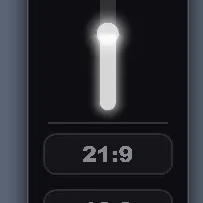
- Aesthetic UI Panel: A sleek, glassmorphic dark-themed control panel that glides in from the right edge of the screen.
- One-Click Presets: Instantly switch between common aspect ratios:
21:9(Ultrawide cinematic view)16:9(Standard widescreen)4:3(Retro/stretched view)1.00(Perfect square)
- Smooth Motion & Transitions: Features dynamic cubic-out animations for a premium, responsive feel when changing ratios or opening/closing the UI.
- Highly Optimized & Server-Safe: Works entirely client-side. Safe to use on any multiplayer server!
🎮 How to Use
- Press
Right Shift(default keybinding) while in-game to open the ence-size adjustment panel. - Drag the vertical slider up or down to set a custom aspect ratio.
- Click on any of the preset buttons (
21:9,16:9, etc.) to snap instantly to that ratio. - Click anywhere outside the panel or press
ESC/Right Shiftto close it. - (Optional) Customize the keybinding in Minecraft's standard controls menu under Key Binds > ence-size.
🛠️ Installation
- Make sure you have Fabric Loader installed for Minecraft 1.21.11.
- Download the latest ence-size JAR file.
- Place the downloaded JAR in your Minecraft
mods/directory. - (Recommended) Install Mod Menu to access the configuration screen directly from the main menu.
📄 License
This mod is released under the MIT License. Feel free to include it in your modpacks!
Available Versions
How to Install Ence size on Your Server
Order Server
Order a Minecraft Java server with at least 3 GB RAM (4 GB recommended).
Set fabric Loader
In the panel under "Egg", select the fabric loader and matching Minecraft version (1.21.11).
Install Mod
Open the mod browser in the dashboard and search for "Ence size". Click "Install" – done! Alternatively, upload the .jar via SFTP to the /mods folder.
Compatibility
Mod Loaders
Minecraft Versions
1.21.11
Server-side
✗ UnsupportedRecommended RAM
4 GB(min. 3 GB)Frequently Asked Questions
Ence size server crashes on startup – what to do?
Most common cause: wrong fabric version or insufficient RAM. Check the server log (latest.log) for "OutOfMemoryError" or "Mixin" errors. With Mado Hosting: ensure at least 3 GB RAM is allocated and the loader matches the mod version (1.21.11). You can switch loaders with one click in the panel.
Is Ence size compatible with fabric?
Ence size officially supports fabric for Minecraft 1.21.11. The Mado dashboard automatically detects incompatible loader combinations.
Server lagging with Ence size – how to optimize performance?
Recommended RAM: 4 GB (per 8 players). Use /spark profiler to check if Ence size consumes the most tick time. Common fixes: reduce server view-distance to 8-10, install "performant" or "starlight" as supplementary mods on Forge. With Mado Hosting, your server runs on NVMe SSDs with dedicated CPU cores for minimal latency.
Rent Modded Server
Install Ence size with just one click on your server.