
Enchanted Book Redesign
Color code enchanted books by what they can be applied to
About this Mod
Ever notice how all enchanted books are the same color with no way to tell them apart or even how strong they are?
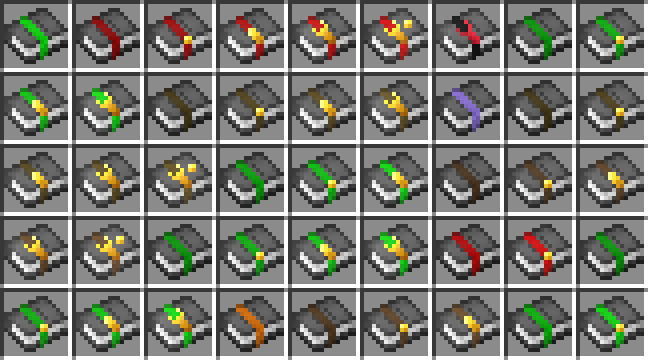
This mod aims to fix that issue by changing the ribbon/glint colors to match the types of items that the enchants can go on and changing the textures of the enchanted books to reflect the level of them
Note: Enchanted books have their tint color changed to white and weakened to more easily see the book colors
Inspired by https://www.reddit.com/r/Minecraft/comments/d563cn/oc_enchanted_book_redesign_to_make_them_easier_to/
Green - can be applied to armor
Red - Can be applied to swords
Purple - Can be applied to tridents
Orange - Can be applied to bow
Teal - Can be applied to crossbow
Blue - Can be applied to Fishing rods
Brown - Can be applied to tools
Black - These are cursed, stay away
White - Undefined, used when the enchant doesn't match any other category
These colors can be changed or even new groups added for each tag
In the case of multiple enchants, the highest level one will take preference for the model and the colors will be combined.
The mod is client side only so it can be used on vanilla servers.
Available Versions
How to Install Enchanted Book Redesign on Your Server
Order Server
Order a Minecraft Java server with at least 3 GB RAM (4 GB recommended).
Set fabric Loader
In the panel under "Egg", select the fabric loader and matching Minecraft version (1.21.1).
Install Mod
Open the mod browser in the dashboard and search for "Enchanted Book Redesign". Click "Install" – done! Alternatively, upload the .jar via SFTP to the /mods folder.
Compatibility
Mod Loaders
Minecraft Versions
1.21.1
Server-side
✗ UnsupportedRecommended RAM
4 GB(min. 3 GB)Frequently Asked Questions
Enchanted Book Redesign server crashes on startup – what to do?
Most common cause: wrong fabric version or insufficient RAM. Check the server log (latest.log) for "OutOfMemoryError" or "Mixin" errors. With Mado Hosting: ensure at least 3 GB RAM is allocated and the loader matches the mod version (1.21.1). You can switch loaders with one click in the panel.
Is Enchanted Book Redesign compatible with fabric and neoforge?
Enchanted Book Redesign officially supports fabric, neoforge for Minecraft 1.21.1. The Mado dashboard automatically detects incompatible loader combinations.
Server lagging with Enchanted Book Redesign – how to optimize performance?
Recommended RAM: 4 GB (per 8 players). Use /spark profiler to check if Enchanted Book Redesign consumes the most tick time. Common fixes: reduce server view-distance to 8-10, install "performant" or "starlight" as supplementary mods on Forge. With Mado Hosting, your server runs on NVMe SSDs with dedicated CPU cores for minimal latency.
Rent Modded Server
Install Enchanted Book Redesign with just one click on your server.