
Enchantment Shifter
Enchantment Shifter is a Minecraft mod that allows players to freely move enchantments between items using the anvil. Transfer enchantments to books for storage, shift enchantments between tools, and customize XP costs and limits.
Screenshots
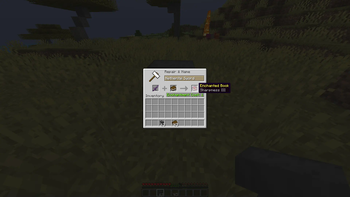
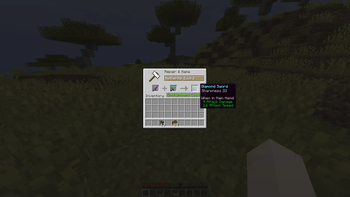
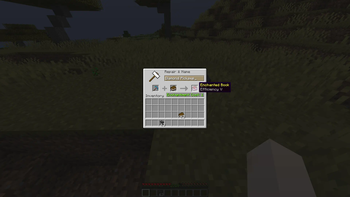
About this Mod
Enchantment Shifter
Tired of being stuck with enchantments on items you don't need? Want to move that Fortune III from your old pickaxe to a new one, or turn your enchanted sword into a shiny enchanted book? Enchantment Shifter lets you shift enchantments between items using just an anvil and some XP—no grindstone needed!
What Does It Do?
This mod lets you:
- Extract enchantments from items and turn them into enchanted books
- Transfer enchantments directly from one item to another (if they're compatible)
- Customize the process with your own XP costs and rules
Just place your enchanted item in the first slot, a book or target item in the second slot, and watch the magic happen!
Why You'll Love It
- Balanced & Fair: Uses vanilla anvil XP calculations as a base, but fully tweakable
- No New Blocks or Items: Fits seamlessly into your existing Minecraft world
- Server & Client: Works on servers (install on server for multiplayer)
- Modpack Friendly: Free to use in any modpack
How to Install
- Download the latest version of Enchantment Shifter for your Minecraft version
- Install Fabric Loader for your Minecraft version
- Place the mod JAR file in your
modsfolder - Launch Minecraft with Fabric
How to Configure
Enchantment Shifter uses a simple configuration file. Here's how to set it up:
Step 1: Locate Your Config Folder
Navigate to your Minecraft installation directory:
- Windows:
%APPDATA%\.minecraft\config\ - Mac:
~/Library/Application Support/minecraft/config/ - Linux:
~/.minecraft/config/
Step 2: Find the Config File
Look for a file named enchantment-transfer-config.properties in the config folder.
Step 3: Edit the Configuration
Open the file with any text editor. It should look something like this:
# Enchantment Shifter Configuration
# Last updated: 2024-01-15

# Cost Setting (Default: 1000)
# This sets a fixed XP cost for all enchantment transfers.
# Set to 1000 to disable fixed cost and use the default vanilla calculation.
cost=1000

# Cost Factor (Default: 1.0)
# Multiplies the XP cost by this value.
# Set to 0.5 for half cost, 2.0 for double cost, etc.
factor=1.0

# Enchantment Limit (Default: 0)
# Limits how many enchantments can be transferred at once.
# Set to 0 to disable the limit (transfer all enchantments).
limit=0

# Return Item Setting (Default: 1)
# Controls what happens to the source item after transfer:
#   0 = Source item vanishes (is consumed)
#   1 = Source item returns to you (with enchantments removed)
return=1
Configuration Options Explained
| Setting | Default | Description |
|---|---|---|
cost |
1000 | Fixed XP cost for transfers. Set to 1000 to use vanilla calculation. |
factor |
1.0 | Multiplier for XP cost. 0.5 = half cost, 2.0 = double cost. |
limit |
0 | Max enchantments to transfer per operation. 0 = no limit. |
return |
1 | Source item behavior: 0 = vanish, 1 = return with enchantments removed. |
Example Configurations
Budget-Friendly Mode:
cost=1000
factor=0.5
limit=0
return=1
How to Use
- Place an enchanted item in the first anvil slot
- Place a book (for extraction) or another item (for transfer) in the second slot
- Take the result from the output slot
- Receive your modified item based on your
returnsetting
Compatibility Notes
- Item-to-Book: Works with any enchanted item and a regular book
- Item-to-Item: Only works if the enchantments are compatible with the target item
- Enchanted Books: Cannot be used as source items (use grindstone instead)
- Vanilla Enchanting: This mod doesn't interfere with regular enchanting
Support & Feedback
Found a bug? Have a suggestion? Open an issue on the GitHub repository.
Available Versions
How to Install Enchantment Shifter on Your Server
Order Server
Order a Minecraft Java server with at least 3 GB RAM (4 GB recommended).
Set fabric Loader
In the panel under "Egg", select the fabric loader and matching Minecraft version (1.21.11).
Install Mod
Open the mod browser in the dashboard and search for "Enchantment Shifter". Click "Install" – done! Alternatively, upload the .jar via SFTP to the /mods folder.
Compatibility
Mod Loaders
Minecraft Versions
1.21.11, 1.21.10, 1.21.9 (+14 more)
Server-side
✓ RequiredRecommended RAM
4 GB(min. 3 GB)Frequently Asked Questions
Enchantment Shifter server crashes on startup – what to do?
Most common cause: wrong fabric version or insufficient RAM. Check the server log (latest.log) for "OutOfMemoryError" or "Mixin" errors. With Mado Hosting: ensure at least 3 GB RAM is allocated and the loader matches the mod version (1.21.11). You can switch loaders with one click in the panel.
Is Enchantment Shifter compatible with fabric?
Enchantment Shifter officially supports fabric for Minecraft 1.21.11, 1.21.10, 1.21.9. The Mado dashboard automatically detects incompatible loader combinations.
Server lagging with Enchantment Shifter – how to optimize performance?
Recommended RAM: 4 GB (per 8 players). Use /spark profiler to check if Enchantment Shifter consumes the most tick time. Common fixes: reduce server view-distance to 8-10, install "performant" or "starlight" as supplementary mods on Forge. With Mado Hosting, your server runs on NVMe SSDs with dedicated CPU cores for minimal latency.
Rent Modded Server
Install Enchantment Shifter with just one click on your server.