
Enchantments Unbound
Remove "Too Expensive!" anvil limits, bypass level caps, and combine Mending + Infinity, all with complete customization.
Screenshots

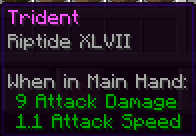
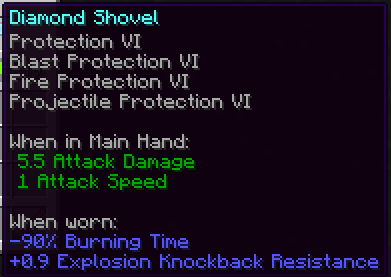
About this Mod


Enchantments Unbound provides full control over removing enchantment limits and setting individual level caps. The mod is completely survival-friendly and allows you to combine enchantments directly in the anvil without worrying about the vanilla "Too Expensive!" limit. The mod can also provide overleveled enchantments through villager trading, and vanilla conflicts can be disabled to allow Mending & Infinity or Sharpness on Tridents.

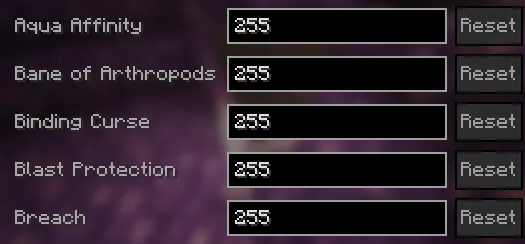
- Set any enchantment to any level (Sharpness 255)
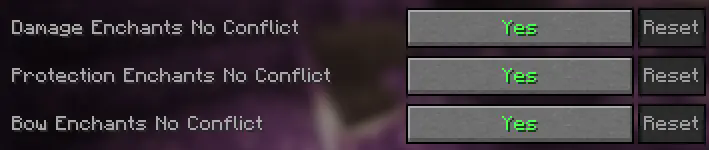
- Remove all enchantment conflicts (Infinity + Mending, etc.)
- Bypass the “Too Expensive!” anvil limit
- Apply any enchantment to any item (Sharpness on Tridents)
- Customize anvil XP cost and scaling
- Generate high-level books via villager trading
- Supports custom enchantments automatically
- Works on vanilla servers (client-side optional)


The mod can be configured through the ingame ModMenu and Cloth Config GUI. Server owners can configure settings in the enchantmentsunbound.json
Individual Enchantment Level Caps
Enchantment Conflict Settings
Level Cost Configuration

Server Support for Vanilla Clients


/eu configinfo anvilcaps (page #)

/eu configinfo anvilcost

/eu configinfo misc


Please join my Discord with feedback, questions, bugs, or to say thanks!
Planned Features
- Infinite anvil durability
- Modify enchantments from the enchantment table, fishing, chests, looted items, and piglins
- Particle effects for anvil transations
- Customizable grindstone behavior
Available Versions
How to Install Enchantments Unbound on Your Server
Order Server
Order a Minecraft Java server with at least 3 GB RAM (4 GB recommended).
Set fabric Loader
In the panel under "Egg", select the fabric loader and matching Minecraft version (26.1.1).
Install Mod
Open the mod browser in the dashboard and search for "Enchantments Unbound". Click "Install" – done! Alternatively, upload the .jar via SFTP to the /mods folder.
Compatibility
Mod Loaders
Minecraft Versions
26.1.1, 26.1, 1.21.11 (+11 more)
Server-side
✓ RequiredRecommended RAM
4 GB(min. 3 GB)Frequently Asked Questions
Enchantments Unbound server crashes on startup – what to do?
Most common cause: wrong fabric version or insufficient RAM. Check the server log (latest.log) for "OutOfMemoryError" or "Mixin" errors. With Mado Hosting: ensure at least 3 GB RAM is allocated and the loader matches the mod version (26.1.1). You can switch loaders with one click in the panel.
Is Enchantments Unbound compatible with fabric?
Enchantments Unbound officially supports fabric for Minecraft 26.1.1, 26.1, 1.21.11. The Mado dashboard automatically detects incompatible loader combinations.
Server lagging with Enchantments Unbound – how to optimize performance?
Recommended RAM: 4 GB (per 8 players). Use /spark profiler to check if Enchantments Unbound consumes the most tick time. Common fixes: reduce server view-distance to 8-10, install "performant" or "starlight" as supplementary mods on Forge. With Mado Hosting, your server runs on NVMe SSDs with dedicated CPU cores for minimal latency.
Similar Mods




![[TaCZ] Timeless and Classics Zero](https://cdn.modrinth.com/data/SzzJttH8/fd27766d2bb8390d284696b1dbd358f87e081439_96.webp)

Rent Modded Server
Install Enchantments Unbound with just one click on your server.