
EnchantMenu
EnchantMenu is basically an advanced item editor for Minecraft Fabric 1.21.11. It gives you a GUI-based way to create enchanted, customized, styled, duplicated, and visually modified items without manually writing long commands.
Screenshots
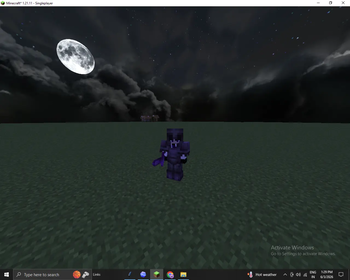
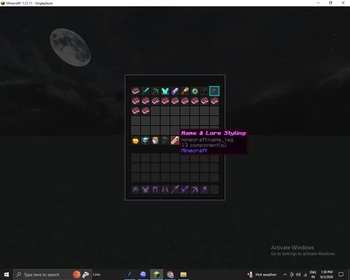
About this Mod
EnchantMenu: Overview ⚡
EnchantMenu is a powerful Fabric mod for Minecraft 1.21.11 that turns item customization into a fast, visual, command-free experience. Instead of typing long enchantment or component commands, you get a full in-game GUI where you can edit, enchant, upgrade, style, duplicate, and transform items with just a few clicks.
Built for creative players, server operators, map makers, datapack creators, and item designers, EnchantMenu gives you the tools to create everything from clean survival-style gear to completely overpowered god-tier weapons, armor, and custom showcase items.
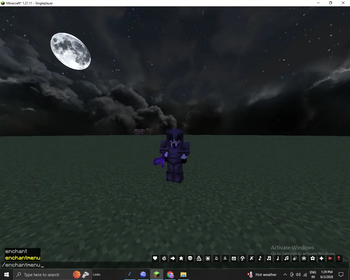
Command - /enchantmenu
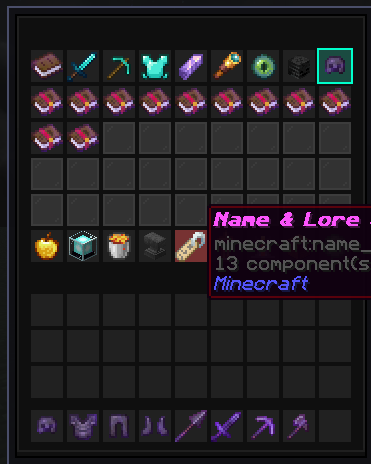
Main Purpose
EnchantMenu lets you open a custom item editor menu and modify your selected item directly from a GUI.
You can use it to:
- Add and remove enchantments.
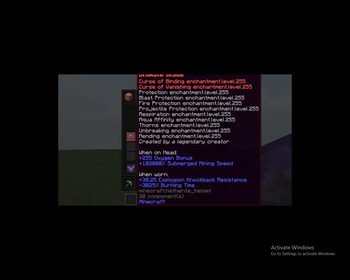
- Push enchantments far beyond normal vanilla limits.
- Rename and style items.
- Add lore and rarity effects.
- Modify attributes like damage, speed, health, and resistance.
- Apply armor trims and leather dyes.
- Add potion-style weapon effects.
- Save and load item presets.
- Duplicate finished items instantly.
Whether you are building a custom server kit, testing combat gear, making boss loot, or creating a legendary item for a map, EnchantMenu gives you full creative control.
How To Open It
Use this command in-game:
/enchantmenu
You need creative/operator-level permission to use it.
Enchantments
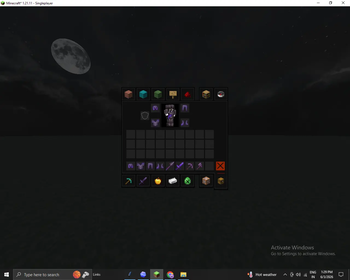
The main menu shows enchantments as clickable enchanted books.
You can:
- Left-click to increase an enchantment level.
- Right-click to decrease an enchantment level.
- Shift-left-click to push an enchantment to a very high level.
- Shift-right-click to remove that enchantment.
- Use Max All Vanilla to apply normal maximum enchantment levels.
- Use God Tier Override to apply extreme high-level enchantments.
This makes it easy to create normal enchanted gear, maxed-out tools, or completely overpowered god items.
Search And Filters 🔎
EnchantMenu includes search and filtering tools so you do not have to scroll through everything manually.
Features include:
- Search enchantments by name.
- Show all enchantments.
- Filter combat enchantments.
- Filter tool and utility enchantments.
- Filter armor enchantments.
- Show modded enchantments separately.
- Hide curses.
- Show curses.
- Show only curses.
- Toggle Universal Mode to allow enchantments on items that normally cannot accept them.
Universal Mode is especially useful for experimental gear, custom map items, and intentionally broken/fun creations.
Attribute Editor
The attribute editor lets you directly change item power and player stats.
You can adjust:
- Attack damage.
- Attack speed.
- Movement speed.
- Max health.
- Knockback resistance.
Normal clicks make small changes, while shift-clicks apply larger changes. This lets you fine-tune balanced items or create ridiculous high-power equipment.
Name And Lore Styling
The name and lore tools let you customize how the item looks in the player’s inventory.
You can:
- Set custom preset names.
- Add lore text.
- Clear custom lore.
- Change item rarity.
- Toggle enchantment glow.
- Edit custom model data.
- Hide tooltip details.
This is useful for making legendary weapons, custom RPG items, server rewards, admin tools, or clean hidden-stat items.
Trim And Dye Tools
The trim and dye menu focuses on item appearance.
You can:
- Apply armor trim patterns like Bolt, Flow, Silence, and Spire.
- Apply trim materials like Copper, Gold, Netherite, and Redstone.
- Dye leather armor with preset colors.
This helps you create custom armor sets without needing separate commands or manual item editing.
Potion And Durability Tools 🧪
This menu lets you add special utility and combat effects.
You can:
- Set durability to full.
- Set durability very low.
- Toggle unbreakable.
- Add potion-style effects to weapons.
- Make weapons apply effects to targets when attacking.
This is great for custom swords, boss weapons, cursed items, event gear, and experimental PvP tools.
Preset Manager
The preset system lets you save and load item setups quickly.
You can:
- Left-click a preset slot to save the current item setup.
- Right-click a preset slot to load a saved setup.
Presets can store:
- Enchantments.
- Custom names.
- Lore.
- Rarity.
- Custom model data.
- Glow settings.
- Unbreakable state.
- Damage value.
This makes it easier to reuse item designs without rebuilding them from scratch.
Item Duplicator
EnchantMenu includes a live item duplicator.
It copies the selected target item into an empty inventory slot, making it easy to duplicate finished gear, test multiple versions, or prepare full item sets.
Who It Is For
EnchantMenu is useful for:
- Creative builders.
- Server operators.
- Map makers.
- Datapack creators.
- Modpack testers.
- Custom item designers.
- Admins creating kits or rewards.
- Players experimenting with enchantments and item components.
- Anyone who wants god-tier gear without writing long commands.
Short Summary
EnchantMenu is an advanced GUI-based item editor for Minecraft Fabric 1.21.11. It gives you fast access to enchantments, attributes, names, lore, trims, dyes, potion effects, durability tools, presets, and duplication.
It is designed for players who want to create powerful, polished, and highly customized items directly inside Minecraft.
Open it with:
/enchantmenu
Then choose your item, click your upgrades, and build your perfect weapon, tool, or armor set.
Join us on -
Available Versions
How to Install EnchantMenu on Your Server
Order Server
Order a Minecraft Java server with at least 3 GB RAM (4 GB recommended).
Set fabric Loader
In the panel under "Egg", select the fabric loader and matching Minecraft version (1.21.11).
Install Mod
Open the mod browser in the dashboard and search for "EnchantMenu". Click "Install" – done! Alternatively, upload the .jar via SFTP to the /mods folder.
Compatibility
Mod Loaders
Minecraft Versions
1.21.11
Server-side
✓ RequiredRecommended RAM
4 GB(min. 3 GB)Frequently Asked Questions
EnchantMenu server crashes on startup – what to do?
Most common cause: wrong fabric version or insufficient RAM. Check the server log (latest.log) for "OutOfMemoryError" or "Mixin" errors. With Mado Hosting: ensure at least 3 GB RAM is allocated and the loader matches the mod version (1.21.11). You can switch loaders with one click in the panel.
Is EnchantMenu compatible with fabric?
EnchantMenu officially supports fabric for Minecraft 1.21.11. The Mado dashboard automatically detects incompatible loader combinations.
Server lagging with EnchantMenu – how to optimize performance?
Recommended RAM: 4 GB (per 8 players). Use /spark profiler to check if EnchantMenu consumes the most tick time. Common fixes: reduce server view-distance to 8-10, install "performant" or "starlight" as supplementary mods on Forge. With Mado Hosting, your server runs on NVMe SSDs with dedicated CPU cores for minimal latency.
Similar Mods






Rent Modded Server
Install EnchantMenu with just one click on your server.