
Encounters
Adds immersive, fully customizable encounters. More challenge, more surprises.
Screenshots
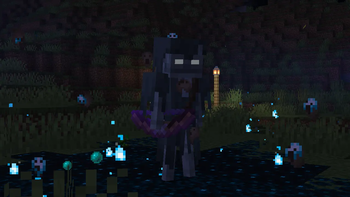
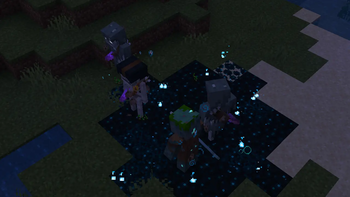
About this Mod
Encounters
Adds configurable encounter events to Minecraft. Each event has its own
trigger, behavior and mob pool, defined in config/encounters.json5
or edited in-game through the YACL config screen.
More events are planned.
Configuration
- In-game GUI powered by YACL (required on both loaders)
- Config file:
config/encounters.json5 - Each event exposes its own toggles, chances and a weighted mob pool
- Pool entries accept custom SNBT (same syntax as
/summon) for gear,
attributes, effects… - Entries referencing a missing mod are skipped at load, so a single
config works across any modpack
Global options
mobsDropEquipment— when off (default), mobs spawned by any event
keep the gear they spawned with instead of dropping it on death
Events
Lightning Overcharge
Natural lightning bolts during a thunderstorm may spawn a group of mobs
at the impact point, preceded by a short cinematic.
Options
- Enable toggle
- Trigger chance per bolt
- Group size (min / max)
- Group cohesion — the first mob acts as leader, followers regroup
around it when they stray too far - Mob pool (weighted, with per-entry SNBT and optional label)
Compatibility
- Iron's Spells 'n Spellbooks — adds a shockwave at the impact point
- Epic Fight — honors the vanilla
generic.scaleattribute so
scaled mobs render at the correct size - The default mob pool ships with entries referencing Iron's Spells,
Epic Fight and Simply Swords. Each entry is ignored automatically
when the corresponding mod is missing.
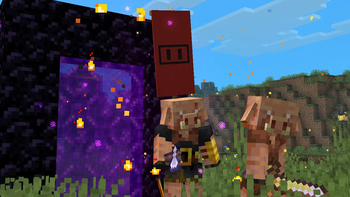
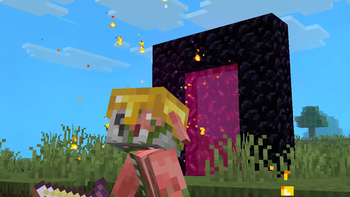
Nether Portal Invasion
Active nether portals in the overworld may suddenly disgorge several
escalating waves of nether mobs, preceded by a short buildup cinematic.
Trigger
- Periodic passive scan around each overworld player (only one
invasion may run at a time globally; a configurable cooldown gates
the next one) - Portal frame analysis picks one of the two perpendicular spawn
faces; the chosen face must offer a walkable foot row across the
full portal width
Cinematic
- The next wave starts only when the current one is fully wiped (with
a short grace period to absorb AoE wipes) - Portal teleportation is disabled for everyone (mobs and players)
while an invasion runs, with a brief grace period after it ends
Waves
- Random wave count between configurable min/max
- Linear size progression:
firstWaveSize + (n-1) * step - Rarity bias: later waves shift toward rare entries (capped at 4×
base weight, so very-rare mobs never become dominant)
Mobs
- Default roster: Piglin Soldier / Marksman / Shieldbearer, Wither
Skeleton, Blaze, Piglin Brute, Hoglin + Piglin Brute (Tusked
Vanguard), Hoglin + crossbow Piglin (Crossbow Outrider) and a very
rare Ghast - Hoglins and piglins spawned by the event are immune to vanilla
zombification so they don't morph mid-fight - Encounter piglins ignore gold-armor pacification — they keep
fighting regardless of player gear
Army identity
- All invasion mobs share an allies tag — no friendly fire across
goal-driven or brain-driven AI - Per-wave group cohesion: the first survivor acts as leader, others
regroup around it when not in active combat - Per-wave portal leash: mobs straying too far from the portal are
pulled back, unless they're chasing the player - One of six curated banner themes (Bloodflag, Skullbearer, Brimstone,
Iron Phalanx, Cinder Banner, Hellscar) is rolled per invasion;
~30 % of eligible mobs become banner bearers, with the matching
pattern stamped on any vanilla shield they carry. Two parallel
invasions look like distinct armies.
Options
- Enable toggle
- Trigger chance per scan
- Scan interval (ticks)
- Portal cooldown after an invasion (ticks)
- Wave count (min / max)
- First wave size and per-wave step
- Group cohesion enable + radius
- Mob pool (weighted, with per-entry SNBT and optional label).
Banner eligibility is opt-in per entry via theencounters_banner_eligibleentity tag in SNBT.
Available Versions
How to Install Encounters on Your Server
Order Server
Order a Minecraft Java server with at least 3 GB RAM (4 GB recommended).
Set fabric Loader
In the panel under "Egg", select the fabric loader and matching Minecraft version (1.21.1).
Install Mod
Open the mod browser in the dashboard and search for "Encounters". Click "Install" – done! Alternatively, upload the .jar via SFTP to the /mods folder.
Compatibility
Mod Loaders
Minecraft Versions
1.21.1
Server-side
✓ RequiredRecommended RAM
4 GB(min. 3 GB)Frequently Asked Questions
Encounters server crashes on startup – what to do?
Most common cause: wrong fabric version or insufficient RAM. Check the server log (latest.log) for "OutOfMemoryError" or "Mixin" errors. With Mado Hosting: ensure at least 3 GB RAM is allocated and the loader matches the mod version (1.21.1). You can switch loaders with one click in the panel.
Is Encounters compatible with fabric and neoforge?
Encounters officially supports fabric, neoforge for Minecraft 1.21.1. The Mado dashboard automatically detects incompatible loader combinations.
Server lagging with Encounters – how to optimize performance?
Recommended RAM: 4 GB (per 8 players). Use /spark profiler to check if Encounters consumes the most tick time. Common fixes: reduce server view-distance to 8-10, install "performant" or "starlight" as supplementary mods on Forge. With Mado Hosting, your server runs on NVMe SSDs with dedicated CPU cores for minimal latency.
Similar Mods




Rent Modded Server
Install Encounters with just one click on your server.