
Ender Logistics Network
Adds a compact Ender-based item transport system. Ender Pouches linked to the same channel share one inventory, enabling easy long-distance item transfer and automation.
Screenshots
About this Mod
Ender Logistics Network
Ender Logistics Network adds a shared storage channel system that allows items to be transferred between pouches, hoppers, barrels, and other connected blocks without keeping chunks loaded.
The core mechanic of the mod is the Channel System. Multiple devices connected to the same channel share a single inventory, making it possible to access, send, and receive items from anywhere in the world.
This can be used for:
- Sending mined resources back to your base.
- Accessing food, tools, and supplies remotely.
- Sharing inventories between players.
- Building long-distance logistics systems.
- Storing and transferring items without chunk loaders.
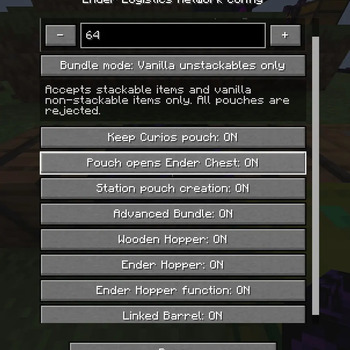
One of the main features of the mod is its flexibility. Almost every feature can be individually enabled or disabled through the configuration file.
Features
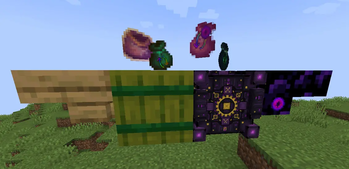
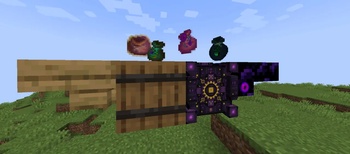
- Ender Pouch with Ender Chest access.
- Shared Storage Pouches.
- Ender Hopper for long-distance item transfer.
- Linking Station for channel management.
- Linked Barrel connected to channel storage.
- Advanced Bundle with support for unstackable items.
- Wooden Hopper as a cheaper early-game alternative.
- Crafting recipe for the vanilla Bundle.
Recipes
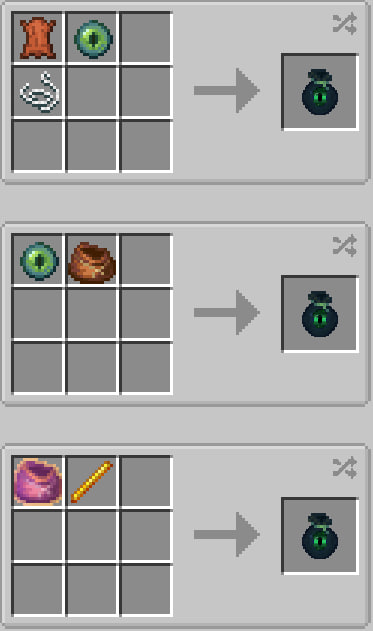
Ender Pouch
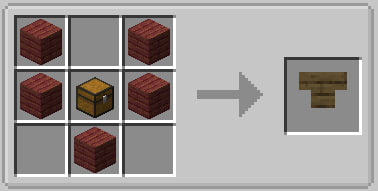
Wooden Hopper
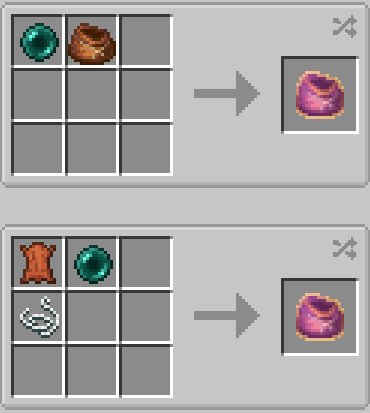
Advanced Bundle
Ender Hopper
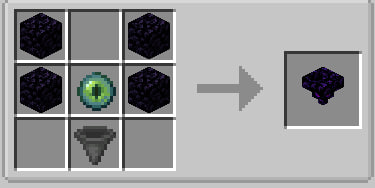
Linking Station
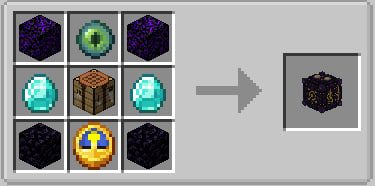
Blocks and Items
Ender Pouch
Provides direct access to the player's Ender Chest from the inventory.
Config:
enderPouchChestEnabled=true
Can also be configured to stay with the player after death:
curiosPouchKeepOnDeath=true
Transfer Pouch
Multiple pouches can be linked to the same channel and share a single inventory.
Config:
binderStationPouchCreationEnabled=true
Ender Hopper
Connects to a channel and provides access to shared storage. Allows item transfer across any distance without chunk loading.
Config:
enderHopperEnabled=true
enderHopperFunctionEnabled=true
Disabling the block completely:
enderHopperEnabled=false
Disabling only the remote storage functionality:
enderHopperFunctionEnabled=false
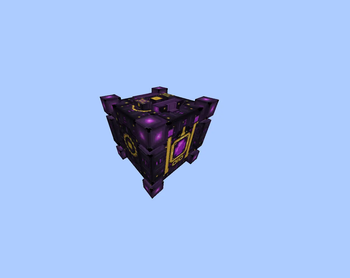
Linking Station
Used to create, edit, copy, and delete channels, as well as link pouches and other devices to them.
Config:
binderStationPouchCreationEnabled=true
Linked Barrel
A barrel that connects directly to a storage channel and shares its inventory.
Config:
linkedBarrelEnabled=true
Advanced Bundle
An upgraded bundle that supports unstackable items.
Config:
advancedBundleEnabled=true
advancedBundleCapacity=64
advancedBundleMode="DEFAULT"
Modes:
- DEFAULT — all items except storage containers (backpacks, pouches, etc.).
- VANILLA_UNSTACKABLES — only vanilla unstackable items.
Wooden Hopper
A cheaper but significantly slower version of the vanilla hopper.
Config:
woodenHopperEnabled=true
Additional Information
The mod also adds a crafting recipe for the vanilla Bundle, allowing it to be obtained in regular survival gameplay.
Language Support
The mod currently includes translations for:
- de_de (German)
- en_us (English)
- es_es (Spanish)
- fr_fr (French)
- ja_jp (Japanese)
- ko_kr (Korean)
- pt_br (Brazilian Portuguese)
- ru_ru (Russian)
- uk_ua (Ukrainian)
- zh_cn (Simplified Chinese)
Available Versions
How to Install Ender Logistics Network on Your Server
Order Server
Order a Minecraft Java server with at least 3 GB RAM (4 GB recommended).
Set forge Loader
In the panel under "Egg", select the forge loader and matching Minecraft version (1.20.1).
Install Mod
Open the mod browser in the dashboard and search for "Ender Logistics Network". Click "Install" – done! Alternatively, upload the .jar via SFTP to the /mods folder.
Compatibility
Mod Loaders
Minecraft Versions
1.20.1
Server-side
✓ RequiredRecommended RAM
4 GB(min. 3 GB)Frequently Asked Questions
Ender Logistics Network server crashes on startup – what to do?
Most common cause: wrong forge version or insufficient RAM. Check the server log (latest.log) for "OutOfMemoryError" or "Mixin" errors. With Mado Hosting: ensure at least 3 GB RAM is allocated and the loader matches the mod version (1.20.1). You can switch loaders with one click in the panel.
Is Ender Logistics Network compatible with forge?
Ender Logistics Network officially supports forge for Minecraft 1.20.1. The Mado dashboard automatically detects incompatible loader combinations.
Server lagging with Ender Logistics Network – how to optimize performance?
Recommended RAM: 4 GB (per 8 players). Use /spark profiler to check if Ender Logistics Network consumes the most tick time. Common fixes: reduce server view-distance to 8-10, install "performant" or "starlight" as supplementary mods on Forge. With Mado Hosting, your server runs on NVMe SSDs with dedicated CPU cores for minimal latency.
Similar Mods






Rent Modded Server
Install Ender Logistics Network with just one click on your server.