
Ender Pouch
A lightweight mod adding a portable Ender Chest access item with immersive effects and vanilla-friendly crafting.
Screenshots
About this Mod
Ender Pouch is a lightweight, standalone tool designed to help you access your Ender Chest inventory effortlessly while on the move. With a simple right-click, you can tap into your dimensional storage anywhere, anytime.
This mod contains only one item — the Ender Pouch — keeping it simple and easy to use.
Features
- Instant Ender Access: Right-click to open your Ender Chest inventory, no matter where you are.
- Immersive Effects: Enjoy custom particle and sound effects when opening and closing the pouch.
- Inventory Protection: Prevents the Ender Pouch from being placed inside an Ender Chest.
- Unique Advancement: Unlock the "Pocket Dimension" advancement upon crafting.
- Thematic Crafting: A balanced recipe that fits naturally into Minecraft's progression.
How it Works
Opening the Pouch
Right-Click while holding the Ender Pouch to instantly open your Ender Chest inventory.
While the GUI is Open
Faint Witch/Entity Effect particles will rise slowly around you, indicating the dimensional connection is active.
Closing the Pouch
Simply close the inventory screen (usually by pressing Esc or your inventory key).
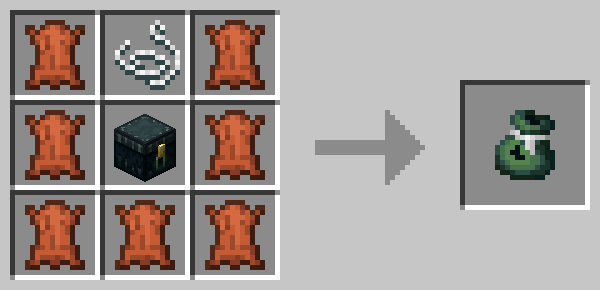
Crafting the Pouch
Craft the Ender Pouch by surrounding an Ender Chest with a string and 7 pieces of Leather:
[ L ] [ S ] [ L ]
[ L ] [ E ] [ L ]
[ L ] [ L ] [ L ]
Where: L = Leather, S = String, E = Ender Chest
FAQ
Q: What does this mod add?
A: This mod adds only one item: the Ender Pouch. No other items, blocks, or entities.
Q: How do I open the Ender Chest?
A: Just right-click while holding the Ender Pouch in your hand.
Q: Does the Ender Pouch have durability?
A: No, the Ender Pouch has unlimited uses and does not have durability.
Q: Can I put an Ender Pouch inside an Ender Chest?
A: No, the mod prevents this to avoid issues. You will receive a message if you try.
Q: Can I use this in my modpack?
A: Absolutely. This mod can be freely used in any modpack. No need to ask permission (though credit is always appreciated!).
Mod Compatibility
- Works in both singleplayer and multiplayer (SMP).
- Should be compatible with most inventory mods (though report any issues you find!).
Support
Found a bug or have a suggestion?
Feel free to leave a comment. Feedback is always welcome and helps improve the mod!
Available Versions
How to Install Ender Pouch on Your Server
Order Server
Order a Minecraft Java server with at least 3 GB RAM (4 GB recommended).
Set forge Loader
In the panel under "Egg", select the forge loader and matching Minecraft version (1.21.5).
Install Mod
Open the mod browser in the dashboard and search for "Ender Pouch". Click "Install" – done! Alternatively, upload the .jar via SFTP to the /mods folder.
Compatibility
Mod Loaders
Minecraft Versions
1.21.5, 1.21.4, 1.21.1 (+1 more)
Server-side
✓ RequiredRecommended RAM
4 GB(min. 3 GB)Frequently Asked Questions
Ender Pouch server crashes on startup – what to do?
Most common cause: wrong forge version or insufficient RAM. Check the server log (latest.log) for "OutOfMemoryError" or "Mixin" errors. With Mado Hosting: ensure at least 3 GB RAM is allocated and the loader matches the mod version (1.21.5). You can switch loaders with one click in the panel.
Is Ender Pouch compatible with forge and neoforge?
Ender Pouch officially supports forge, neoforge for Minecraft 1.21.5, 1.21.4, 1.21.1. The Mado dashboard automatically detects incompatible loader combinations.
Server lagging with Ender Pouch – how to optimize performance?
Recommended RAM: 4 GB (per 8 players). Use /spark profiler to check if Ender Pouch consumes the most tick time. Common fixes: reduce server view-distance to 8-10, install "performant" or "starlight" as supplementary mods on Forge. With Mado Hosting, your server runs on NVMe SSDs with dedicated CPU cores for minimal latency.
Similar Mods


Rent Modded Server
Install Ender Pouch with just one click on your server.