
Endercage
A tool for capturing and carrying mobs.
Screenshots
About this Mod
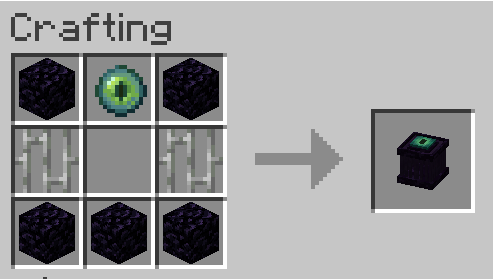
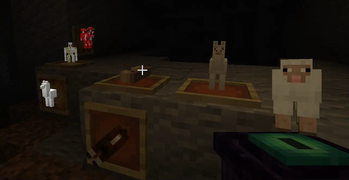
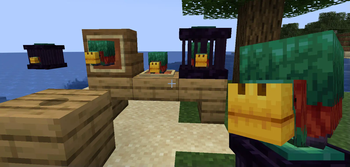
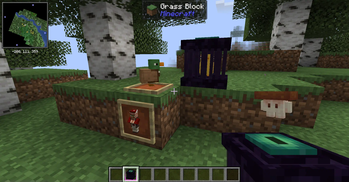
The endercage is a tool/block for capturing and easily transporting mobs. Other than that it also has some other functionalities including the ability to play sounds from contained entities and displaying the entity as decoration.
Features:
= General functionality:
-> Capture entities by rightclicking them with the cage.
-> Transfer entities between a placed cage and a cage in your hand by rightclicking them with it.
-> Entities inside the cage will play their ambient sound once in a while. You can mute a cage by rightclicking it with a feather and unmute it by rightclicking it with a noteblock.
= Redstone functionality:
-> If a cage is powered it will:
-->> Release the contained entity / capture the entity above if the block above is air.
-->> Steal from/give the contained entity to a cage above.
-> Noteblocks above cages will always play the ambient of the entity below, even if the cage is muted.
-> Comparators will output a redstone signal of 15 if the cage is filled and 0 if not.
= Misc:
-> If a filled endercage is placed in a itemframe it will just show the entitiy. If the itemframe is facing up the entity will stand normally.
There are some settings to enable/disable containment of hostiles (disabled by default), disable redstone functionality, mute them altogether and ban certain entities from being captured at all.
Note: If a entity renders as a question mark it errored while trying to render and its model got replaced with the "?" to prevent a crash. If released it will look normal.
Available Versions
How to Install Endercage on Your Server
Order Server
Order a Minecraft Java server with at least 3 GB RAM (4 GB recommended).
Set fabric Loader
In the panel under "Egg", select the fabric loader and matching Minecraft version (1.20.1).
Install Mod
Open the mod browser in the dashboard and search for "Endercage". Click "Install" – done! Alternatively, upload the .jar via SFTP to the /mods folder.
Compatibility
Mod Loaders
Minecraft Versions
1.20.1
Server-side
✓ RequiredRecommended RAM
4 GB(min. 3 GB)Frequently Asked Questions
Endercage server crashes on startup – what to do?
Most common cause: wrong fabric version or insufficient RAM. Check the server log (latest.log) for "OutOfMemoryError" or "Mixin" errors. With Mado Hosting: ensure at least 3 GB RAM is allocated and the loader matches the mod version (1.20.1). You can switch loaders with one click in the panel.
Is Endercage compatible with fabric?
Endercage officially supports fabric for Minecraft 1.20.1. The Mado dashboard automatically detects incompatible loader combinations.
Server lagging with Endercage – how to optimize performance?
Recommended RAM: 4 GB (per 8 players). Use /spark profiler to check if Endercage consumes the most tick time. Common fixes: reduce server view-distance to 8-10, install "performant" or "starlight" as supplementary mods on Forge. With Mado Hosting, your server runs on NVMe SSDs with dedicated CPU cores for minimal latency.
Similar Mods


Rent Modded Server
Install Endercage with just one click on your server.