
Endernium
A successor to Netherite, with special abilities!
Screenshots
About this Mod

Endernium is an advanced material, surpassing Netherite in both strength and rarity, found exclusively within The End.
Obtaining Endernium
Upgrade Process:
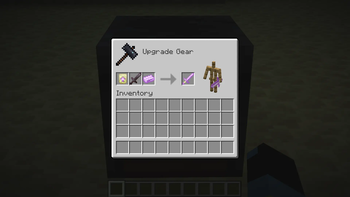
- Acquire an Endernium Upgrade Smithing Template from End City Chests.
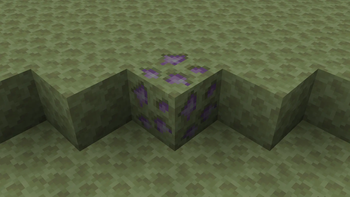
- Mine Endernium Ore across the End islands. When broken, Endernium Ore drops Endernium Dust.
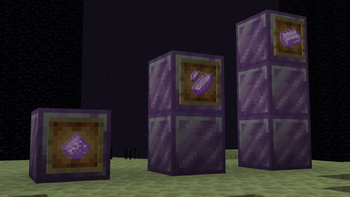
- Combine four Endernium Dust to craft an Endernium Shard.
- Surround a Netherite Ingot with Endernium Shards to create an Endernium Ingot.
Upgradable Items
Using Endernium Ingots and the appropriate Smithing Template found in End City chests, you may upgrade the following Netherite equipment to Endernium:
- Sword
- Shovel
- Pickaxe
- Axe
- Hoe
- All Armor pieces
Special Abilities
Each Endernium tool and the full armor set comes with a special ability.
Endernium Armor Set
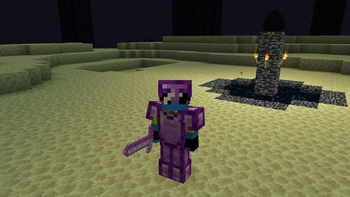
- Grants a unique "last-minute defense" ability when wearing the full set of armor.
- When health drops below 4, nearby monsters are launched away.
- You are granted a short regeneration buff to get you back up.
- Offers a final chance to survive dangerous encounters.
- 2 minute cooldown.
Endernium Sword
- Features a Teleportation Barrage attack.
- Right Click to automatically teleport to each hostile mob in front of you and slice them.
- Deals triple damage to each mob hit.
- Base cooldown: 10 seconds.
- Additional 5 seconds cooldown per mob hit.
Endernium Tools
All tools have Vein Mining ability:
- Toggle with Sneak + Right Click.
- Mine up to 64 connected blocks of the same type at once.
- Cancel vein mining mid-operation with Right Click.
Blocks broken with Endernium tools are teleported directly to your inventory (unless full).
Credits
Textures designed by Alizarin.
Issues & Bug Reports
Should you encounter any bugs, issues, or require assistance, please submit a report via the GitHub Issues page. Feedback and suggestions are always appreciated.
Available Versions
How to Install Endernium on Your Server
Order Server
Order a Minecraft Java server with at least 3 GB RAM (4 GB recommended).
Set forge Loader
In the panel under "Egg", select the forge loader and matching Minecraft version (1.21.8).
Install Mod
Open the mod browser in the dashboard and search for "Endernium". Click "Install" – done! Alternatively, upload the .jar via SFTP to the /mods folder.
Compatibility
Mod Loaders
Minecraft Versions
1.21.8, 1.21.7, 1.21.6 (+1 more)
Server-side
✓ RequiredRecommended RAM
4 GB(min. 3 GB)Frequently Asked Questions
Endernium server crashes on startup – what to do?
Most common cause: wrong forge version or insufficient RAM. Check the server log (latest.log) for "OutOfMemoryError" or "Mixin" errors. With Mado Hosting: ensure at least 3 GB RAM is allocated and the loader matches the mod version (1.21.8). You can switch loaders with one click in the panel.
Is Endernium compatible with forge and neoforge?
Endernium officially supports forge, neoforge for Minecraft 1.21.8, 1.21.7, 1.21.6. The Mado dashboard automatically detects incompatible loader combinations.
Server lagging with Endernium – how to optimize performance?
Recommended RAM: 4 GB (per 8 players). Use /spark profiler to check if Endernium consumes the most tick time. Common fixes: reduce server view-distance to 8-10, install "performant" or "starlight" as supplementary mods on Forge. With Mado Hosting, your server runs on NVMe SSDs with dedicated CPU cores for minimal latency.
Similar Mods




Rent Modded Server
Install Endernium with just one click on your server.