
Endoplasm
The End finally has a slime, and it eats blocks. Feed a violet gel cube obsidian and get crying obsidian back. It teleports its prey, splits when killed, grows from chorus fruit, and rides home in a bucket. The conversion table is yours to edit. Fabric.
Screenshots
About this Mod
Endoplasm
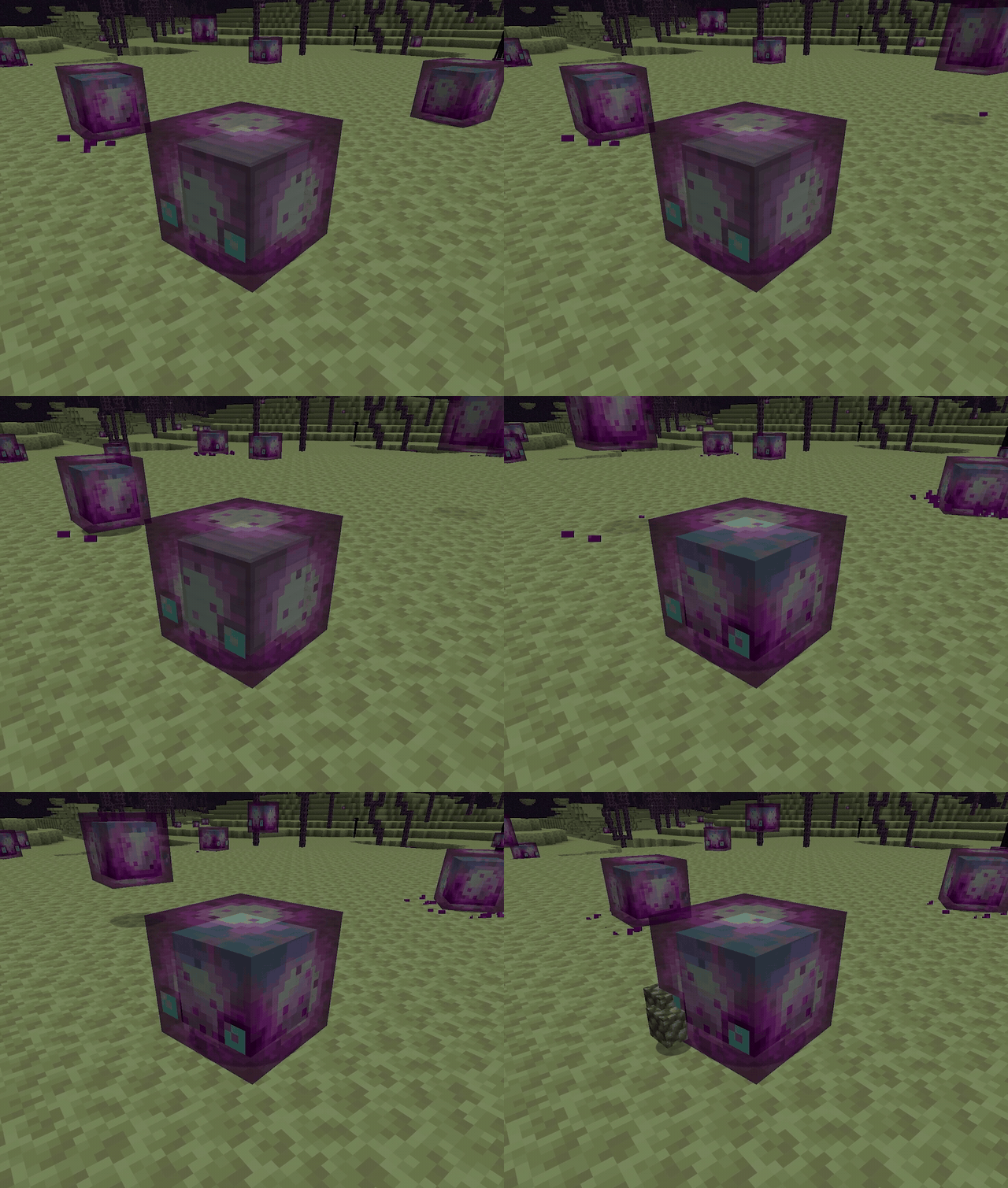
The End finally has a slime, and it eats blocks.
Out on the outer End islands, violet gel cubes hop between the chorus trees.
Get too close and one will come for you. About half the hits a big one lands
will chorus-teleport you somewhere you did not plan to be.
But catch one alive, and you've got yourself a portable block converter.
Watch it work.
Hand a big Endoplasm a block of obsidian. It freezes dead still, the block
sinks into its gel, and four seconds later it spits out crying obsidian.
Keep stuffing blocks in. It holds the whole batch and pops everything out
converted at once.
The menu
Most conversions run both ways: feed it the output and you get the input
back.
| Feed it | Get back | Both ways? |
|---|---|---|
| Obsidian | Crying Obsidian | yes |
| Gravel | Sand | yes |
| Terracotta | Red Sand | yes |
| Copper Block | Oxidized Copper | one way |
| Exposed Copper | Oxidized Copper | one way |
| Weathered Copper | Oxidized Copper | one way |
| Oxidized Copper | Block of Raw Copper | yes |
| Iron Block | Block of Raw Iron | yes |
| Gold Block | Block of Raw Gold | yes |
| Cobblestone | End Stone | yes |
| Dried Kelp Block | Hay Bale | yes |
| Magma Block | Netherrack | yes |
| Nether Wart Block | Warped Wart Block | yes |
| Crimson Stem | Warped Stem | yes |
| Crimson Hyphae | Warped Hyphae | yes |
The whole table lives in one little file (config/endoplasm_warps.json), so
you can rewrite it however you want. Any item to any item, one way or both.
Go nuts.
Raise your own
Small Endoplasms grow up on their own in 20 minutes, or you can speed-run it
with chorus fruit: five fruits and it pops to full size on the spot. Scoop the
grown one up in a bucket, carry it home, and plop your new pet block-warper
down wherever you like. Bucketed ones never despawn.
Original concept by u/NateTSO on Reddit (r/minecraftsuggestions). Built by
BeansNToast.
Available Versions
How to Install Endoplasm on Your Server
Order Server
Order a Minecraft Java server with at least 3 GB RAM (4 GB recommended).
Set fabric Loader
In the panel under "Egg", select the fabric loader and matching Minecraft version (26.1.2).
Install Mod
Open the mod browser in the dashboard and search for "Endoplasm". Click "Install" – done! Alternatively, upload the .jar via SFTP to the /mods folder.
Compatibility
Mod Loaders
Minecraft Versions
26.1.2, 26.1.1, 26.1 (+1 more)
Server-side
✓ RequiredRecommended RAM
4 GB(min. 3 GB)Frequently Asked Questions
Endoplasm server crashes on startup – what to do?
Most common cause: wrong fabric version or insufficient RAM. Check the server log (latest.log) for "OutOfMemoryError" or "Mixin" errors. With Mado Hosting: ensure at least 3 GB RAM is allocated and the loader matches the mod version (26.1.2). You can switch loaders with one click in the panel.
Is Endoplasm compatible with fabric?
Endoplasm officially supports fabric for Minecraft 26.1.2, 26.1.1, 26.1. The Mado dashboard automatically detects incompatible loader combinations.
Server lagging with Endoplasm – how to optimize performance?
Recommended RAM: 4 GB (per 8 players). Use /spark profiler to check if Endoplasm consumes the most tick time. Common fixes: reduce server view-distance to 8-10, install "performant" or "starlight" as supplementary mods on Forge. With Mado Hosting, your server runs on NVMe SSDs with dedicated CPU cores for minimal latency.
Similar Mods




Rent Modded Server
Install Endoplasm with just one click on your server.