Enhanced Boss Bars
New improved boss bars!
Screenshots

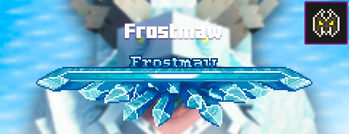
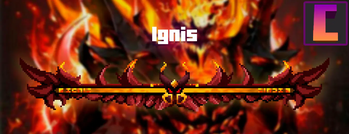
About this Mod

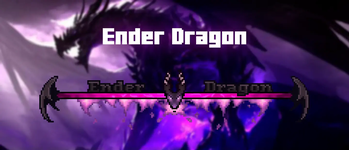
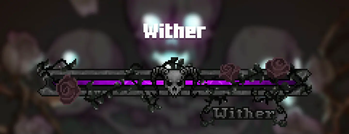
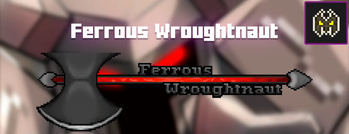
Enhanced Boss Bars is a project that aims to improve all the boss bars so that there is a better immersion in the amazing world of minecraft, since the default bars are very uncreative.
If you have any suggestions for a mod boss, please comment on the CurseForge page and I'll put it on the mod list :)
I hope you enjoy it and thank you very much for watching.
Fabric version soon.
Mod List
Click here to show
Mowzie's Mobs
- ✅ Frostmaw
- ✅ Ferrous Wroughtnaut
- ◻️ Umvuthi
L_Ender's Cataclysm
- ✅ Ignis
- ✅ Netherite Monstrosity
- ✅ Ender Guardian
- ✅ The Harbinger
- ✅ The Leviathan
- ◻️ Ancient Remnant
Bosses of Mass Destruction
- ✅ Night Lich
- ✅ Void Blossom
- ✅ Obsidilith
- ✅ Nether Gauntlet
The Aether
- ✅ Slider
- ✅ Sun Spirit
- ✅ Valkyrie Queen
Meet your Fight
- ✅ Swampjaw
- ✅ Bellringer
- ◻️ Dame Fortuna
- ◻️ Rosalyne, Blade of Dusk
Cracker's Witherstorm
- ✅ Wither Storm
- ◻️ Withered Symbiont
Alex's Mobs
- ✅ Voidworm
Mod Compatibility Errors
In the next update, I'll be adding options to set where you want the boss bars, but for now if you're using the upcoming mods, you'll need to do these things:
Jade
You can set where you want to see Jade HUD by modifying Horizontal Ratio and Vertical Ratio
or you can turning it off by doing the following:
1.19.2 and older versions:
- Main Menu -> Mods -> Jade -> Config -> Jade Settings -> Display entities -> OFF
1.20.1 and new versions:
- Main Menu -> Mods -> Jade -> Config -> Mod Settings -> Display Bosses -> OFF
- Main Menu -> Mods -> Jade -> Config -> Mod Settings -> Boss Bars Overlap -> Push Down Tooltip
RPG-HUD
- (In game) Press Esc -> RPG-Hud -> Entity Inspector -> Show Entity Inspect: OFF (or just
change the position) - (In game) Press Esc -> RPG-Hud -> Compass -> Enable Compass: OFF (or just change the
position)
What's new?
Hey! As some of you probably know, there are mods that are incompatible in the texture pack version of Enhanced Boss Bars, so I made this mod to make them compatible. These mods were L_Ender's Cataclysm and The Aether. Both of them works now and you can see them in the gallery.
Available Versions
How to Install Enhanced Boss Bars on Your Server
Order Server
Order a Minecraft Java server with at least 3 GB RAM (4 GB recommended).
Set forge Loader
In the panel under "Egg", select the forge loader and matching Minecraft version (1.21.1).
Install Mod
Open the mod browser in the dashboard and search for "Enhanced Boss Bars". Click "Install" – done! Alternatively, upload the .jar via SFTP to the /mods folder.
Compatibility
Mod Loaders
Minecraft Versions
1.21.1, 1.21, 1.20.1 (+2 more)
Server-side
✗ UnsupportedRecommended RAM
4 GB(min. 3 GB)Frequently Asked Questions
Enhanced Boss Bars server crashes on startup – what to do?
Most common cause: wrong forge version or insufficient RAM. Check the server log (latest.log) for "OutOfMemoryError" or "Mixin" errors. With Mado Hosting: ensure at least 3 GB RAM is allocated and the loader matches the mod version (1.21.1). You can switch loaders with one click in the panel.
Is Enhanced Boss Bars compatible with forge and neoforge?
Enhanced Boss Bars officially supports forge, neoforge for Minecraft 1.21.1, 1.21, 1.20.1. The Mado dashboard automatically detects incompatible loader combinations.
Server lagging with Enhanced Boss Bars – how to optimize performance?
Recommended RAM: 4 GB (per 8 players). Use /spark profiler to check if Enhanced Boss Bars consumes the most tick time. Common fixes: reduce server view-distance to 8-10, install "performant" or "starlight" as supplementary mods on Forge. With Mado Hosting, your server runs on NVMe SSDs with dedicated CPU cores for minimal latency.
Similar Mods




Rent Modded Server
Install Enhanced Boss Bars with just one click on your server.