
Accuracy Tracker
A simple mod that tells how good your aim is at PVP!
Screenshots
About this Mod
Accuracy Tracker Mod
Overview
Accuracy Tracker is a lightweight and strict accuracy tracking mod for Minecraft. It monitors how precisely you keep your crosshair on an entity, helping you refine your aim and improve performance in combat situations, providing accuracy in percentages.
Features
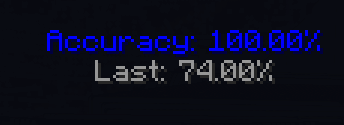
Strict Accuracy Tracking: Only records accuracy when the crosshair is directly on an entity's hitbox.
Dynamic HUD Display: Displays real-time accuracy at the top-middle of the screen.
Color-Coded Accuracy Meter: The HUD smoothly transitions from red (low accuracy) to blue (high accuracy) for easy visualization.
Customizable Reset Interval: Configure how long the tracker waits before resetting accuracy calculations. Open the menu through the default keybind "J"
Last Accuracy Display: Keeps track of your last recorded accuracy percentage before resetting.
Lightweight and Performance-Friendly: Designed to have minimal impact on FPS.
 Installation
Install Fabric Loader and Fabric API.
Download the latest version of Accuracy Tracker.
Place the .jar file into your Minecraft mods folder.
Launch the game and start tracking your aim accuracy!
Why Use This Mod?
Whether you're a competitive PvPer, or just curious about your precision in combat, this mod provides an accurate and unforgiving way to measure your crosshair discipline.
Compatibilty
This mod is built for Fabric and is not compatible with Forge.
It does not interfere with other mods and should work alongside other PVP mods.
Support
If you encounter any issues or have feature requests, feel free to reach out or report bugs.
The mod has reached EOL.
Available Versions
How to Install Accuracy Tracker on Your Server
Order Server
Order a Minecraft Java server with at least 3 GB RAM (4 GB recommended).
Set fabric Loader
In the panel under "Egg", select the fabric loader and matching Minecraft version (1.21.1).
Install Mod
Open the mod browser in the dashboard and search for "Accuracy Tracker". Click "Install" – done! Alternatively, upload the .jar via SFTP to the /mods folder.
Compatibility
Mod Loaders
Minecraft Versions
1.21.1, 1.20.1
Server-side
✗ UnsupportedRecommended RAM
4 GB(min. 3 GB)Frequently Asked Questions
Accuracy Tracker server crashes on startup – what to do?
Most common cause: wrong fabric version or insufficient RAM. Check the server log (latest.log) for "OutOfMemoryError" or "Mixin" errors. With Mado Hosting: ensure at least 3 GB RAM is allocated and the loader matches the mod version (1.21.1). You can switch loaders with one click in the panel.
Is Accuracy Tracker compatible with fabric?
Accuracy Tracker officially supports fabric for Minecraft 1.21.1, 1.20.1. The Mado dashboard automatically detects incompatible loader combinations.
Server lagging with Accuracy Tracker – how to optimize performance?
Recommended RAM: 4 GB (per 8 players). Use /spark profiler to check if Accuracy Tracker consumes the most tick time. Common fixes: reduce server view-distance to 8-10, install "performant" or "starlight" as supplementary mods on Forge. With Mado Hosting, your server runs on NVMe SSDs with dedicated CPU cores for minimal latency.
Similar Mods




![[TaCZ] Timeless and Classics Zero](https://cdn.modrinth.com/data/SzzJttH8/fd27766d2bb8390d284696b1dbd358f87e081439_96.webp)

Rent Modded Server
Install Accuracy Tracker with just one click on your server.