
Entity Cleaner
Cleans up unwanted entities automatically to improve server performance. Safely removes items, arrows, XP orbs, projectiles, and other leftover entities while keeping farms and important structures intact.
Screenshots
About this Mod
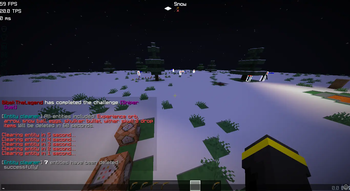
This standalone datapack/mod is a powerful upgrade verison to the original Lag Sweeper, designed to work seamlessly across multiple Minecraft versions. It efficiently clears a wide range of entities, including dropped items, eggs, snow, arrows, shulker bullets, wither skulls, and more, reducing lag and keeping your world running smoothly.
Key Features:
- Multi-version compatibility – Works reliably on different Minecraft versions without errors.
- Comprehensive entity cleanup – Removes common lag-causing entities automatically (Every 5min).
- Lightweight and easy to use – Install and run without affecting gameplay performance.
- Optimized for servers and singleplayer – Keeps both worlds and servers smooth, even with high entity counts.
Multiplayer Support / SinglePlayer Support
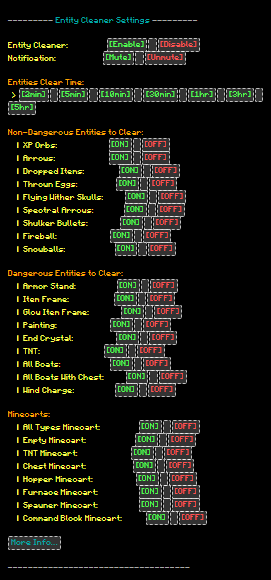
- Added toggle notification.
- Added toggle mod/datapack.
- Added toggle entity.
- To get Op Run
tag @s add ec_operator - To mute sendCommandFeedback Run
/gamerule sendCommandFeedback falseor/gamerule send_command_feedback falseor Download↗
If you notice any missing entities or any error related to version, feel free to DM Planet Minecraft ↗!
Available Versions
How to Install Entity Cleaner on Your Server
Order Server
Order a Minecraft Java server with at least 3 GB RAM (4 GB recommended).
Set datapack Loader
In the panel under "Egg", select the datapack loader and matching Minecraft version (26.2-rc-2).
Install Mod
Open the mod browser in the dashboard and search for "Entity Cleaner". Click "Install" – done! Alternatively, upload the .jar via SFTP to the /mods folder.
Compatibility
Mod Loaders
Minecraft Versions
26.2-rc-2, 26.2-rc-1, 26.2-pre-6 (+65 more)
Server-side
✓ RequiredRecommended RAM
4 GB(min. 3 GB)Frequently Asked Questions
Entity Cleaner server crashes on startup – what to do?
Most common cause: wrong datapack version or insufficient RAM. Check the server log (latest.log) for "OutOfMemoryError" or "Mixin" errors. With Mado Hosting: ensure at least 3 GB RAM is allocated and the loader matches the mod version (26.2-rc-2). You can switch loaders with one click in the panel.
Is Entity Cleaner compatible with datapack and fabric and forge and neoforge and quilt?
Entity Cleaner officially supports datapack, fabric, forge, neoforge, quilt for Minecraft 26.2-rc-2, 26.2-rc-1, 26.2-pre-6. Note: Forge and Fabric mods are NOT cross-compatible – pick one loader and stick with it. The Mado dashboard automatically detects incompatible loader combinations.
Server lagging with Entity Cleaner – how to optimize performance?
Recommended RAM: 4 GB (per 8 players). Use /spark profiler to check if Entity Cleaner consumes the most tick time. Common fixes: reduce server view-distance to 8-10, install "performant" or "starlight" as supplementary mods on Forge. With Mado Hosting, your server runs on NVMe SSDs with dedicated CPU cores for minimal latency.
Similar Mods






Rent Modded Server
Install Entity Cleaner with just one click on your server.