
Entity Culling
Skip rendering of hidden entities
About this Mod
Entity Culling - 1.16.5 - 2.1.4 and newer versions are only compatible with Optifine G8!
Entity Culling - 1.16.5 - 2.1.3 and older versions are only compatible with Optifine G7!
Entity Culling - 1.12.2 - 2.0.8 and newer versions are only compatible with Optifine G5!
Entity Culling - 1.12.2 - 2.0.7 and older versions are only compatible with Optifine F5!
This mod requires MixinBootstrap (curseforge, modrinth) and RenderLib (curseforge, modrinth) to run (MC 1.12.2 only)!
Mixin 0.7-0.8 Compatibility (curseforge, modrinth) might be helpful when another mod uses an older mixin version and you are thus unable to launch the game (MC 1.12.2 only).
Entity Culling is a client-side performance mod that aims to skip rendering of hidden (tile-)entities.
In vanilla, it just renders all (tile-)entities that are in the field of view of the player. This means there may be hundreds of (tile-)entities eating your fps while you can't even see them because they are hidden behind a wall.
Culling of hidden Entities
By default, this mod uses an OpenGL occlusion culling implementation which gives you pixel-perfect bounding box culling with only one frame delay and a very small overhead.
If your hardware does not support OpenGL 4.3 then this mod uses a raytraced culling implementation. The raytraced culling is more CPU intensive while the OpenGL culling is more GPU intensive and thus depending on your hardware you might want to prefer one over the other.
This can result in massive FPS improvements when a lot of (tile-)entities are on the screen but not visible because they are occluded.
Test with EntityCulling-1.12.2-6.0.2 inside a Chocolate Quest Repoured dungeon with ~200 entities on screen shows huge improvements!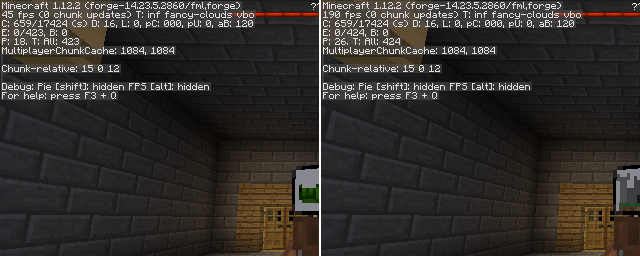


Available Versions
How to Install Entity Culling on Your Server
Order Server
Order a Minecraft Java server with at least 3 GB RAM (4 GB recommended).
Set forge Loader
In the panel under "Egg", select the forge loader and matching Minecraft version (1.16.5).
Install Mod
Open the mod browser in the dashboard and search for "Entity Culling". Click "Install" – done! Alternatively, upload the .jar via SFTP to the /mods folder.
Compatibility
Mod Loaders
Minecraft Versions
1.16.5, 1.12.2
Server-side
✗ UnsupportedRecommended RAM
4 GB(min. 3 GB)Frequently Asked Questions
Entity Culling server crashes on startup – what to do?
Most common cause: wrong forge version or insufficient RAM. Check the server log (latest.log) for "OutOfMemoryError" or "Mixin" errors. With Mado Hosting: ensure at least 3 GB RAM is allocated and the loader matches the mod version (1.16.5). You can switch loaders with one click in the panel.
Is Entity Culling compatible with forge?
Entity Culling officially supports forge for Minecraft 1.16.5, 1.12.2. The Mado dashboard automatically detects incompatible loader combinations.
Server lagging with Entity Culling – how to optimize performance?
Recommended RAM: 4 GB (per 8 players). Use /spark profiler to check if Entity Culling consumes the most tick time. Common fixes: reduce server view-distance to 8-10, install "performant" or "starlight" as supplementary mods on Forge. With Mado Hosting, your server runs on NVMe SSDs with dedicated CPU cores for minimal latency.
Rent Modded Server
Install Entity Culling with just one click on your server.