
Entity Logger
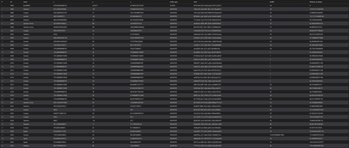
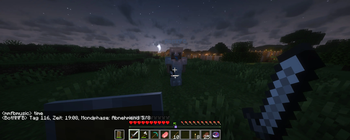
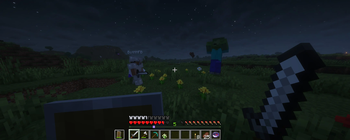
Entity Logger is a utility mod that records mob positions in real time and saves them into a log file.
Screenshots


About this Mod
EntityLogger
Real-time entity tracking and world state monitoring for Minecraft, optimized for bot automation and external tools.
📊 What does this mod do?
EntityLogger continuously monitors your Minecraft world and logs all relevant entity data to a fast SQLite database. Perfect for creating AI bots, automation scripts, or analytics tools that need real-time access to game state information.
✨ Key Features
🎯 Three Organized Data Tables
1. Monster Tracking (monsters table)
- Logs all hostile mobs in your vicinity
- Tracks name, exact coordinates (x, y, z)
- Calculates distance to player
- Records health values
- Includes unique UUID for identification
2. Player Tracking (players table)
- Monitors all players in the area (including yourself)
- Same detailed information as monsters
- Perfect for multiplayer coordination
3. World State (world_time table)
- Current game day and tick count
- Moon phase information (important for mob spawning!)
- Human-readable time format:
"Tag 5, Zeit: 14567 ticks, Mondphase: Vollmond 8/8"
⚡ Performance Optimized
- High-speed updates: Database refreshes 2x per second (every 10 ticks)
- WAL mode enabled: No database locking - read while the mod writes
- Snapshot-based: Always current data, no historical clutter
- Batch operations: Efficient SQL transactions for minimal overhead
- Concurrent access: Python/Java scripts can read database in real-time
🤖 Perfect for Bot Scripts
The mod is specifically designed for automation:
- Clean data structure - Easy to parse and query
- No timestamps to worry about - Always fresh snapshots
- Distance calculations included - Prioritize threats automatically
- Reliable updates - Consistent 10-tick refresh cycle
📦 What’s Included
The mod automatically creates logs/minecraft_entities.db with three simple tables:
-- Example: Get nearest monsters
SELECT name, x, y, z, distance_to_player
FROM monsters
ORDER BY distance_to_player ASC
LIMIT 5;

-- Example: Find all players
SELECT name, x, y, z FROM players;

-- Example: Current game time
SELECT game_day, game_ticks, moon_phase
FROM world_time WHERE id = 1;
🎮 Use Cases
- Combat Bots: Automatically track and respond to nearby threats
- Multiplayer Coordination: Monitor teammate positions
- Analytics: Study mob spawning patterns and player behavior
- Automation Scripts: Build self-playing Minecraft bots
- External Dashboards: Create real-time monitoring interfaces
- Machine Learning: Collect training data for AI models
🔧 Technical Details
- Client-side only - No server installation needed
- Lightweight - Minimal performance impact
- SQLite database - No external database server required
- Fabric mod - Requires both Fabric Loader and Fabric API
Requirements
- Fabric API 0.133.4+1.21.8 (Required dependency)
- Fabric Loader for Minecraft 1.21.8
- Java 17+
📋 Monster List
Tracks all hostile mobs including:
- Basic: Zombie, Skeleton, Creeper, Spider, Witch, Slime
- Nether: Blaze, Wither Skeleton, Magma Cube, Hoglin, Piglin variants
- Ocean: Drowned, Guardian, Elder Guardian
- Illagers: Pillager, Vindicator, Evoker, Ravager, Vex
- Special: Warden, Breeze, Shulker, Silverfish
- Excludes: Enderman, Zombified Piglin, Ghast (configurable in future versions)
🚀 Getting Started
- Install Fabric Loader for Minecraft 1.21.8
- Download and install Fabric API 0.133.4+1.21.8
- Drop EntityLogger into your
modsfolder - Launch Minecraft
- Find the database at
logs/minecraft_entities.db - Start building your automation scripts!
💻 Example Python Integration
import sqlite3
import time

# Connect to the database
conn = sqlite3.connect('logs/minecraft_entities.db')
cursor = conn.cursor()

while True:
    # Get nearest monster
    cursor.execute("""
        SELECT name, distance_to_player
        FROM monsters
        ORDER BY distance_to_player ASC
        LIMIT 1
    """)
    result = cursor.fetchone()

    if result:
        print(f"Warning! {result[0]} at {result[1]:.1f} blocks away!")

    time.sleep(0.5)  # Check twice per second
🤝 Community & Support
This mod is open for feature requests! If you’re building automation tools and need additional data logged, feel free to suggest improvements.
License: MIT
Supports: Minecraft 1.21.8 (Fabric)
Dependencies: Fabric API 0.133.4+1.21.8 (Required)
Java: 17+
Available Versions
How to Install Entity Logger on Your Server
Order Server
Order a Minecraft Java server with at least 3 GB RAM (4 GB recommended).
Set fabric Loader
In the panel under "Egg", select the fabric loader and matching Minecraft version (1.21.8).
Install Mod
Open the mod browser in the dashboard and search for "Entity Logger". Click "Install" – done! Alternatively, upload the .jar via SFTP to the /mods folder.
Compatibility
Mod Loaders
Minecraft Versions
1.21.8
Server-side
✗ UnsupportedRecommended RAM
4 GB(min. 3 GB)Frequently Asked Questions
Entity Logger server crashes on startup – what to do?
Most common cause: wrong fabric version or insufficient RAM. Check the server log (latest.log) for "OutOfMemoryError" or "Mixin" errors. With Mado Hosting: ensure at least 3 GB RAM is allocated and the loader matches the mod version (1.21.8). You can switch loaders with one click in the panel.
Is Entity Logger compatible with fabric?
Entity Logger officially supports fabric for Minecraft 1.21.8. The Mado dashboard automatically detects incompatible loader combinations.
Server lagging with Entity Logger – how to optimize performance?
Recommended RAM: 4 GB (per 8 players). Use /spark profiler to check if Entity Logger consumes the most tick time. Common fixes: reduce server view-distance to 8-10, install "performant" or "starlight" as supplementary mods on Forge. With Mado Hosting, your server runs on NVMe SSDs with dedicated CPU cores for minimal latency.
Similar Mods





Rent Modded Server
Install Entity Logger with just one click on your server.