
EnvironmentDetector (API)
EnvironmentDetector is a lightweight Fabric API that automatically detects launcher, platform, modpack, loader, and environment information through a simple placeholder and developer API system.
Screenshots
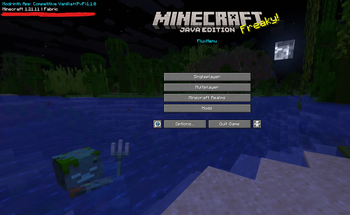
About this Mod
![Join DC [middle small]](https://cdn.modrinth.com/data/cached_images/bfca91ef533789255f946e0c21aa5a6f4925876f_0.webp)
EnvironmentDetector API
A lightweight and crash-safe Minecraft environment detection API for Fabric, Quilt and modern modpack launchers.
EnvironmentDetector automatically identifies:
- Launcher
- Modpack instance
- Loader
- Minecraft version
- Special client environments
The API is designed for:
- Mods
- HUDs
- Placeholder systems
- Analytics
- Compatibility layers
- Launcher-aware integrations
✨ Features
Automatic Launcher Detection
EnvironmentDetector can automatically detect:
- Modrinth App
- CurseForge
- GDLauncher
- Prism Launcher
- MultiMC
- ATLauncher
- Feather Client
- NoRisk Client
- Lunar Client
- Badlion Client
- Official Minecraft Launcher
No manual configuration required.
🧩 Compatibility
Supported Minecraft Versions
Primary Support
- Minecraft
1.21.x(1.21,1.21.1,1.21.2, etc.) - Optimized and tested for modern Minecraft environments.
The project currently targets:
Java 21- modern Fabric Loader versions
- current launcher ecosystems
Backwards Compatibility
EnvironmentDetector mainly relies on:
- Fabric Loader APIs
- filesystem checks
- runtime analysis
The API does NOT deeply modify Minecraft internals and avoids complex mixins for detection logic.
Because of this, the project can also be ported to older versions like:
1.20.11.19.4
with only minimal adjustments:
- lowering the Java target from
21→17 - adjusting
fabric.mod.json - rebuilding the project
Supported Mod Loaders
Fabric
✅ Full native support
(Main target platform)
Quilt
✅ Full native support
Quilt supports Fabric mods natively and EnvironmentDetector includes dedicated Quilt detection logic.
This means logs will correctly show:
Loader=Quilt
instead of Fabric when running on Quilt.
NeoForge / Forge
⚡ Not natively supported
EnvironmentDetector is primarily a Fabric mod.
However, the mod works correctly through compatibility layers such as:
- Sinytra Connector
- Fabric Connector implementations
When used through these layers, the API can even detect that the environment is running on:
- Forge
- NeoForge
Technical Requirements
Java Version
- Java
21required for Minecraft1.20.5+
Fabric Loader
- Fabric Loader
0.16.0+
Compatibility Overview
| Feature | Status |
|---|---|
| Minecraft 1.21.x | ✅ Optimized & Tested |
| Fabric | ✅ Native Support |
| Quilt | ✅ Native Support |
| NeoForge / Forge | ⚡ Via Connector Only |
| Dedicated Server | ✅ Fully Compatible |
| Java 21 | 🛠️ Required |
🧠 High Precision Detection System
Unlike many other mods, EnvironmentDetector does NOT rely on process names only.
Instead, it uses:
- file-based validation
- recursive directory scanning
- launcher metadata verification
- classpath analysis
- runtime environment analysis
This avoids false positives and duplicate detections.
Example:
Other mods may simply scan for "Modrinth" running on the system.
EnvironmentDetector instead uses a more advanced runtime-based detection system.
1. JVM Argument Scan
The API scans Minecraft startup arguments (the same information normally visible in logs and runtime launch parameters).
If the word:
modrinth
appears inside JVM arguments, launch paths or runtime parameters, the launcher is automatically detected as:
Modrinth App
This works reliably because the Modrinth launcher usually injects Modrinth-related paths or identifiers into the Minecraft runtime environment.
2. Manual Configuration Fallback
On first startup, EnvironmentDetector automatically creates:
config/environmentdetector.properties
Inside this file, custom values can be manually configured:
manual_pack_name=Your Modpack Name
manual_launcher_name=Your Custom Launcher
If these values are set, they always take highest priority and override automatic detection.
This allows:
- custom launchers
- private modpacks
- unsupported launchers
- development environments
- portable instances
to work reliably with the API.
🔍 Detection Logic
The API scans multiple directory levels to identify launcher structures.
Supported Markers
Modrinth App
- Runtime JVM analysis
- launch argument analysis
- optional metadata validation
CurseForge
CURSEFORGE_INSTANCE_NAMEminecraftinstance.json.curseclient
Feather Client
featherfeather-core.feather
NoRisk Client
norisk.config- Mod ID:
norisk
GDLauncher
gd-launcher.jsongdlauncher.json
Prism Launcher / MultiMC
prism.configprism.jsonmultimc.cfg
ATLauncher
instance.jsonatlauncher.json
Lunar / Badlion
Classpath keyword analysis:
lunarbadlion
Official Launcher
launcher_profiles.json
📜 Standardized Logging
After initialization, EnvironmentDetector outputs a unified log entry.
Example:
[EnvironmentDetector] Launcher=Modrinth App, Instance=Ultra Survival, NoRisk=false, Loader=Fabric, Version=1.21.1
Other examples:
[EnvironmentDetector] Launcher=CurseForge, Instance=BetterMC, NoRisk=false, Loader=Fabric, Version=1.21.1
[EnvironmentDetector] Launcher=NoRisk Client, Instance=Unknown Pack, NoRisk=true, Loader=Fabric, Version=1.21.1
Fallback:
[EnvironmentDetector] Unknown Environment
⚡ Performance
- Single startup scan
- Cached results
- Thread-safe internals
- Minimal overhead
- No background scanning
EnvironmentDetector runs once during startup and afterwards only serves cached data.
🛠 Developer Integration
Gradle Setup
repositories {
    exclusiveContent {
        forRepository {
            maven {
                name = "Modrinth"
                url = "https://api.modrinth.com/maven"
            }
        }
        filter {
            includeGroup "maven.modrinth"
        }
    }
}
Dependency
dependencies {
    modImplementation "maven.modrinth:environmentdetector-api:VERSION"
}
Replace VERSION with the latest release.
💻 Usage Example
public String getLauncherName() {
    if (FabricLoader.getInstance().isModLoaded("environmentdetector")) {
        return de.felixfgf.environmentdetector.EnvironmentDetectorAPI
                .getEnvironment()
                .launcher();
    }

    return "Vanilla";
}
⚠ Best Practices
Always use optional integration
Do NOT hard depend on EnvironmentDetector.
Always check:
FabricLoader.getInstance().isModLoaded("environmentdetector")
before using the API.
🚫 Common Mistakes
Wrong package
Correct package:
de.felixfgf.environmentdetector
NOT:
de.felixfgf.environmentdetector.api
Missing modLoaded check
Direct API access without checking if the mod exists can crash other mods.
Using placeholders every frame
Do not resolve placeholders every render frame.
Cache values when opening menus or HUDs.
🐛 Bug Reports & Support
Found a bug or detection issue?
Please report:
- launcher used
- Minecraft version
- loader
- latest.log
- detected environment output
Join the Discord server for support, bug reports and API discussions:
🎯 Goals
- Maximum environment transparency
- Reliable launcher identification
- High compatibility
- Zero-config setup
- Crash-safe integration
- Lightweight architecture
EnvironmentDetector is built to become the standard environment API for modern Minecraft launcher ecosystems 🚀
Available Versions
How to Install EnvironmentDetector (API) on Your Server
Order Server
Order a Minecraft Java server with at least 3 GB RAM (4 GB recommended).
Set fabric Loader
In the panel under "Egg", select the fabric loader and matching Minecraft version (1.21.11).
Install Mod
Open the mod browser in the dashboard and search for "EnvironmentDetector (API)". Click "Install" – done! Alternatively, upload the .jar via SFTP to the /mods folder.
Compatibility
Mod Loaders
Minecraft Versions
1.21.11, 1.21.10, 1.21.9 (+9 more)
Server-side
✗ UnsupportedRecommended RAM
4 GB(min. 3 GB)Frequently Asked Questions
EnvironmentDetector (API) server crashes on startup – what to do?
Most common cause: wrong fabric version or insufficient RAM. Check the server log (latest.log) for "OutOfMemoryError" or "Mixin" errors. With Mado Hosting: ensure at least 3 GB RAM is allocated and the loader matches the mod version (1.21.11). You can switch loaders with one click in the panel.
Is EnvironmentDetector (API) compatible with fabric?
EnvironmentDetector (API) officially supports fabric for Minecraft 1.21.11, 1.21.10, 1.21.9. The Mado dashboard automatically detects incompatible loader combinations.
Server lagging with EnvironmentDetector (API) – how to optimize performance?
Recommended RAM: 4 GB (per 8 players). Use /spark profiler to check if EnvironmentDetector (API) consumes the most tick time. Common fixes: reduce server view-distance to 8-10, install "performant" or "starlight" as supplementary mods on Forge. With Mado Hosting, your server runs on NVMe SSDs with dedicated CPU cores for minimal latency.
Similar Mods



Rent Modded Server
Install EnvironmentDetector (API) with just one click on your server.