
EquipSet
Predefined equipment set,let you switch equipment more quickly。
About this Mod
[EqS]EquipSet
Not a native English speaker,This article used translation app
This mod help players to quickly switch between preseted armors and off-hand items in the game.
How to use
Define your preset
First, you need to know how to use the preset manager and define your custom equipment preset, follow these syntax confirmations:
- Open the settings interface by pressing the key 'B'.
- In the equipment preset management interface on the left side, you will see the following options:
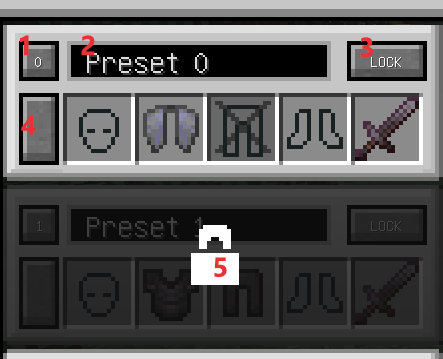
- Use presets while opening the manager screen, the numbers is the ID of current preset.
- Modify the name of the current preset.
- Lock and disable the current preset, mainly to exclude it from cycling switching.
- Update the current preset by saving the wearing equipments(Armors and off-hand).
- Unlock the current preset.
- The equipment slots shown in the image are essentially buttons, not as containers. Do not drag items onto them, it just throw your items.
- Click on the equipment slots in the image to enable or disable them. Disabled slots will not trigger equipment swapping when using presets.(Like the leg slot in image)
- If no other needs, just wear armor item as usual and then click the left side button which marked with Red 4 in the picture. The preset will update and save.
Use presets:
Mod provides two switching methods: cyclic switching and selective switching.
- Cyclic switching: Use the command "/eqs use_preset" or the default shortcut key 'R'.
- Selective switching: Use the command "/eqs use_preset [Id]" where [Id] is the target preset's ID, or use the default shortcut keys "Ctrl" + ? where "?" varies with the target preset ID, Due to changes in configuration files, the range may vary, so please refer to the key binding setting screen.
Notes and Configuration
- The number of available presets can be modified in the configuration file, with a minimum of 2 sets, a maximum of 10 sets, and a default of 4 sets. When exceeding 4 sets, although there is no scrollbar in the manager interface, you can scroll to view all presets by hovering your mouse over the interface.
- The functionality of using presets is achieved through commands, with shortcut keys essentially executing predefined commands. If needed, you can disable shortcut key registration in the configuration file. Of course, you will need other mod to support quick input commands.
- The essence of the mod is to search for the target equipment in the inventory and forcibly swap it. Normally, even cursed bound items will be removed. You can enable curse detection in the configuration file to prevent this.
- When searching the item, mod considers items with the same name, type, and enchantments as the desired items, please avoid having multiple equipment item same with these.
- This mod searching item in deafult inventory only.
To Developers
If you wanna expland item searching container type.
find com.AutomaticalEchoes.equipset.api.ContainerType, and add your custom container to TYPE,like this:
 public static ContainerType TYPE_INVENTORY = new ContainerType("type_inventory", Player::getInventory) ;
 public static ContainerType TYPE_ENDER_CHEST = new ContainerType("type_ender_chest",Player::getEnderChestInventory);

    public static void init(){
        TYPES.clear();
        TYPES.put(TYPE_INVENTORY.Name(),TYPE_INVENTORY);
//        TYPES.put(TYPE_ENDER_CHEST.Name(), TYPE_ENDER_CHEST);
    }
中文百科:[Eqs]装备预设
Available Versions
How to Install EquipSet on Your Server
Order Server
Order a Minecraft Java server with at least 3 GB RAM (4 GB recommended).
Set fabric Loader
In the panel under "Egg", select the fabric loader and matching Minecraft version (1.21).
Install Mod
Open the mod browser in the dashboard and search for "EquipSet". Click "Install" – done! Alternatively, upload the .jar via SFTP to the /mods folder.
Compatibility
Mod Loaders
Minecraft Versions
1.21, 1.20.1, 1.20 (+5 more)
Server-side
✓ RequiredRecommended RAM
4 GB(min. 3 GB)Frequently Asked Questions
EquipSet server crashes on startup – what to do?
Most common cause: wrong fabric version or insufficient RAM. Check the server log (latest.log) for "OutOfMemoryError" or "Mixin" errors. With Mado Hosting: ensure at least 3 GB RAM is allocated and the loader matches the mod version (1.21). You can switch loaders with one click in the panel.
Is EquipSet compatible with fabric and forge and neoforge?
EquipSet officially supports fabric, forge, neoforge for Minecraft 1.21, 1.20.1, 1.20. Note: Forge and Fabric mods are NOT cross-compatible – pick one loader and stick with it. The Mado dashboard automatically detects incompatible loader combinations.
Server lagging with EquipSet – how to optimize performance?
Recommended RAM: 4 GB (per 8 players). Use /spark profiler to check if EquipSet consumes the most tick time. Common fixes: reduce server view-distance to 8-10, install "performant" or "starlight" as supplementary mods on Forge. With Mado Hosting, your server runs on NVMe SSDs with dedicated CPU cores for minimal latency.
Similar Mods




![[TaCZ] Timeless and Classics Zero](https://cdn.modrinth.com/data/SzzJttH8/fd27766d2bb8390d284696b1dbd358f87e081439_96.webp)

Rent Modded Server
Install EquipSet with just one click on your server.