
Equipmentor
A mod adding different equipment sets for each material / ore that needs a equipment set.
Screenshots
About this Mod
Equipmentor
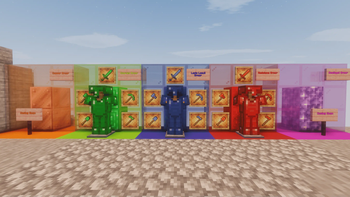
Introducing Equipmentor, a mod that adds a complete set of armor and tools for each ore and material in Minecraft that feels like it needs it!
Currently in Beta
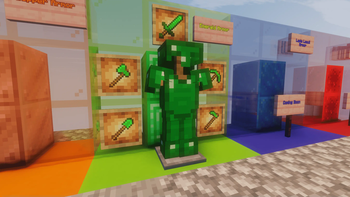
Emerald Equipment:
- Emerald Armor : Grants the Hero of the Village effect for easier trading.
- Emerald Tools : as good as iron but a little better.
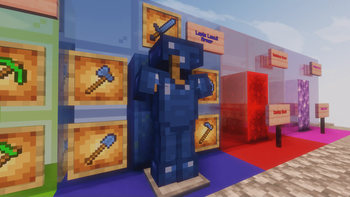
Lapis Lazuli Equipment:
- Lapis Lazuli Armor : Grants the Underwater Breathing effect for those under water caves.
- Lapis Lazuli Tools : A little better then iron, worse then emerald, but better enchantibility then gold.
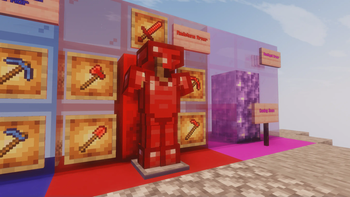
Redstone Equipment:
- Redstone Armor : Grants the Saturation effect for easier exploring in deserts or in caves.
- Redstone Tools : as good as lapis but worse durability.
Future Plans
Full Material Support
- We plan to expand Equipmentor to include armor and tools for every ore and material in Minecraft, that feels like it needs a little bit of armor and tools to it.
Important Notes
Beta Status
- Equipmentor is still under development, so expect bugs and potential imbalances. We appreciate your feedback and patience as we work towards a polished release.
Modding Policy
- Please respect the hard work of the development team. Copying or distributing this mod without permission is strictly prohibited. We encourage you to use this mod for personal enjoyment and to share your feedback with us.
Stay tuned for updates and new material sets!
Available Versions
How to Install Equipmentor on Your Server
Order Server
Order a Minecraft Java server with at least 3 GB RAM (4 GB recommended).
Set forge Loader
In the panel under "Egg", select the forge loader and matching Minecraft version (1.20.1).
Install Mod
Open the mod browser in the dashboard and search for "Equipmentor". Click "Install" – done! Alternatively, upload the .jar via SFTP to the /mods folder.
Compatibility
Mod Loaders
Minecraft Versions
1.20.1
Server-side
✓ RequiredRecommended RAM
4 GB(min. 3 GB)Frequently Asked Questions
Equipmentor server crashes on startup – what to do?
Most common cause: wrong forge version or insufficient RAM. Check the server log (latest.log) for "OutOfMemoryError" or "Mixin" errors. With Mado Hosting: ensure at least 3 GB RAM is allocated and the loader matches the mod version (1.20.1). You can switch loaders with one click in the panel.
Is Equipmentor compatible with forge?
Equipmentor officially supports forge for Minecraft 1.20.1. The Mado dashboard automatically detects incompatible loader combinations.
Server lagging with Equipmentor – how to optimize performance?
Recommended RAM: 4 GB (per 8 players). Use /spark profiler to check if Equipmentor consumes the most tick time. Common fixes: reduce server view-distance to 8-10, install "performant" or "starlight" as supplementary mods on Forge. With Mado Hosting, your server runs on NVMe SSDs with dedicated CPU cores for minimal latency.
Similar Mods



![[TaCZ] Timeless and Classics Zero](https://cdn.modrinth.com/data/SzzJttH8/fd27766d2bb8390d284696b1dbd358f87e081439_96.webp)


Rent Modded Server
Install Equipmentor with just one click on your server.