
Essential Info HUD
Hi, I’m cherMew! Inspired by my love for Minecraft and the amazing modding community, I wanted to try building something of my own. This 'Essential Info HUD' is my first step into the modding world. Hope you like it!
Screenshots

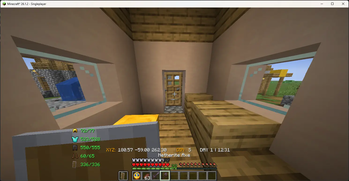
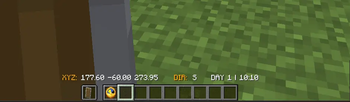
About this Mod
Essential Info HUD — A tiny mod born from passion!
Inspired by the incredible creativity of the Minecraft modding community, I decided to take my first leap into modding with this small project.
Key Features:
Precise Coordinates (XYZ): 2-decimal precision just like the F3 screen.
Day & Time Tracker: Always know your current day and time.
Direction Indicator: Quick directional reference (N, S, E, W).
Dynamic Armor Status: Real-time durability tracking that automatically adjusts based on your game mode (Creative/Survival)!
Essential Info HUD ม็อดเล็กๆ ที่เริ่มจากความหลงใหล!
ด้วยความที่เป็นแฟนตัวยงของ Minecraft ผมมักจะคอยติดตามผลงานของนักม็อดท่านอื่นอยู่เสมอ จนเกิดไอเดียอยากลองสร้างม็อดในแบบของตัวเองดูบ้างครับ
ฟีเจอร์หลัก:
Coordinates (XYZ): แสดงพิกัดละเอียดถึง 2 ตำแหน่งแบบ F3
Day & Time: บอกจำนวนวันที่ผ่านไปและเวลาในเกม
Direction: เช็กทิศทางได้ทันที (N, S, E, W)
Armor Status: ตรวจสอบความทนทานชุดเกราะและไอเทมในมือซ้ายแบบ Dynamic ปรับตำแหน่งตามโหมดการเล่น (Creative/Survival) อัตโนมัติ!
This Mod make for support version fabric-26.1.2
Available Versions
How to Install Essential Info HUD on Your Server
Order Server
Order a Minecraft Java server with at least 3 GB RAM (4 GB recommended).
Set fabric Loader
In the panel under "Egg", select the fabric loader and matching Minecraft version (26.2).
Install Mod
Open the mod browser in the dashboard and search for "Essential Info HUD". Click "Install" – done! Alternatively, upload the .jar via SFTP to the /mods folder.
Compatibility
Mod Loaders
Minecraft Versions
26.2, 26.1.2
Server-side
✗ UnsupportedRecommended RAM
4 GB(min. 3 GB)Frequently Asked Questions
Essential Info HUD server crashes on startup – what to do?
Most common cause: wrong fabric version or insufficient RAM. Check the server log (latest.log) for "OutOfMemoryError" or "Mixin" errors. With Mado Hosting: ensure at least 3 GB RAM is allocated and the loader matches the mod version (26.2). You can switch loaders with one click in the panel.
Is Essential Info HUD compatible with fabric?
Essential Info HUD officially supports fabric for Minecraft 26.2, 26.1.2. The Mado dashboard automatically detects incompatible loader combinations.
Server lagging with Essential Info HUD – how to optimize performance?
Recommended RAM: 4 GB (per 8 players). Use /spark profiler to check if Essential Info HUD consumes the most tick time. Common fixes: reduce server view-distance to 8-10, install "performant" or "starlight" as supplementary mods on Forge. With Mado Hosting, your server runs on NVMe SSDs with dedicated CPU cores for minimal latency.
Rent Modded Server
Install Essential Info HUD with just one click on your server.