
Eternal Furnace
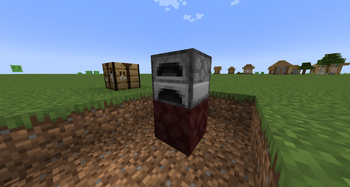
Craft Hellfire Netherrack, place it under a Furnace, and get infinite fuel forever — no more hauling coal. The catch: it smelts 1.8x slower. Gives Netherrack a real purpose.
Screenshots
About this Mod
Eternal Furnace
Gives Netherrack a new purpose — craft Hellfire Netherrack, place it under a Furnace, and burn forever. No more hauling coal. The catch: eternal fuel smelts slower than the real thing.
How it works
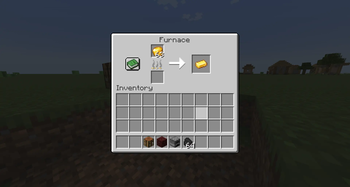
Combine Flint and Steel + Netherrack to craft Hellfire Netherrack. Place that block directly beneath a regular Furnace, and the furnace runs on infinite fuel — no need to feed the fuel slot at all. The trade-off is speed: each item takes 1.8x longer than normal.
| Normal Furnace | Eternal Furnace | |
|---|---|---|
| Fuel | Consumes fuel | Infinite, no fuel needed |
| Speed | ~10s per item | ~18s per item |
Set up a stack of ore, walk away, and let it cook through the night.
Features
- New block: Hellfire Netherrack, a darker, smoldering variant of Netherrack
- Simple recipe — Flint and Steel + Netherrack (the Flint and Steel is consumed)
- Infinite fuel when placed under a Furnace, balanced by 1.8x slower smelting
- Works only on the regular Furnace — Blast Furnaces and Smokers are untouched, keeping their role as the fast option
- Remove the block and the furnace reverts to normal vanilla behavior
Installation
- Install Minecraft Forge for 1.20.1
- Download the latest
.jarfrom the Versions tab - Place it in your
mods/folder - Launch the game and enjoy!
Requirements
- Minecraft 1.20.1
- Forge
Available Versions
How to Install Eternal Furnace on Your Server
Order Server
Order a Minecraft Java server with at least 3 GB RAM (4 GB recommended).
Set forge Loader
In the panel under "Egg", select the forge loader and matching Minecraft version (1.20.1).
Install Mod
Open the mod browser in the dashboard and search for "Eternal Furnace". Click "Install" – done! Alternatively, upload the .jar via SFTP to the /mods folder.
Compatibility
Mod Loaders
Minecraft Versions
1.20.1
Server-side
✓ RequiredRecommended RAM
4 GB(min. 3 GB)Frequently Asked Questions
Eternal Furnace server crashes on startup – what to do?
Most common cause: wrong forge version or insufficient RAM. Check the server log (latest.log) for "OutOfMemoryError" or "Mixin" errors. With Mado Hosting: ensure at least 3 GB RAM is allocated and the loader matches the mod version (1.20.1). You can switch loaders with one click in the panel.
Is Eternal Furnace compatible with forge?
Eternal Furnace officially supports forge for Minecraft 1.20.1. The Mado dashboard automatically detects incompatible loader combinations.
Server lagging with Eternal Furnace – how to optimize performance?
Recommended RAM: 4 GB (per 8 players). Use /spark profiler to check if Eternal Furnace consumes the most tick time. Common fixes: reduce server view-distance to 8-10, install "performant" or "starlight" as supplementary mods on Forge. With Mado Hosting, your server runs on NVMe SSDs with dedicated CPU cores for minimal latency.
Similar Mods



![CobbleDollars [Cobblemon Addon]](https://cdn.modrinth.com/data/s7N7AsqL/684040a264fc1d7f9b856ec5d2da39767398c7ad.png)

Rent Modded Server
Install Eternal Furnace with just one click on your server.