
Eternal Starlight Vanilla Ores
Add vanilla ores to Eternal Starlight Dimension.
Screenshots

About this Mod
About
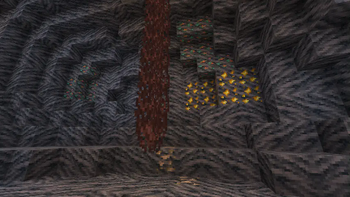
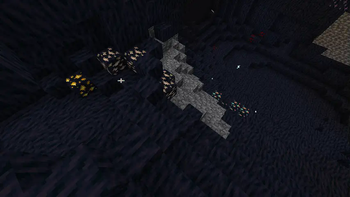
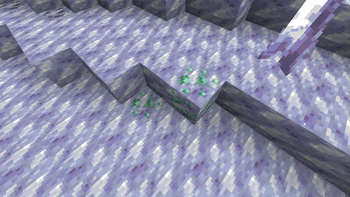
This is an unofficial add-on to Eternal Starlight that produces eight vanilla ores in addition to redstone ores in the Eternal Starlight Dimension underground.
With this mod, you can increase the amount of resources you can acquire by exploring Eternal Starlight's underground.
Also, even if you have acquired a lot of ore in the overworld and your ore resources are depleted, you can acquire vanilla ore again as a side trip in your search for Eternal Starlight.
Feature
Ore production is similar to that of vanilla, but some biomes produce more of certain ores. If there is an ore you want, you may want to concentrate your search on a particular biome.
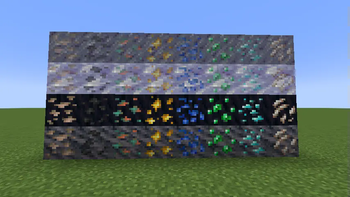
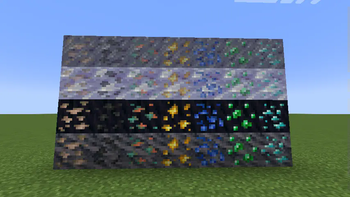
There are also four ore types: Grimstone, Voidstone, Eternal Ice, and Haze Ice. Each type is assigned to each location where it is generated.
Eternal Ice and Haze Ice take slightly longer to refine than the other types.
Extra Iron
- Dark Swamp
Extra Coal
- Starlight Permafrost Forest
- Crystallized Desert
- Permafrost Peaks
- Starlight Taiga
Extra Copper,Gold
- Torreya Forest
- Scarlet Forest
Extra Lapis
- Starlight Forest
- Starlight Dense Forest
- Umbral Plains
- Glimmer Scrubland
Extra Emerald
- Starlight Permafrost Forest
- Permafrost Peaks
- Starlight Taiga
Extra Diamond
- Crystallized Desert
- Lucent Mycelium Isle
Extra Quartz
- Ether River
- Shimmer River
Reduce Ore Config (After 1.1.0)
Fabric / NeoForge(After 2.1.0)
Open the file "eternal_starlight_vo.json" in the config directory and change the parameters to reduce ore production.
"ReduceOres" (default:false) reduces the frequency of pure ore production, while "ExtraOrePerBiome" (default:true) can be used to increase the production of some ores in a characteristic biome.
"GenerateQuartz"(default:true) can be set to false to disable quartz generation. (After1.2.0)
NeoForge(Before 2.0.0)
The amount of ore produced can be reduced by applying the datapack attached to the project page. The contents of each pack are as follows
- lite.zip
Reduces the amount of ore produced.
- non_extra.zip
It will no longer increase the amount of ore per biome.
- lite_non_extra.zip
Reduces the amount of ore produced and eliminates the increase in ore per biome.
Available Versions
How to Install Eternal Starlight Vanilla Ores on Your Server
Order Server
Order a Minecraft Java server with at least 4 GB RAM (6 GB recommended).
Set fabric Loader
In the panel under "Egg", select the fabric loader and matching Minecraft version (1.21.1).
Install Mod
Open the mod browser in the dashboard and search for "Eternal Starlight Vanilla Ores". Click "Install" – done! Alternatively, upload the .jar via SFTP to the /mods folder.
Compatibility
Mod Loaders
Minecraft Versions
1.21.1
Server-side
✓ RequiredRecommended RAM
6 GB(min. 4 GB)Frequently Asked Questions
Eternal Starlight Vanilla Ores server crashes on startup – what to do?
Most common cause: wrong fabric version or insufficient RAM. Check the server log (latest.log) for "OutOfMemoryError" or "Mixin" errors. With Mado Hosting: ensure at least 4 GB RAM is allocated and the loader matches the mod version (1.21.1). You can switch loaders with one click in the panel.
Is Eternal Starlight Vanilla Ores compatible with fabric and neoforge?
Eternal Starlight Vanilla Ores officially supports fabric, neoforge for Minecraft 1.21.1. The Mado dashboard automatically detects incompatible loader combinations.
Server lagging with Eternal Starlight Vanilla Ores – how to optimize performance?
Recommended RAM: 6 GB (per 5 players). Use /spark profiler to check if Eternal Starlight Vanilla Ores consumes the most tick time. Common fixes: reduce server view-distance to 8-10, install "performant" or "starlight" as supplementary mods on Forge. With Mado Hosting, your server runs on NVMe SSDs with dedicated CPU cores for minimal latency.
Similar Mods




Rent Modded Server
Install Eternal Starlight Vanilla Ores with just one click on your server.