
Event.jar remake
This is a arthouse where scary entities appear and events. Arthouse.
Screenshots
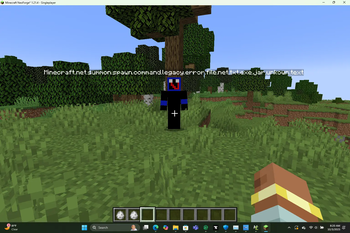
About this Mod
Event.jar Remake is a fan-made reimagining of the classic Aware and Conscious.jar mod. It recreates the eerie, unpredictable atmosphere of the original while introducing new pixel-style entities and simplified textures for a more retro, less realistic look.
This mod adds several unique entities with their own behaviors and interactions:
- Meetboy — a fast-moving entity who roams the world peacefully until provoked. Once attacked, he will chase and counter-attack.
- G0d — a mysterious being that appears when you strike a hammer against certain objects. Be ready to run if you summon its attention.
- The Seeker — capable of climbing up to 255 blocks high.
- Other entities, such as The Watcher, who eerily appears and watches you from a distance.
Players who enjoyed Aware and Conscious.jar will appreciate this remake’s nostalgic pixel-art style and fresh entity mechanics.
Key Features:
Simplified, pixel-based visuals (no PNG realism). (no pngs but the 3d entities may be relistic.)
Dynamic entities that react to player actions.
A mysterious world full of unexpected events and hidden behaviors.
Important Note:
This mod is an independent fan-made remake and is not affiliated with the original Aware and Conscious.jar or Event.jar projects.
Available Versions
How to Install Event.jar remake on Your Server
Order Server
Order a Minecraft Java server with at least 3 GB RAM (4 GB recommended).
Set bukkit Loader
In the panel under "Egg", select the bukkit loader and matching Minecraft version (1.21.11).
Install Mod
Open the mod browser in the dashboard and search for "Event.jar remake". Click "Install" – done! Alternatively, upload the .jar via SFTP to the /mods folder.
Compatibility
Mod Loaders
Minecraft Versions
1.21.11, 1.21.10, 1.21.9 (+10 more)
Server-side
✓ RequiredRecommended RAM
4 GB(min. 3 GB)Frequently Asked Questions
Event.jar remake server crashes on startup – what to do?
Most common cause: wrong bukkit version or insufficient RAM. Check the server log (latest.log) for "OutOfMemoryError" or "Mixin" errors. With Mado Hosting: ensure at least 3 GB RAM is allocated and the loader matches the mod version (1.21.11). You can switch loaders with one click in the panel.
Is Event.jar remake compatible with bukkit and fabric and forge and neoforge?
Event.jar remake officially supports bukkit, fabric, forge, neoforge for Minecraft 1.21.11, 1.21.10, 1.21.9. Note: Forge and Fabric mods are NOT cross-compatible – pick one loader and stick with it. The Mado dashboard automatically detects incompatible loader combinations.
Server lagging with Event.jar remake – how to optimize performance?
Recommended RAM: 4 GB (per 8 players). Use /spark profiler to check if Event.jar remake consumes the most tick time. Common fixes: reduce server view-distance to 8-10, install "performant" or "starlight" as supplementary mods on Forge. With Mado Hosting, your server runs on NVMe SSDs with dedicated CPU cores for minimal latency.
Similar Mods





Rent Modded Server
Install Event.jar remake with just one click on your server.