
EventAntiXray
a lightweight Minecraft Fabric mod designed for server administrators to detect potential X-ray cheating
Screenshots

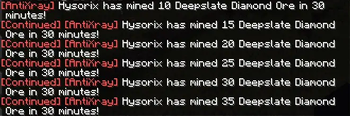
About this Mod
EventAntiXray
EventAntiXray is a lightweight, purely observational Fabric mod for server administrators who want to detect potential X-ray cheating without impacting server performance or gameplay. It intelligently tracks player mining activity for valuable blocks and discreetly alerts staff when it detects suspicious patterns, complete with Discord integration.
Dependencies
Features
- Observational Detection: Monitors block breaks without interfering with gameplay. It never cancels actions, sends packets, or affects block visibility, ensuring zero impact on players.
- Time-Window Analysis: Detects suspicious activity by tracking how many valuable blocks a player mines within a configurable time period (e.g., 10 diamonds in 30 minutes).
- Progressive Alerts: Sends an initial alert and then tracks continued suspicious activity, sending follow-up alerts with a special prefix if the behavior persists.
- Discord Webhook Integration: Sends detailed, customizable embed messages to a Discord channel when an alert is triggered, including the player's inventory at the time of detection. Alerts for continued activity will smartly update the original Discord message.
- Player-Placed Block Tracking: Features an optional MySQL database integration to track blocks placed by players, effectively eliminating false positives from players mining their own placed ores.
- Highly Configurable: Customize everything from thresholds and time windows on a per-block basis to the in-game alert messages and sounds.
- Performance First: Built to be extremely lightweight. It has zero impact on server TPS and uses efficient data structures to minimize memory usage, with non-blocking operations for webhooks.
Commands
The primary command is /antixray, with the alias /eax.
| Command | Permission | Description |
|---|---|---|
/antixray reload |
antixray.reload |
Reloads the config.json file from disk, applying any changes immediately. |
Configuration
EventAntiXray uses a single, well-documented configuration file located at config/eventantixray/config.json. This file is broken down into clear sections for easy management.
tracked_blocks - The Core of Detection
This is a list where you define every block you want to monitor. Each entry has several key options:
| Setting | Description |
|---|---|
block_id |
The Minecraft ID for the block (e.g., "minecraft:diamond_ore"). |
alert_threshold |
The number of blocks a player must break within the time_window_minutes to trigger the first alert. |
time_window_minutes |
The duration (in minutes) that the mod will look back in a player's mining history to count blocks. |
subsequent_alert_threshold |
After the first alert, this is the number of additional blocks the player must break to trigger a follow-up "Continued" alert. |
reset_after_minutes |
The number of minutes of inactivity (mining this specific block) after which the tracking for a player will automatically reset. Set to 0 to never reset. |
alert_message |
The customizable, MiniMessage-formatted message sent to staff. Supports placeholders like {player}, {count}, {block}, and coordinates. |
alerts - Customizing Staff Notifications
This section controls how staff are notified in-game.
sound: Configure thesound_id,volume, andpitchof the sound played to staff on an alert. You can even set multipliers to make the sound louder or higher-pitched for each subsequent alert.continued_alert_prefix: A MiniMessage-formatted prefix added to alerts for ongoing suspicious activity (e.g.,"<red>[Continued]</red> ").
webhook - Discord Integration
Connect the mod to your Discord server for remote monitoring.
enabled: A simpletrue/falsetoggle to turn on webhook notifications.url: The full URL of your Discord webhook. Alerts will be sent here as detailed embed messages.
database - Preventing False Positives
This section is for configuring the optional MySQL database to track player-placed blocks.
enabled: Iftrue, the mod will connect to your MySQL database to log and check against blocks placed by players. When a player breaks a block, the mod will first check the database. If the block was player-placed, it will be ignored for X-ray detection, preventing false alerts.- Connection Details: The config provides fields for your database
address,databasename,username, andpassword, along with other standard connection options.
Available Versions
How to Install EventAntiXray on Your Server
Order Server
Order a Minecraft Java server with at least 3 GB RAM (4 GB recommended).
Set fabric Loader
In the panel under "Egg", select the fabric loader and matching Minecraft version (1.21.1).
Install Mod
Open the mod browser in the dashboard and search for "EventAntiXray". Click "Install" – done! Alternatively, upload the .jar via SFTP to the /mods folder.
Compatibility
Mod Loaders
Minecraft Versions
1.21.1
Server-side
✓ RequiredRecommended RAM
4 GB(min. 3 GB)Frequently Asked Questions
EventAntiXray server crashes on startup – what to do?
Most common cause: wrong fabric version or insufficient RAM. Check the server log (latest.log) for "OutOfMemoryError" or "Mixin" errors. With Mado Hosting: ensure at least 3 GB RAM is allocated and the loader matches the mod version (1.21.1). You can switch loaders with one click in the panel.
Is EventAntiXray compatible with fabric?
EventAntiXray officially supports fabric for Minecraft 1.21.1. The Mado dashboard automatically detects incompatible loader combinations.
Server lagging with EventAntiXray – how to optimize performance?
Recommended RAM: 4 GB (per 8 players). Use /spark profiler to check if EventAntiXray consumes the most tick time. Common fixes: reduce server view-distance to 8-10, install "performant" or "starlight" as supplementary mods on Forge. With Mado Hosting, your server runs on NVMe SSDs with dedicated CPU cores for minimal latency.
Similar Mods






Rent Modded Server
Install EventAntiXray with just one click on your server.