
eXc BetterMending
Turn Mending into an active ability — Press R to instantly repair your gear using your own XP.
Screenshots
About this Mod
eXc BetterMending
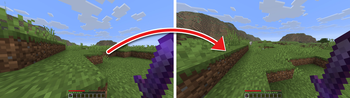
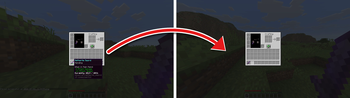
Tired of waiting for Mending to slowly sip your XP orbs one at a time? eXc BetterMending turns Mending into an active ability. Hold a Mending-enchanted tool, weapon, or piece of armor, Shift + Left-click, and instantly pour your experience into repairing it — right when you need it.
Features
- On-demand repair — Shift + Left-click a held item to repair it using your current XP.
- Works with any Mending item — tools, weapons, and armor all supported.
- Vanilla-accurate rate — 1 experience point restores 2 durability, just like regular Mending.
- Smart spending — one click repairs as much as it can; fully if you have enough XP, otherwise as far as your XP reaches.
- Server-safe — all repairs are handled server-side, so no desync and no cheating. Great for multiplayer.
- Zero config, zero clutter — no new items, no GUI, no keybinds to set up. It just works.
How to use
- Hold a damaged item that has the Mending enchantment in your main hand.
- Press R (or your chosen key).
- Your XP is spent and the item's durability is restored. A soft chime confirms the repair.
Nothing happens if the item is undamaged, has no Mending, or you have no XP — so your normal left-click is never in the way.
Available Versions
How to Install eXc BetterMending on Your Server
Order Server
Order a Minecraft Java server with at least 3 GB RAM (4 GB recommended).
Set fabric Loader
In the panel under "Egg", select the fabric loader and matching Minecraft version (26.2).
Install Mod
Open the mod browser in the dashboard and search for "eXc BetterMending". Click "Install" – done! Alternatively, upload the .jar via SFTP to the /mods folder.
Compatibility
Mod Loaders
Minecraft Versions
26.2, 26.1.2, 1.21.11 (+10 more)
Server-side
✓ RequiredRecommended RAM
4 GB(min. 3 GB)Frequently Asked Questions
eXc BetterMending server crashes on startup – what to do?
Most common cause: wrong fabric version or insufficient RAM. Check the server log (latest.log) for "OutOfMemoryError" or "Mixin" errors. With Mado Hosting: ensure at least 3 GB RAM is allocated and the loader matches the mod version (26.2). You can switch loaders with one click in the panel.
Is eXc BetterMending compatible with fabric?
eXc BetterMending officially supports fabric for Minecraft 26.2, 26.1.2, 1.21.11. The Mado dashboard automatically detects incompatible loader combinations.
Server lagging with eXc BetterMending – how to optimize performance?
Recommended RAM: 4 GB (per 8 players). Use /spark profiler to check if eXc BetterMending consumes the most tick time. Common fixes: reduce server view-distance to 8-10, install "performant" or "starlight" as supplementary mods on Forge. With Mado Hosting, your server runs on NVMe SSDs with dedicated CPU cores for minimal latency.
Similar Mods



![[TaCZ] Timeless and Classics Zero](https://cdn.modrinth.com/data/SzzJttH8/fd27766d2bb8390d284696b1dbd358f87e081439_96.webp)


Rent Modded Server
Install eXc BetterMending with just one click on your server.