
Excavators
Automate excavation of entire areas
Screenshots
About this Mod
This is the result of another case of "couldn't find it elsewhere, so I made it"
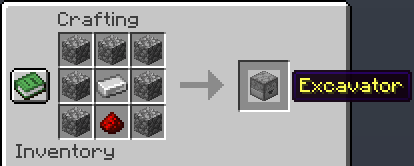
Speaking of making stuff, here's how you can make the excavator
So, what does it do?
Have you ever needed to clear out large portions of land to fit in a building? Excavators will 'excavate' a specific area of your choice. And for me, the last straw was when I found an underground schematic that had me mine out a whole chunk. I said nope, and thus Excavators was born.
But it's not only useful for clearing terrain. It can also clear lava and water and other fluids.
How are drops handled?
They drop in-world items of whatever they would normally if mined by a player. I imagine it wouldn't be easy to fit an entire mountain in a single machine.
What are its Limitations?
For starters, it requires a pickaxe to mine stuff with. The pickaxe tier you give it will determine the rate of excavation. Be mindful though, if your pickaxe can't mine a block in the path of the excavator, then the excavator will pause when it reaches it until the block is broken, moved, whatever it takes.
Lastly, one more limitation is its capacity for range. It may only mine (at a time) a 64x64x64 cube. This is a fixed cap.
How do I control it?
The control panel is its own inventory system. It doesn't matter what item you use for area selection; all it looks at is the stack count. So, if you want a 1x2x3 area mined out, grab any items and stack them up as 1, 2, and 3.
On the first row, the first slot is area length, second slot is area height, and third slot is area width. It will always mine forward (that's length, slot 1) and work its way to the left (that's width, slot 3) and then move down a layer (that's height, slot 2). It stops automatically when the pickaxe needs repairing or can't mine something such as bedrock or something the pickaxe can't handle. It will resume when repaired/unblocked.
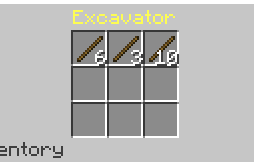
Here's what a 6x3x10 area selection looks like inside the excavator
In this example, I used sticks, but you can use any item you wish. Even unstackables. They don't get destroyed either.
Clearing any of the first 3 slots will reset its progress. You can make area adjustments while its moving, if you're quick enough. The pickaxe always goes in the smack center of the panel. Second row, second slot. Your pickaxe will never be destroyed, only brought down to 1 use left.
But if you just want it to pause, take the pickaxe out. It will keep progress until a pickaxe is returned.
Pickaxe enchantments support
Partialy, yes. Unbreaking, up to 10 levels, and mending. Mending pickaxes will never lose durability. And unbreaking works as intended in vanilla.
Demonstration
See my other mods
Available Versions
How to Install Excavators on Your Server
Order Server
Order a Minecraft Java server with at least 3 GB RAM (4 GB recommended).
Set datapack Loader
In the panel under "Egg", select the datapack loader and matching Minecraft version (26.1.2).
Install Mod
Open the mod browser in the dashboard and search for "Excavators". Click "Install" – done! Alternatively, upload the .jar via SFTP to the /mods folder.
Compatibility
Mod Loaders
Minecraft Versions
26.1.2, 26.1.1, 26.1 (+10 more)
Server-side
✓ RequiredRecommended RAM
4 GB(min. 3 GB)Frequently Asked Questions
Excavators server crashes on startup – what to do?
Most common cause: wrong datapack version or insufficient RAM. Check the server log (latest.log) for "OutOfMemoryError" or "Mixin" errors. With Mado Hosting: ensure at least 3 GB RAM is allocated and the loader matches the mod version (26.1.2). You can switch loaders with one click in the panel.
Is Excavators compatible with datapack and fabric and forge and neoforge and quilt?
Excavators officially supports datapack, fabric, forge, neoforge, quilt for Minecraft 26.1.2, 26.1.1, 26.1. Note: Forge and Fabric mods are NOT cross-compatible – pick one loader and stick with it. The Mado dashboard automatically detects incompatible loader combinations.
Server lagging with Excavators – how to optimize performance?
Recommended RAM: 4 GB (per 8 players). Use /spark profiler to check if Excavators consumes the most tick time. Common fixes: reduce server view-distance to 8-10, install "performant" or "starlight" as supplementary mods on Forge. With Mado Hosting, your server runs on NVMe SSDs with dedicated CPU cores for minimal latency.
Similar Mods





Rent Modded Server
Install Excavators with just one click on your server.