
Exoskeleton armor
Exoskeleton armor with thermal imaging and incremental jump boost.
Screenshots
About this Mod
Exo adds an exoskeleton-like armor that allows to jump higher the longer the jump is charged (max 2 seconds, custom keybind) and to activate the thermal imaging mode (custom keybind).
Jump boost:
The longer you press and hold the keybind, the higher you will jump. The charge stops increasing the upward launch at 2 seconds. The max jump height is about 10 blocks. Lateral momentum is conserved.
Thermal imaging:
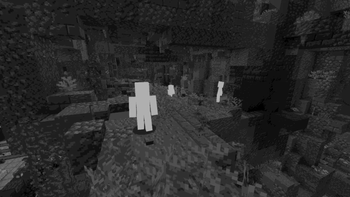
All entities are highlighted with a bright white and the rest of the world will appear as a grayscale. This makes finding mobs very easy. Note that shaders might impact this effect.

Other armor attributes:
Boots: Negate all fall damage.
Leggings: Grant launch (incremental jump) ability and give speed boost 1.
Chest: Gives strength 2 and haste 2.
Helmet: Grants thermal imaging ability.
The protection value of the armor is significantly higher than netherite.
The mod is client-side.
There is no config file yet.
Please credit me if you plan on distributing content containing this mod.
Discord for private messaging:
https://discord.com/users/398496975949004800
Available Versions
How to Install Exoskeleton armor on Your Server
Order Server
Order a Minecraft Java server with at least 3 GB RAM (4 GB recommended).
Set forge Loader
In the panel under "Egg", select the forge loader and matching Minecraft version (1.20.1).
Install Mod
Open the mod browser in the dashboard and search for "Exoskeleton armor". Click "Install" – done! Alternatively, upload the .jar via SFTP to the /mods folder.
Compatibility
Mod Loaders
Minecraft Versions
1.20.1
Server-side
✓ RequiredRecommended RAM
4 GB(min. 3 GB)Frequently Asked Questions
Exoskeleton armor server crashes on startup – what to do?
Most common cause: wrong forge version or insufficient RAM. Check the server log (latest.log) for "OutOfMemoryError" or "Mixin" errors. With Mado Hosting: ensure at least 3 GB RAM is allocated and the loader matches the mod version (1.20.1). You can switch loaders with one click in the panel.
Is Exoskeleton armor compatible with forge?
Exoskeleton armor officially supports forge for Minecraft 1.20.1. The Mado dashboard automatically detects incompatible loader combinations.
Server lagging with Exoskeleton armor – how to optimize performance?
Recommended RAM: 4 GB (per 8 players). Use /spark profiler to check if Exoskeleton armor consumes the most tick time. Common fixes: reduce server view-distance to 8-10, install "performant" or "starlight" as supplementary mods on Forge. With Mado Hosting, your server runs on NVMe SSDs with dedicated CPU cores for minimal latency.
Similar Mods




![[TaCZ] Timeless and Classics Zero](https://cdn.modrinth.com/data/SzzJttH8/fd27766d2bb8390d284696b1dbd358f87e081439_96.webp)

Rent Modded Server
Install Exoskeleton armor with just one click on your server.